
- cPanel 教程
- cPanel - 首頁
- cPanel - 概述
- cPanel - 註冊域名
- cPanel - 獲取網站託管
- cPanel - 設定域名伺服器
- cPanel - 登入cPanel控制面板
- cPanel - 修改密碼
- cPanel - 樣式
- cPanel - 聯絡資訊
- cPanel - 首頁
- cPanel - 統計和控制面板
- cPanel - 使用者管理
- cPanel - 檔案管理器
- cPanel - 檔案許可權
- cPanel - 圖片
- cPanel - 圖片縮放
- cPanel - 圖片轉換
- cPanel - 目錄隱私
- cPanel - 磁碟使用情況
- cPanel - FTP
- cPanel - FTP 會話
- cPanel - 備份
- cPanel - 備份嚮導
- cPanel - MySQL 資料庫
- cPanel - MySQL 資料庫嚮導
- cPanel - phpMyAdmin
- cPanel - 遠端MySQL
- cPanel - 子域名
- cPanel - 別名
- cPanel - 附加域名
- cPanel - 重定向
- cPanel - 簡單區域編輯器
- cPanel - 高階區域編輯器
- cPanel - 郵件帳戶
- cPanel - 郵件轉發器
- cPanel - 網頁郵件
- cPanel - MX 記錄
- cPanel - 自動回覆
- cPanel - 郵件傳送追蹤
- cPanel - 郵件過濾器
- cPanel - 身份驗證
- cPanel - 地址匯入
- cPanel - 加密
- cPanel - Apache Spamassassin
- cPanel - 訪問者
- cPanel - 錯誤
- cPanel - 頻寬
- cPanel - Webalizer
- cPanel - 原始訪問日誌
- cPanel - CPU 和連線使用情況
- cPanel - IP 攔截器
- cPanel - SSH/TLS
- cPanel - 防盜鏈
- cPanel - Ruby on Rails
- cPanel - 最佳化網站
- cPanel - 計劃任務
- cPanel - 域名DNS追蹤
- cPanel - 索引
- cPanel - 錯誤頁面
- cPanel - MIME 型別
- cPanel - 病毒掃描器
- cPanel - Softaculous 應用安裝程式
- cPanel - 安裝 WordPress
- cPanel - FileZilla FTP 客戶端
- cPanel - CloudFlare
- cPanel 有用資源
- cPanel - 快速指南
- cPanel - 有用資源
- cPanel - 討論
cPanel - 域名DNS追蹤
您可以使用此cPanel介面查詢域名的通用DNS。它將提供該域名的IP地址、郵件伺服器和原始DNS資訊。這對於檢索網路資訊很有用。
域名查詢
此工具檢索域名的IP地址並顯示該域名使用的電子郵件主機。它還顯示域名的原始DNS資料。
要查詢域名,請執行以下步驟 -
步驟1 - 點選cPanel“高階”部分中的“DNS追蹤”連結,開啟cPanel DNS追蹤。

步驟2 - 在域名查詢介面中,輸入您要查詢的域名。

步驟3 - 按“查詢”按鈕查詢域名的DNS。
您將以以下方式獲取資訊。
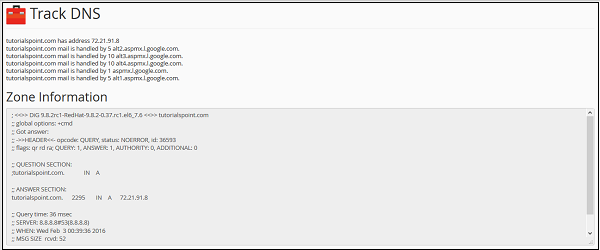
最上面的行提供域名的IP地址。其他後續行說明郵件伺服器。在“區域資訊”中,您將看到域名的原始DNS資訊。
路由跟蹤
cPanel DNS追蹤中的另一個功能是路由跟蹤。此功能提供使用者登入的計算機與託管您網站的伺服器之間的路由資訊。

要跟蹤您的計算機和伺服器的路由,請向下滾動以檢視“路由跟蹤”介面。點選“跟蹤”以獲取您的Web伺服器和您之間的路由資訊。
廣告