
- Biopython 教程
- Biopython - 首頁
- Biopython - 簡介
- Biopython - 安裝
- 建立簡單的應用程式
- Biopython - 序列
- 高階序列操作
- 序列 I/O 操作
- Biopython - 序列比對
- Biopython - BLAST 概述
- Biopython - Entrez 資料庫
- Biopython - PDB 模組
- Biopython - 基序物件
- Biopython - BioSQL 模組
- Biopython - 群體遺傳學
- Biopython - 基因組分析
- Biopython - 表型微陣列
- Biopython - 繪圖
- Biopython - 聚類分析
- Biopython - 機器學習
- Biopython - 測試技術
- Biopython 資源
- Biopython - 快速指南
- Biopython - 有用資源
- Biopython - 討論
Biopython - 基序物件
序列基序是一種核苷酸或氨基酸序列模式。序列基序是由氨基酸的三維排列形成的,這些氨基酸可能不相鄰。Biopython 提供了一個單獨的模組 Bio.motifs 來訪問序列基序的功能,如下所示:
from Bio import motifs
建立簡單的 DNA 基序
讓我們使用以下命令建立一個簡單的 DNA 基序序列:
>>> from Bio import motifs
>>> from Bio.Seq import Seq
>>> DNA_motif = [ Seq("AGCT"),
...               Seq("TCGA"),
...               Seq("AACT"),
...             ]
>>> seq = motifs.create(DNA_motif)
>>> print(seq) AGCT TCGA AACT
要計算序列值,請使用以下命令:
>>> print(seq.counts)
         0       1      2       3
A:    2.00    1.00   0.00    1.00
C:    0.00    1.00   2.00    0.00
G:    0.00    1.00   1.00    0.00
T:    1.00    0.00   0.00    2.00
使用以下程式碼計算序列中的“A”:
>>> seq.counts["A", :]
(2, 1, 0, 1)
如果要訪問計數列,請使用以下命令:
>>> seq.counts[:, 3]
{'A': 1, 'C': 0, 'T': 2, 'G': 0}
建立序列標識
我們現在將討論如何建立序列標識。
考慮以下序列:
AGCTTACG
ATCGTACC
TTCCGAAT
GGTACGTA
AAGCTTGG
您可以使用以下連結建立自己的標識:http://weblogo.berkeley.edu/
新增上述序列並建立一個新的標識,並將名為 seq.png 的影像儲存到您的 biopython 資料夾中。
seq.png
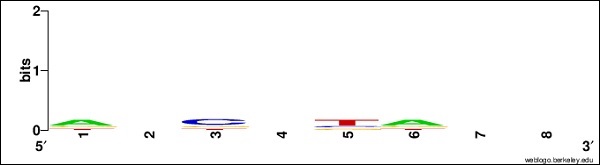
建立影像後,現在執行以下命令:
>>> seq.weblogo("seq.png")
此 DNA 序列基序表示為 LexA 結合基序的序列標識。
JASPAR 資料庫
JASPAR 是最流行的資料庫之一。它提供任何基序格式的讀取、寫入和掃描序列的功能。它儲存每個基序的元資訊。Bio.motifs 模組包含一個專門的類 jaspar.Motif 來表示元資訊屬性。
它具有以下值得注意的屬性型別:
- matrix_id - 唯一的 JASPAR 基序 ID
- name - 基序的名稱
- tf_family - 基序的家族,例如“螺旋-環-螺旋”
- data_type - 基序中使用的資料型別。
讓我們在 biopython 資料夾中建立一個名為 sample.sites 的 JASPAR 站點格式。其定義如下:
sample.sites
>MA0001 ARNT 1
AACGTGatgtccta
>MA0001 ARNT 2
CAGGTGggatgtac
>MA0001 ARNT 3
TACGTAgctcatgc
>MA0001 ARNT 4
AACGTGacagcgct
>MA0001 ARNT 5
CACGTGcacgtcgt
>MA0001 ARNT 6
cggcctCGCGTGc
在上面的檔案中,我們建立了基序例項。現在,讓我們從上面的例項建立一個基序物件:
>>> from Bio import motifs
>>> with open("sample.sites") as handle:
... data = motifs.read(handle,"sites")
...
>>> print(data)
TF name None
Matrix ID None
Matrix:
            0       1       2       3       4       5
A:       2.00    5.00    0.00    0.00    0.00    1.00
C:       3.00    0.00    5.00    0.00    0.00    0.00
G:       0.00    1.00    1.00    6.00    0.00    5.00
T:       1.00    0.00    0.00    0.00    6.00    0.00
在這裡,data 從 sample.sites 檔案讀取所有基序例項。
要列印 data 中的所有例項,請使用以下命令:
>>> for instance in data.instances:
...    print(instance)
...
AACGTG
CAGGTG
TACGTA
AACGTG
CACGTG
CGCGTG
使用以下命令計算所有值:
>>> print(data.counts)
            0       1       2       3       4       5
A:       2.00    5.00    0.00    0.00    0.00    1.00
C:       3.00    0.00    5.00    0.00    0.00    0.00
G:       0.00    1.00    1.00    6.00    0.00    5.00
T:       1.00    0.00    0.00    0.00    6.00    0.00
>>>
廣告