- Angular Material 7 教程
- Angular Material 7 - 首頁
- Angular Material 7 - 概述
- 環境設定
- 表單控制元件
- Angular Material 7 - 自動完成
- Angular Material 7 - 複選框
- Angular Material 7 - 日期選擇器
- Angular Material 7 - 表單欄位
- Angular Material 7 - 輸入框
- Angular Material 7 - 單選按鈕
- Angular Material 7 - 選擇器
- Angular Material 7 - 滑塊
- Angular Material 7 - 開關滑塊
- 導航
- Angular Material 7 - 選單
- Angular Material 7 - 側邊導航
- Angular Material 7 - 工具欄
- 佈局
- Angular Material 7 - 卡片
- Angular Material 7 - 分隔線
- Angular Material 7 - 展開面板
- Angular Material 7 - 網格列表
- Angular Material 7 - 列表
- Angular Material 7 - 步驟指示器
- Angular Material 7 - 標籤頁
- Angular Material 7 - 樹
- 按鈕和指示器
- Angular Material 7 - 按鈕
- Angular Material 7 - 按鈕切換
- Angular Material 7 - 徽章
- Angular Material 7 - 晶片
- Angular Material 7 - 圖示
- Angular Material 7 - 進度旋轉器
- Angular Material 7 - 進度條
- Angular Material 7 - 水波紋
- 彈出框和模態框
- Angular Material 7 - SnackBar
- Angular Material 7 - 工具提示
- 資料表格
- Angular Material 7 - 分頁器
- Angular Material 7 - 排序標題
- Angular Material 7 - 表格
- Angular Material 7 資源
- Angular Material 7 - 快速指南
- Angular Material 7 - 資源
- Angular Material 7 - 討論
Angular Material 7 - 滑塊
<mat-slider>是一個Angular指令,用作具有材質設計樣式和動畫功能的增強型範圍選擇器。
在本章中,我們將展示使用Angular Material繪製滑塊控制元件所需的配置。
建立Angular應用程式
按照以下步驟更新我們在Angular 6 - 專案設定章節中建立的Angular應用程式:
| 步驟 | 描述 |
|---|---|
| 1 | 按照Angular 6 - 專案設定章節中的說明,建立一個名為materialApp的專案。 |
| 2 | 修改app.module.ts、app.component.ts、app.component.css和app.component.html,如下所述。其餘檔案保持不變。 |
| 3 | 編譯並執行應用程式以驗證已實現邏輯的結果。 |
以下是修改後的模組描述符app.module.ts的內容。
import { BrowserModule } from '@angular/platform-browser';
import { NgModule } from '@angular/core';
import { AppComponent } from './app.component';
import {BrowserAnimationsModule} from '@angular/platform-browser/animations';
import {MatSliderModule, MatCheckboxModule} from '@angular/material'
import {FormsModule, ReactiveFormsModule} from '@angular/forms';
@NgModule({
   declarations: [
      AppComponent
   ],
   imports: [
      BrowserModule,
      BrowserAnimationsModule,
      MatSliderModule, MatCheckboxModule,
      FormsModule,
      ReactiveFormsModule
   ],
   providers: [],
   bootstrap: [AppComponent]
})
export class AppModule { }
以下是修改後的HTML主機檔案app.component.html的內容。
<mat-slider
   class = "tp-margin"
   [disabled] = "disabled"
   [invert] = "invert"
   [thumbLabel] = "thumbLabel"
   [(ngModel)] = "value"
   [vertical] = "vertical">
</mat-slider>
<section class = "tp-section">
   <mat-checkbox class = "tp-margin" [(ngModel)] = "thumbLabel">Show thumb label</mat-checkbox>
</section>
<section class = "tp-section">
   <mat-checkbox class = "tp-margin" [(ngModel)] = "vertical">Vertical</mat-checkbox>
   <mat-checkbox class = "tp-margin" [(ngModel)] = "invert">Inverted</mat-checkbox>
</section>
<section class = "tp-section">
   <mat-checkbox class = "tp-margin" [(ngModel)] = "disabled">Disabled</mat-checkbox>
</section>
以下是修改後的CSS檔案app.component.css的內容。
.tp-section {
   display: flex;
   align-content: center;
   align-items: center;
   height: 60px;
}
.tp-margin {
   margin: 30px;
}

.mat-slider-horizontal {
   width: 300px;
}
.mat-slider-vertical {
   height: 300px;
}
以下是修改後的ts檔案app.component.ts的內容。
import { Component } from '@angular/core';
@Component({
   selector: 'app-root',
   templateUrl: './app.component.html',
   styleUrls: ['./app.component.css']
})
export class AppComponent {
   title = 'materialApp';
   disabled = false;
   invert = false;
   thumbLabel = false;
   value = 0;
   vertical = false;
}
結果
驗證結果。
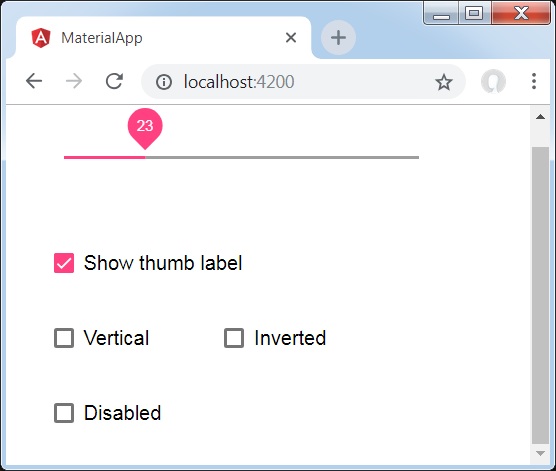
詳情
首先,我們使用mat-checkbox建立了四個複選框,並使用ngModel將它們與變數繫結。這些屬性將用於自定義滑塊。
然後,我們建立了滑塊,並展示了其與.ts檔案中的變數繫結的各種屬性。
廣告