
- Angular 4 教程
- Angular 4 - 首頁
- Angular 4 – 概述
- Angular 4 – 環境設定
- Angular 4 – 專案設定
- Angular 4 – 元件
- Angular 4 – 模組
- Angular 4 – 資料繫結
- Angular 4 – 事件繫結
- Angular 4 – 模板
- Angular 4 – 指令
- Angular 4 – 管道
- Angular 4 – 路由
- Angular 4 – 服務
- Angular 4 - Http服務
- Angular 4 – 表單
- Angular 4 – 動畫
- Angular 4 – 材料
- Angular 4 – CLI
- Angular 4 – 示例
- Angular 4 有用資源
- Angular 4 - 快速指南
- Angular 4 - 有用資源
- Angular 4 - 討論
Angular 4 - Http服務
Http服務將幫助我們獲取外部資料,向其釋出資料等。我們需要匯入http模組才能使用http服務。讓我們考慮一個示例來了解如何使用http服務。
要開始使用http服務,我們需要在app.module.ts中匯入該模組,如下所示:
import { BrowserModule } from '@angular/platform-browser';
import { NgModule } from '@angular/core';
import { BrowserAnimationsModule } from '@angular/platform-browser/animations';
import { HttpModule } from '@angular/http';
import { AppComponent } from './app.component';

@NgModule({
   declarations: [
      AppComponent
   ],
   imports: [
      BrowserModule,
      BrowserAnimationsModule,
      HttpModule
   ],
   providers: [],
   bootstrap: [AppComponent]
})
export class AppModule { }
如果您看到突出顯示的程式碼,我們已從@angular/http匯入HttpModule,並且它也新增到imports陣列中。
現在讓我們在app.component.ts中使用http服務。
import { Component } from '@angular/core';
import { Http } from '@angular/http';
import 'rxjs/add/operator/map';

@Component({
   selector: 'app-root',
   templateUrl: './app.component.html',
   styleUrls: ['./app.component.css']
})

export class AppComponent {
   constructor(private http: Http) { }
   ngOnInit() {
      this.http.get("http://jsonplaceholder.typicode.com/users").
      map((response) ⇒ response.json()).
      subscribe((data) ⇒ console.log(data))
   }
}
讓我們瞭解上面突出顯示的程式碼。我們需要匯入http才能使用該服務,方法如下:
import { Http } from '@angular/http';
在類AppComponent中,建立了一個建構函式,以及型別為Http的私有變數http。為了獲取資料,我們需要使用http提供的get API,如下所示
this.http.get();
它將要獲取的URL作為引數,如程式碼所示。
我們將使用測試URL - https://jsonplaceholder.typicode.com/users 來獲取json資料。對獲取到的URL資料執行了兩個操作:map和subscribe。Map方法有助於將資料轉換為json格式。要使用map,我們需要匯入它,如下所示:
import 'rxjs/add/operator/map';
完成map操作後,subscribe將在控制檯中記錄輸出,如瀏覽器中所示:
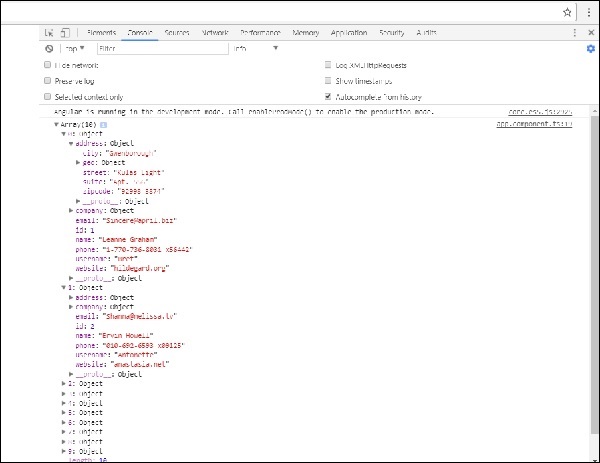
如果您看到,json物件顯示在控制檯中。這些物件也可以顯示在瀏覽器中。
為了在瀏覽器中顯示這些物件,請按如下所示更新app.component.html和app.component.ts中的程式碼:
import { Component } from '@angular/core';
import { Http } from '@angular/http';
import 'rxjs/add/operator/map';

@Component({
   selector: 'app-root',
   templateUrl: './app.component.html',
   styleUrls: ['./app.component.css']
})
export class AppComponent {
   constructor(private http: Http) { }
   httpdata;
   ngOnInit() {
      this.http.get("http://jsonplaceholder.typicode.com/users").
      map(
         (response) ⇒ response.json()
      ).
      subscribe(
         (data) ⇒ {this.displaydata(data);}
      )
   }
   displaydata(data) {this.httpdata = data;}
}
在app.component.ts中,使用subscribe方法,我們將呼叫displayData方法,並將獲取到的資料作為引數傳遞給它。
在displayData方法中,我們將資料儲存在一個名為httpdata的變數中。使用for迴圈在瀏覽器中顯示此httpdata變數中的資料,此操作在app.component.html檔案中完成。
<ul *ngFor = "let data of httpdata">
   <li>Name : {{data.name}} Address: {{data.address.city}}</li>
</ul>
json物件如下所示:
{
   "id": 1,
   "name": "Leanne Graham",
   "username": "Bret",
   "email": "Sincere@april.biz",

   "address": {
      "street": "Kulas Light",
      "suite": "Apt. 556",
      "city": "Gwenborough",
      "zipcode": "92998-3874",
      "geo": {
         "lat": "-37.3159",
         "lng": "81.1496"
      }
   },

   "phone": "1-770-736-8031 x56442",
   "website": "hildegard.org",
   "company": {
      "name": "Romaguera-Crona",
      "catchPhrase": "Multi-layered client-server neural-net",
      "bs": "harness real-time e-markets"
   }
}
該物件具有id、name、username、email和address等屬性,address內部包含street、city等,以及與phone、website和company相關的其他詳細資訊。使用for迴圈,我們將在瀏覽器中顯示name和city詳細資訊,如app.component.html檔案中所示。
瀏覽器中的顯示效果如下所示:

現在讓我們新增搜尋引數,它將根據特定資料進行篩選。我們需要根據傳遞的搜尋引數獲取資料。
以下是app.component.html和app.component.ts檔案中所做的更改:
app.component.ts
import { Component } from '@angular/core';
import { Http } from '@angular/http';
import 'rxjs/add/operator/map';

@Component({
   selector: 'app-root',
   templateUrl: './app.component.html',
   styleUrls: ['./app.component.css']
})
export class AppComponent {
   title = 'app';
   searchparam = 2;
   jsondata;
   name;
   constructor(private http: Http) { }
   ngOnInit() {
      this.http.get("http://jsonplaceholder.typicode.com/users?id="+this.searchparam).
      map(
         (response) ⇒ response.json()
      ).
      subscribe((data) ⇒ this.converttoarray(data))
   }
   converttoarray(data) {
      console.log(data);
      this.name = data[0].name;
   }
}
對於get api,我們將新增搜尋引數id=this.searchparam。searchparam等於2。我們需要來自json檔案的id=2的詳細資訊。
app.component.html
{{name}}
瀏覽器顯示效果如下所示:
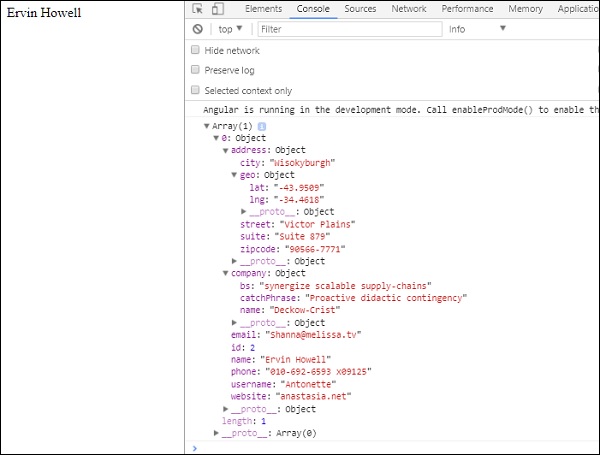
我們在瀏覽器中輸出了從http接收到的資料。它也顯示在瀏覽器控制檯中。瀏覽器中顯示了json中id=2對應的name。