
- Pygame 教程
- Pygame - 首頁
- Pygame - 概述
- Pygame - Hello World
- Pygame - 顯示模式
- Pygame - Locals 模組
- Pygame - 顏色物件
- Pygame - 事件物件
- Pygame - 鍵盤事件
- Pygame - 滑鼠事件
- Pygame - 繪製形狀
- Pygame - 載入影像
- Pygame - 在視窗中顯示文字
- Pygame - 移動影像
- Pygame - 使用數字小鍵盤移動
- Pygame - 使用滑鼠移動
- Pygame - 移動矩形物件
- Pygame - 使用文字作為按鈕
- Pygame - 影像變換
- Pygame - 音效物件
- Pygame - 混音器通道
- Pygame - 播放音樂
- Pygame - 播放影片
- Pygame - 使用攝像頭模組
- Pygame - 載入游標
- Pygame - 訪問CDROM
- Pygame - 精靈模組
- Pygame - PyOpenGL
- Pygame - 錯誤和異常
- Pygame 有用資源
- Pygame - 快速指南
- Pygame - 有用資源
- Pygame - 討論
Pygame - 載入游標
Pygame 允許你控制系統游標。Pygame 只可以使用黑白游標。pygame.cursors 模組定義了預定義的游標列舉。
- pygame.cursors.arrow
- pygame.cursors.diamond
- pygame.cursors.broken_x
- pygame.cursors.tri_left
- pygame.cursors.tri_right
箭頭游標是預設選擇。要使用其他游標,我們使用 pygame.mouse 模組中的 set_cursor() 函式。
pygame.mouse.set_cursor(pygame.cursors.broken_x)
示例
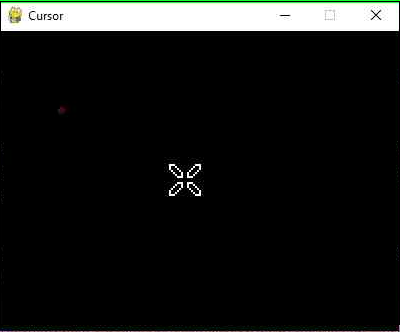
在下面的示例中,此游標可以在顯示視窗中看到。
import pygame,sys
from pygame.locals import *
pygame.init()
pygame.mouse.set_cursor(pygame.cursors.broken_x)
canvas=pygame.display.set_mode((400,300))
pygame.display.set_caption("Cursor")
while True:
for event in pygame.event.get():
   if(event.type == QUIT):
      pygame.quit()
      sys.exit(1)
輸出
此模組還包含一些格式化為字串的游標。要使用它們,請使用 pygame.cursors.compile() 函式。
- pygame.cursors.thickarrow_strings
- pygame.cursors.sizer_x_strings
- pygame.cursors.sizer_y_strings
- pygame.cursors.sizer_xy_strings
- pygame.cursor.textmarker_strings
cursor = pygame.cursors.compile(pygame.cursors.textmarker_strings)
pygame.mouse.set_cursor((10,10), (0, 0), *cursor)
廣告