- Mobile Angular UI 教程
- Mobile Angular UI - 首頁
- Mobile Angular UI - 概述
- Mobile Angular UI - 安裝
- Mobile Angular UI - 專案設定
- Mobile Angular UI - 我的第一個應用
- Mobile Angular UI - 佈局
- Mobile Angular UI - 元件
- Mobile Angular UI - 下拉選單
- Mobile Angular UI - 手風琴
- Mobile Angular UI - 標籤頁
- Mobile Angular UI - 拖放
- Mobile Angular UI - 可滾動區域
- Mobile Angular UI - 表單
- Mobile Angular UI - 滑動手勢
- Mobile Angular UI - 開關
- Mobile Angular UI - 節
- Mobile Angular UI - 核心細節
- Mobile Angular UI - 觸控事件
- Mobile Angular UI - PhoneGap & Cordova
- Mobile Angular UI - 建立APK檔案
- Mobile Angular UI - 應用開發
- Mobile Angular UI - 示例
- Mobile Angular UI 資源
- Mobile Angular UI - 快速指南
- Mobile Angular UI - 有用資源
- Mobile Angular UI - 討論
Mobile Angular UI - 觸控事件
要使用觸控及其事件,您需要新增以下模組:
mobile-angular-ui.gestures
如果您只對觸控模組感興趣,則可以只新增mobile-angular-ui.gestures.touch。
$touch 是觸控模組中可用的服務。它適用於您想要使用的任何輸入裝置。它提供諸如移動、持續時間、速度、方向等詳細資訊。
$touch 中的方法
以下是 $touch 中可用的方法:
bind
讓我們看一下bind 方法。
語法
$touch.bind(element, eventHandlers, [options])
引數
element - 您想要處理觸控細節的 html 元素。
eventHandlers - 包含特定觸控事件處理程式的物件。可用的 eventHandlers 為:
start - 它是 touchstart 事件的回撥。
end - 它是 touchend 事件的回撥。
move - 它是 touchmove 事件的回撥。
cancel - 它是 touchcancel 事件的回撥。
options - 它是一個物件,可以包含如下細節:
movementThreshold - 整數值。在開始觸發 touchmove 處理程式之前的移動畫素數。
valid - 它是一個返回布林值的函式,用於決定是否應該處理或忽略觸控。
sensitiveArea - 它可以是函式、元素或 BoundingClientRect。靈敏區域定義在移動超出邊界時釋放觸控的邊界。
pointerTypes - 它是一個指標陣列,其鍵是預設指標事件對映的子集。
$touch 中可用的型別
以下是 $touch 中可用的型別:
| 屬性 | 型別 | 描述 |
|---|---|---|
| type | 字串 | 這將告訴您事件的型別。例如:touchmove、touchstart、touchend、touchcancel |
| timestamp | 日期 | 觸控發生時的時間戳 |
| duration | 整數 | 當前觸控事件和觸控開始之間的差異 |
| startX | 浮點數 | touchstart 的 X 座標 |
| startY | 浮點數 | touchstart 的 Y 座標 |
| prevX | 浮點數 | 先前發生的 touchstart 或 touchmove 的 X 座標 |
| prevY | 浮點數 | 先前發生的 touchstart 或 touchmove 的 Y 座標 |
| x | 浮點數 | 觸控事件的 X 座標 |
| y | 浮點數 | 觸控事件的 Y 座標 |
| step | 浮點數 | prevX、prevY 和 x、y 點之間的距離 |
| stepX | 浮點數 | prevX 和 x 點之間的距離 |
| stepY | 浮點數 | prevY 和 y 點之間的距離 |
| velocity | 浮點數 | 觸控事件每秒的畫素速度 |
| averageVelocity | 浮點數 | touchstart 事件每秒的平均速度 |
| distance | 浮點數 | startX、startY 和 x、y 點之間的距離 |
| distanceX | 浮點數 | startX 和 x 點之間的距離 |
| distanceY | 浮點數 | startY 和 y 點之間的距離 |
| total | 浮點數 | 總移動量,即裝置上完成的水平和垂直移動 |
| totalX | 浮點數 | 總移動量,即水平方向。它還包括轉向和方向變化 |
| totalY | 浮點數 | 總移動量,即垂直方向。它還包括轉向和方向變化 |
| direction | 浮點數 | 觸控的左、上、下、右方向位置 |
| angle | 浮點數 | x 和 y 軸的度數角度 |
這是一個顯示觸控型別的有效示例。
index.html
<!DOCTYPE html>
<html>
   <head>
      <meta charset="utf-8" />
      <title>Mobile Angular UI Demo</title>
      <meta http-equiv="X-UA-Compatible" content="IE=edge,chrome=1" />
      <meta name="apple-mobile-web-app-capable" content="yes" />
      <meta name="viewport" content="user-scalable=no, initial-scale=1.0, maximum-scale=1.0, minimal-ui" />
      <meta name="apple-mobile-web-app-status-bar-style" content="yes" />
      <link rel="shortcut icon" href="/assets/img/favicon.png" type="image/x-icon" />
      <link rel="stylesheet" href="node_modules/mobile-angular-ui/dist/css/mobile-angular-ui-hover.min.css" />
      <link rel="stylesheet" href="node_modules/mobile-angular-ui/dist/css/mobile-angular-ui-base.min.css" />
      <link rel="stylesheet" href="node_modules/mobile-angular-ui/dist/css/mobile-angular-ui-desktop.min.css" />
      <script src="node_modules/angular/angular.min.js"></script>
      <script src="node_modules/angular-route/angular-route.min.js"></script>
      <script src="node_modules/mobile-angular-ui/dist/js/mobile-angular-ui.min.js"></script>
      <script src="node_modules/angular-route/angular-route.min.js"></script>
      <script src="node_modules/mobile-angular-ui/dist/js/mobile-angular-ui.gestures.min.js"></script>
      <link rel="stylesheet" href="src/css/app.css" />
      <script src="src/js/app.js"></script>
      <style>
         a.active {
            color: blue;
         }
      </style>
   </head>

   <body ng-app="myFirstApp" ng-controller="MainController" class="listening">

      <!-- Sidebars -->
      <div class="sidebar sidebar-left ">
         <div class="scrollable">
            <h1 class="scrollable-header app-name">Tutorials</h1>
            <div class="scrollable-content">
               <div class="list-group" ui-turn-off='uiSidebarLeft'>
                  <a class="list-group-item" href="/">Home Page </a>
                  <a class="list-group-item" href="#/academic"><i class ="fa fa-caret-right"></i>Academic Tutorials </a>
                  <a class="list-group-item" href="#/bigdata"><i class ="fa fa-caret-right"></i>Big Data & Analytics </a>
                  <a class="list-group-item" href="#/computerProg"><i class="fa fa-caret-right"></i>Computer Programming </a>
                  <a class="list-group-item" href="#/computerscience"><i class="fa fa-caret-right"></i>Computer Science </a>
                  <a class="list-group-item" href="#/databases"><i class="fa fa-caret-right"></i>Databases </a>
                  <a class="list-group-item" href="#/devops"><i class="fa fa-caret-right"></i>DevOps </a>
               </div>
            </div>
         </div>
      </div>
      <div class="sidebar sidebar-right">
         <div class="scrollable">
            <h1 class="scrollable-header app-name">eBooks</h1>
            <div class="scrollable-content">
               <div class="list-group" ui-toggle="uiSidebarRight">
                  <a class="list-group-item" href="#/php"><i class="fa fa-caret-right"></i>PHP </a>
                  <a class="list-group-item" href="#/Javascript"><i class="fa fa-caret-right"></i>Javascript </a>
               </div>
            </div>
         </div>
      </div>
      <div class="app">
         <div class="navbar navbar-app navbar-absolute-top">
            <div class="navbar-brand navbar-brand-center" ui-yield-to="title">
               TutorialsPoint
            </div>
            <div class="btn-group pull-left">
               <div ui-toggle="uiSidebarLeft" class="btn sidebar-left-toggle">
                  <i class="fa fa-th-large "></i> Tutorials
               </div>
            </div>
            <div class="btn-group pull-right" ui-yield-to="navbarAction">
               <div ui-toggle="uiSidebarRight" class="btn sidebar-right-toggle">
                  <i class="fal fa-search"></i> eBooks
               </div>
            </div>
         </div>
         <div class="navbar navbar-app navbar-absolute-bottom">
            <div class="btn-group justified">
               <a ui-turn-on="aboutus_modal" class="btn btn-navbar"><i class="fal fa-globe"></i> About us</a>
               <a ui-turn-on="contactus_overlay" class="btn btn-navbar"><i class="fal fa-map-marker-alt"></i> Contact us</a>
            </div>
         </div>

         <!-- App body -->
         <div class='app-body'>
            <div class='app-content'>
               <ng-view></ng-view>
            </div>
         </div>
      </div><!-- ~ .app -->

      <!-- Modals and Overlays -->
      <div ui-yield-to="modals"></div>
   </body>
</html>
在 app.js 中添加了touchtest 指令,它使用了 $touch.bind 方法。
directive('touchtest', ['$touch', function($touch) {
   return {
      restrict: 'C',
      link: function($scope, elem) {
         $scope.touch=null;
         $touch.bind(elem, {
            start: function(touch) {
               $scope.containerRect=elem[0].getBoundingClientRect();
               $scope.touch=touch;
               $scope.$apply();
            },
            cancel: function(touch) {
               $scope.touch=touch;
               $scope.$apply();
            },
            move: function(touch) {
               $scope.touch=touch;
               $scope.$apply();
            },
            end: function(touch) {
               $scope.touch=touch;
               $scope.$apply();
            }
         });
      }
   };
}]);
app.js 中的完整程式碼如下:
/* eslint no-alert: 0 */

'use strict';
//
// Here is how to define your module
// has dependent on mobile-angular-ui
//
var app=angular.module('myFirstApp', ['ngRoute',
   'mobile-angular-ui',
   'mobile-angular-ui.gestures',
]);
app.config(function($routeProvider, $locationProvider) {
   $routeProvider
   .when("/", {
      templateUrl : "src/home/home.html"
   });
   $locationProvider.html5Mode({enabled:true, requireBase:false});
});
app.directive('touchtest', ['$touch', function($touch) {
   return {
      restrict: 'C',
      link: function($scope, elem) {
         $scope.touch=null;
         $touch.bind(elem, {
            start: function(touch) {
               $scope.containerRect=elem[0].getBoundingClientRect();
               $scope.touch=touch;
               $scope.$apply();
            },
            cancel: function(touch) {
               $scope.touch=touch;
               $scope.$apply();
            },
            move: function(touch) {
               $scope.touch=touch;
               $scope.$apply();
            },
            end: function(touch) {
               $scope.touch=touch;
               $scope.$apply();
            }
         });
      }
   };
}]);
app.controller('MainController', function($rootScope, $scope, $routeParams) {
   $scope.msg="Welcome to TutorialsPoint!";
});
src/home/home.html
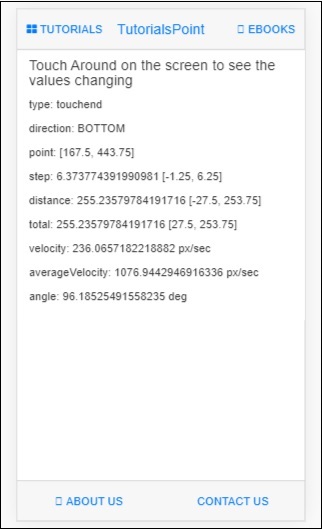
指令 touchtest 在 html 中的使用如下所示:
<div class="section touchtest">
   <h4>Touch Around on the screen to see the values changing</h4>
   <div>
      <p>type: {{touch.type}}</p>
      <p>direction: {{touch.direction == null ? '-' : touch.direction}}</p>
      <p>point: [{{touch.x}}, {{touch.y}}]</p>
      <p>step: {{touch.step}} [{{touch.stepX}}, {{touch.stepY}}]</p>
      <p>distance: {{touch.distance}} [{{touch.distanceX}}, {{touch.distanceY}}]</p>
      <p>total: {{touch.total}} [{{touch.totalX}}, {{touch.totalY}}]</p>
      <p>velocity: {{touch.velocity}} px/sec</p>
      <p>averageVelocity: {{touch.averageVelocity}} px/sec</p>
      <p>angle: {{touch.angle == null ? '-' : touch.angle}} deg</p>
   </div>
</div>
現在讓我們在瀏覽器中測試顯示。結果螢幕如下: