
- Mobile Angular UI 教程
- Mobile Angular UI - 首頁
- Mobile Angular UI - 概述
- Mobile Angular UI - 安裝
- Mobile Angular UI - 專案設定
- Mobile Angular UI - 我的第一個應用
- Mobile Angular UI - 佈局
- Mobile Angular UI - 元件
- Mobile Angular UI - 下拉選單
- Mobile Angular UI - 手風琴
- Mobile Angular UI - 標籤頁
- Mobile Angular UI - 拖放
- Mobile Angular UI - 可滾動區域
- Mobile Angular UI - 表單
- Mobile Angular UI - 滑動手勢
- Mobile Angular UI - 開關按鈕
- Mobile Angular UI - 部分
- Mobile Angular UI - 核心細節
- Mobile Angular UI - 觸控事件
- Mobile Angular UI - PhoneGap & Cordova
- Mobile Angular UI - 建立APK檔案
- Mobile Angular UI - 應用開發
- Mobile Angular UI - 示例
- Mobile Angular UI 資源
- Mobile Angular UI - 快速指南
- Mobile Angular UI - 有用資源
- Mobile Angular UI - 討論
Mobile Angular UI - 可滾動區域
某些裝置上,固定定位元素存在問題。為了處理可滾動區域,Mobile Angular UI 使用了overflow:auto。
可滾動區域的模板如下:
<div class="scrollable">
   <div class="scrollable-content">...</div>
</div>
在可滾動區域中新增頁首和頁尾
新增css類.scrollable-header/.scrollable-footer,我們將固定頁首/頁尾新增到您想要的可滾動區域。您無需擔心高度和定位,css 將處理所有內容。
頁首/頁尾模板如下所示:
<div class="scrollable">
   <div class="scrollable-header"><!-- ... --></div>
   <div class="scrollable-content"><!-- ... --></div>
   <div class="scrollable-footer"><!-- ... --></div>
</div>
可滾動區域中的指令
以下是使用可滾動區域時非常有用的指令:
uiScrollTop - 當滾動到達頂部時要執行某些操作時使用。例如 ui-scroll-top="callyourfunc()"。
uiScrollBottom - 當滾動到達底部時要執行某些操作時使用。例如 ui-scroll-bottom="callyourfunc()"。
uiScrollableHeader - 當滾動到達頁首時要執行某些操作時使用。例如 ui-scroll-header="callyourfunc()"。
uiScrollableFooter - 當滾動到達頁尾時要執行某些操作時使用。例如 ui-scroll-footer="callyourfunc()"。
uiScrollBottom 指令示例:
<div class="scrollable">
   <div class="scrollable-content section" ui-scroll-bottom="callyourfunc()">
      <ul>
         <li ng-repeat="a in lists">
            {{a.name}}
         </li>
      </ul>
   </div>
</div>
這是一個可滾動區域的工作示例。
index.html
<!DOCTYPE html>
<html>
   <head>
      <meta charset="utf-8" />
      <title>Mobile Angular UI Demo</title>
      <meta http-equiv="X-UA-Compatible" content="IE=edge,chrome=1" />
      <meta name="apple-mobile-web-app-capable" content="yes" />
      <meta name="viewport" content="user-scalable=no, initial-scale=1.0, maximum-scale=1.0, minimal-ui" />
      <meta name="apple-mobile-web-app-status-bar-style" content="yes" />
      <link rel="shortcut icon" href="/assets/img/favicon.png" type="image/x-icon" />
      <link rel="stylesheet" href="node_modules/mobile-angular-ui/dist/css/mobile-angular-ui-hover.min.css" />
      <link rel="stylesheet" href="node_modules/mobile-angular-ui/dist/css/mobile-angular-ui-base.min.css" />
      <link rel="stylesheet" href="node_modules/mobile-angular-ui/dist/css/mobile-angular-ui-desktop.min.css" />
      <script src="node_modules/angular/angular.min.js"></script>
      <script src="node_modules/angular-route/angular-route.min.js"></script>
      <script src="node_modules/mobile-angular-ui/dist/js/mobile-angular-ui.min.js"></script>
      <script src="node_modules/angular-route/angular-route.min.js"></script>
      <script src="node_modules/mobile-angular-ui/dist/js/mobile-angular-ui.gestures.min.js"></script>
      <link rel="stylesheet" href="src/css/app.css" />
      <script src="src/js/app.js"></script>
   </head>

   <body ng-app="myFirstApp" ng-controller="MainController">

      <!-- Sidebars -->
      <div class="sidebar sidebar-left">
         <div class="scrollable">
            <h1 class="scrollable-header app-name">Tutorials</h1>
            <div class="scrollable-content">
               <div class="list-group" ui-turn-off='uiSidebarLeft'>
                  <a class="list-group-item" href="/">Home Page </a>
                  <a class="list-group-item" href="#/academic"><i class="fa fa-caret-right"></i>Academic Tutorials </a>
                  <a class="list-group-item" href="#/bigdata"><i class="fa fa-caret-right"></i>Big Data & Analytics </a>
                  <a class="list-group-item" href="#/computerProg"><i class="fa fa-caret-right"></i>Computer Programming </a>
                  <a class="list-group-item" href="#/computerscience"><i class="fa fa-caret-right"></i>Computer Science </a>
                  <a class="list-group-item" href="#/databases"><i class="fa fa-caret-right"></i>Databases </a>
                  <a class="list-group-item" href="#/devops"><i class="fa fa-caret-right"></i>DevOps </a>
               </div>
            </div>
         </div>
      </div>
      <div class="sidebar sidebar-right">
         <div class="scrollable">
            <h1 class="scrollable-header app-name">eBooks</h1>
            <div class="scrollable-content">
               <div class="list-group" ui-toggle="uiSidebarRight">
               <a class="list-group-item" href="#/php"><i class="fa fa-caret-right"></i>PHP </a>
               <a class="list-group-item" href="#/Javascript"><i class="fa fa-caret-right"></i>Javascript </a>
            </div>
         </div>
      </div>
   </div>

   <div class="app">

      <div class="navbar navbar-app navbar-absolute-top">
         <div class="navbar-brand navbar-brand-center" ui-yield-to="title">
            TutorialsPoint
         </div>
         <div class="btn-group pull-left">
            <div ui-toggle="uiSidebarLeft" class="btn sidebar-left-toggle">
               <i class="fa fa-th-large "></i> Tutorials
            </div>
         </div>
         <div class="btn-group pull-right" ui-yield-to="navbarAction">
            <div ui-toggle="uiSidebarRight" class="btn sidebar-right-toggle">
               <i class="fal fa-search"></i> eBooks
            </div>
         </div>
      </div>
      <div class="navbar navbar-app navbar-absolute-bottom">
         <div class="btn-group justified">
            <a ui-turn-on="aboutus_modal" class="btn btn-navbar"><i class="fal fa-globe"></i> About us</a>
            <a ui-turn-on="contactus_overlay" class="btn btn-navbar"><i class="fal fa-map-marker-alt"></i> Contact us</a>
         </div>
      </div>

      <!-- App body -->
      <div class='app-body'>
         <div class='app-content'>
            <ng-view></ng-view>
         </div>
      </div>
   </div><!-- ~ .app -->
   <!-- Modals and Overlays -->
   <div ui-yield-to="modals"></div>

   </body>
</html>
src/js/app.js
/* eslint no-alert: 0 */

'use strict';

//
// Here is how to define your module
// has dependent on mobile-angular-ui
//
var app=angular.module('myFirstApp', [
   'ngRoute',
   'mobile-angular-ui',
   'mobile-angular-ui.gestures'
]);
app.config(function($routeProvider, $locationProvider) {
   $routeProvider
   .when("/", {
      templateUrl : "src/home/home.html"
   });
   $locationProvider.html5Mode({enabled:true, requireBase:false});
});
app.directive('dragItem', ['$drag', function($drag) {
   return {
      controller: function($scope, $element) {
         $drag.bind($element,
            {
               transform: $drag.TRANSLATE_BOTH,
               end: function(drag) {
                  drag.reset();
               }
            },
            {
               sensitiveArea: $element.parent()
            }
         );
      }
   };
}]);
app.controller('MainController', function($rootScope, $scope, $routeParams) {
   $scope.msg="Welcome to Tutorialspoint!"
   $scope.js="JavaScript is a lightweight, interpreted programming language. It is designed
   for creating network-centric applications. It is
   complimentary to and integrated with Java.
   JavaScript is very easy to implement because it
   is integrated with HTML. It is open and cross-platform.";
   $scope.angularjs="AngularJS is a very powerful JavaScript Framework. It is used in Single Page
   Application (SPA) projects. It extends HTML DOM
   with additional attributes and makes it more
   responsive to user actions. AngularJS is open
   source, completely free, and used by thousands of
   developers around the world. It is licensed under the Apache license version 2.0.";
   $scope.reactjs="React is a front-end library developed by Facebook. It is used for handling
   the view layer for web and mobile apps. ReactJS
   allows us to create reusable UI components. It is
   currently one of the most popular JavaScript
   libraries and has a strong foundation and large community behind it.";
   var storyList=[];

   for (var i=1; i <= 100; i++) {
      storyList.push('My story no ' + i);
   }

   $scope.storylist=storyList;
   $scope.bottom=function() {
      alert('End of the stories');
   };
});
src/home/home.html
<div class="scrollable">
   <div class="scrollable-header">My Stories List</div>
   <div class="scrollable-content" ui-scroll-bottom="bottom()">
      <div class="list-group">
         <a ng-repeat="item in storylist" href="" class="list-group-item">
            {{ item }} <i class="fa fa-chevron-right pull-right"></i>
         </a>
      </div>
   </div>
   <div class="scrollable-footer">End of the Stories</div>
</div>
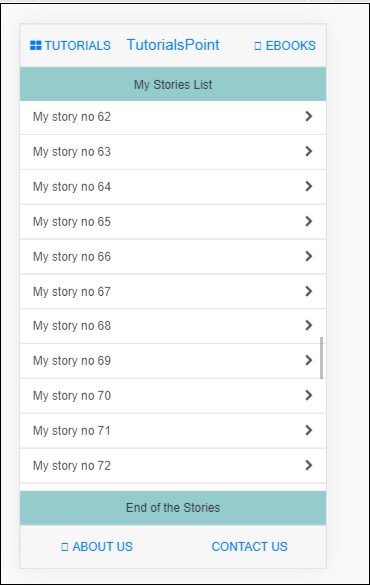
以下是瀏覽器中的顯示:
廣告