
- Magento 基礎教程
- Magento - 首頁
- Magento - 概述
- Magento - 安裝
- Magento - 架構
- Magento 商店設定
- Magento - 產品概述
- Magento - 設定語言
- Magento - 設定聯絡方式
- Magento - 設定分類
- Magento - 設定產品
- Magento - 設定庫存
- Magento - 設定稅費
- Magento - 設定運費
- Magento - 設定付款計劃
- Magento - 設定支付閘道器
- Magento - 設定支付方式
- Magento - 設定貨幣
- Magento - 設定結賬選項
- Magento - 設定PayPal支付
- Magento - 設定Google Checkout
- Magento - 設定商店上線
- Magento 系統設定
- Magento - 設定客戶
- Magento - 設定Google Analytics
- Magento - 設定美觀的URL
- Magento - 設定YouTube影片
- Magento - 設定Facebook點贊
- Magento - 設定翻譯
- Magento - 設定系統主題
- Magento - 設定頁面標題
- Magento - 設定頁面佈局
- Magento - 設定新頁面
- Magento - 設定CMS
- Magento - 設定新聞郵件
- Magento 最佳化
- Magento - 網站最佳化
- Magento - 效能分析
- Magento - 資料庫效能
- 搜尋引擎最佳化
- Magento 有用資源
- Magento - 問答
- Magento - 快速指南
- Magento - 有用資源
- Magento - 討論
Magento - 效能分析
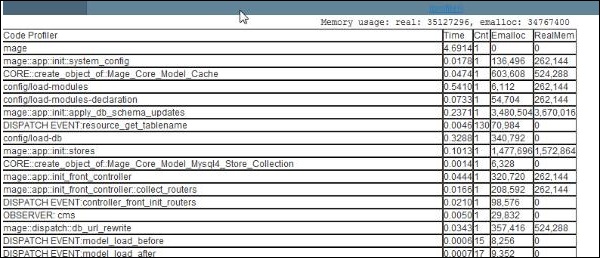
名為效能分析器 (Profiler) 的功能在 Magento 開發中扮演著重要角色,可用於除錯。它指定了導致頁面載入緩慢的程式碼塊。Magento 效能分析器報告程式碼塊執行所需的時間、程式碼塊執行的次數以及渲染 Magento 網頁時使用的記憶體。
要啟用效能分析器,請按照以下步驟操作:
步驟 1 - 登入您的 Magento 管理面板。
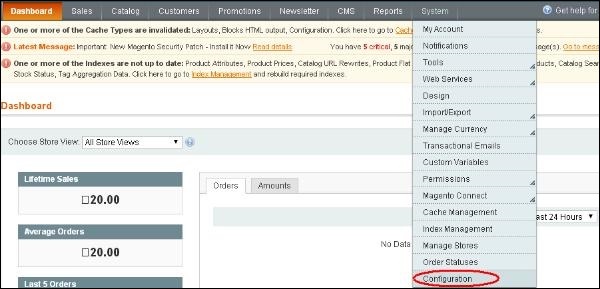
步驟 2 - 轉到系統選單,然後單擊配置選項。
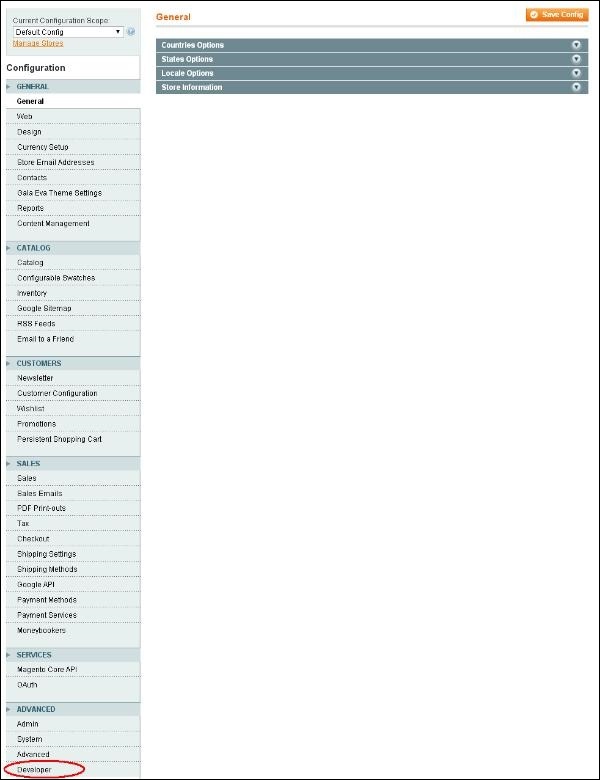
步驟 3 - 在導航欄的左側,轉到高階部分,然後單擊開發者選項。
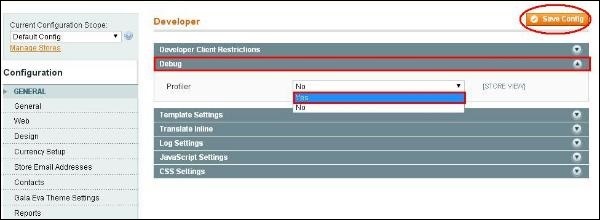
步驟 4 - 展開除錯面板,並將效能分析器設定為“是”,然後單擊儲存配置按鈕。
步驟 5 - 此時效能分析器已啟用,但您需要告訴效能分析器要分析什麼內容。因此,請轉到 Magento 安裝的根目錄 index.php 檔案,查詢#Varien_Profiler::enable(); 行,並取消註釋,即刪除井號。
步驟 6 - 現在轉到您的任何頁面,您應該會在頁面的頁尾區域看到如下所示的輸出。
廣告