
 資料結構
資料結構 網路
網路 關係資料庫管理系統 (RDBMS)
 作業系統
作業系統 Java
Java MS Excel
 iOS
iOS HTML
HTML CSS
CSS Android
 Python
 C語言程式設計
 C++
C++ C#
C# MongoDB
 MySQL
MySQL Javascript
 PHP
PHP 物理學
物理學 化學
化學 生物學
生物學 數學
數學 英語
英語 經濟學
經濟學 心理學
心理學 社會學
社會學 服裝設計
服裝設計 法律研究
法律研究如何在 React 元件中使用 handleChange() 函式?
handleChange() 不是 React 的內建函式,但顧名思義,我們可以定義它來處理使用者對輸入所做的更改。在 React 中,我們需要在使用者在輸入欄位中輸入任何值時處理輸入,以使其可編輯。
在這裡,我們將學習如何將 handleChange() 函式與單個和多個輸入一起使用。
在函式式元件中使用 handleChange() 函式
在 React 中,我們可以使用 function 關鍵字定義元件並將其稱為函式式元件。在使用函式式元件時,我們可以使用 Hook 來管理輸入值。
語法
使用者可以按照以下語法在函式式元件中使用 handleChange() 函式。
function handleChange(event) {
   let value = event.target.value;
}
<input type = "text" onChange = {handleChange} value = {value} />
在上面的語法中,我們使用了 onChange 事件屬性,每當輸入值發生變化時,它都會呼叫 handleChange() 函式。在 handleChange() 函式中,我們可以使用“event.target.value”獲取新的輸入值。
示例
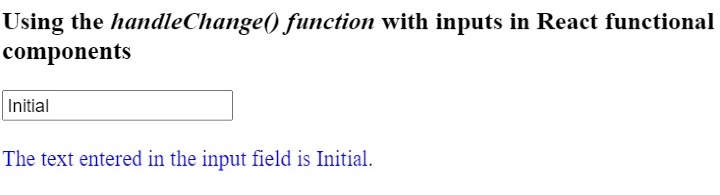
在下面的示例中,我們建立了一個包含文字輸入欄位的函式式元件。我們還在函式式元件中添加了 handleChange() 函式。
在 handleChange() 函式中,我們獲取更新後的輸入值,並使用 Hook 將其設定為 value 變數。我們還在輸出中顯示“value”變數的值。
import React from "react";
import { useState } from "react";

function App() {
   const [value, setValue] = useState("Initial");
   function handleChange(event) {
      // gives the value of the targetted element
      let value = event.target.value;
      setValue(value);
   }
   return (
      <div>
         <h3>
            Using the <i> handleChange() function </i> with inputs in React
            functional components.
         </h3>
         <input type = "text" onChange = {handleChange} value = {value} />
         <br/>   <br/>
         <div style = {{ color: "blue" }}>
            {" "}
            The text entered in the input field is {value}.{" "}
         </div>
      </div>
   );
}
export default App;
輸出
示例
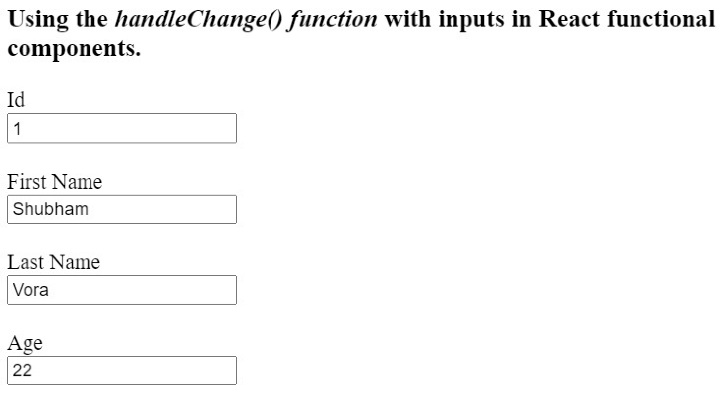
在下面的示例中,我們在單個函式式元件中建立了多個輸入。我們使用單個 handleChange() 函式來處理所有輸入。在 handleChange() 函式中,我們可以使用“event.target.name”獲取輸入的名稱,並根據名稱使用該函式來設定輸入值。
使用者可以在輸入欄位中輸入值,並觀察單個 handleChange() 函式如何處理所有輸入。
import React from "react";
import { useState } from "react";

function App() {
   const [id, setId] = useState("1");
   const [firstName, setFirstName] = useState("Shubham");
   const [lastName, setLastName] = useState("Vora");
   const [age, setAge] = useState(22);
   function handleChange(event) {
      // gives the value of the targetted element
      let value = event.target.value;
      let inputName = event.target.name;
      if (inputName == "id") {
         setId(value);
      } else if (inputName == "fname") {
         setFirstName(value);
      } else if (inputName == "lname") {
         setLastName(value);
      } else {
         setAge(age);
      }
   }
   return (
      <div>
         <h3>
            Using the <i> handleChange() function </i> with inputs in React
            functional components.
         </h3>
         <label for = "Id"> Id </label>
         <br />
         <input type = "text" id = "Id" name = "id" onChange = {handleChange} value = {id} />
         <br /> <br />
         <label for = "fname"> First Name </label>
         <br />
         <input
            type = "text"
            id = "fname"
            name = "fname"
            onChange = {handleChange}
            value = {firstName}
         />
         <br /> <br />
         <label for = "lname"> Last Name </label>
         <br />
         <input
            type = "text"
            id = "lname"
            name = "lname"
            onChange = {handleChange}
            value = {lastName}
         />
         <br /> <br />
         <label for = "age"> Age </label>
         <br />
         <input
            type = "text"
            id = "age"
            name = "age"
            onChange = {handleChange}
            value = {age}
         />
         <br /> <br />
      </div>
   );
}

export default App;
輸出
在類元件中使用 handleChange() 函式
我們可以在 ReactJS 中使用 class 關鍵字建立類元件。我們不能使用 Hook 來管理類元件的變數。因此,我們需要在類元件中使用 state。
此外,每當我們將 handleChange() 方法與類元件一起使用時,都需要在建構函式中繫結該方法。
語法
使用者可以按照以下語法在類元件中使用 handleChange() 函式。
handleChange(event) {
   this.state.text = event.target.value;
}
<input onChange = {this.handleChange} name = "text" />
在上面的語法中,每當輸入值發生變化時,我們都會更新 state 值。
示例
在下面的示例中,我們建立了一個包含輸入欄位的類元件。我們還在輸入欄位上添加了 handleChage() 方法。
每當使用者更改輸入值時,我們都會呼叫 handleChange() 方法,該方法會更新元件的狀態。
import React from "react";

class App extends React.Component {
   constructor(props) {
      super(props);
      this.state = {
         text: "Sample",
      };
      this.handleChange = this.handleChange.bind(this);
   }
   handleChange(event) {
      this.state.text = event.target.value;
   }
   render() {
      return (
         <div>
            <h2>
               {" "}
               Using the <i> handleChange() function </i> in ReactJs with class
               components.{" "}
            </h2>
            <input onChange = {this.handleChange} name = "text" />
         </div>
      );
   }
}
export default App;
輸出

使用者學習瞭如何在 React 類元件和函式式元件中使用輸入欄位的 handleChange() 函式。我們還學習瞭如何使用單個 handleChange() 函式處理多個輸入。

7K+ 次瀏覽
