
 資料結構
資料結構 網路
網路 關係型資料庫管理系統
 作業系統
作業系統 Java
Java MS Excel
 iOS
iOS HTML
HTML CSS
CSS Android
 Python
 C 語言程式設計
 C++
C++ C#
C# MongoDB
 MySQL
MySQL Javascript
 PHP
PHP 物理學
物理學 化學
化學 生物學
生物學 數學
數學 英語
英語 經濟學
經濟學 心理學
心理學 社會學
社會學 服裝設計
服裝設計 法律研究
法律研究如何在 OpenCV 中使用 Python 進行影像旋轉?
要將影像旋轉一定角度,我們首先需要獲取旋轉矩陣。要查詢旋轉矩陣,我們應用 cv2.getRotationMatrix2D() 函式。此函式的語法如下:
M = cv2.getRotationMatrix2D(cr, degree, scale)
其中cr是旋轉中心,degree是影像旋轉的角度,scale是用於放大或縮小影像的縮放因子。
旋轉矩陣 M 是一個 2×2 矩陣(NumPy 陣列)。我們將旋轉矩陣 M 作為引數傳遞給 cv2.warpAffine() 函式。請參見下面的語法:
語法
cv2.warpAffine(img, M, (width, height))
這裡,
img - 要旋轉的輸入影像。
M - 上述定義的旋轉矩陣。
(width, height) - 旋轉後圖像的寬度和高度。
步驟
要執行影像旋轉,您可以按照以下步驟操作:
匯入所需的庫。在以下所有 Python 示例中,所需的 Python 庫是OpenCV。確保您已安裝它。
import cv2
使用 cv2.imread() 函式讀取輸入影像。傳遞輸入影像的完整路徑。
img = cv2.imread('interior1.jpg')
使用 cv2.getRotationMatrix2D(cr, degree, scale) 函式定義旋轉矩陣 M。例如,將旋轉中心cr、旋轉角度 degree 和縮放因子 scale 傳遞給函式,例如,cr=(width/2, height/2), degree=30, scale=1。
M = cv2.getRotationMatrix2D(cr,30,1)
使用 cv2.warpAffine() 方法旋轉影像。
img = cv2.warpAffine(img,M,(w,h))
顯示旋轉後的影像。
cv2.imshow('Image Translation', img)
cv2.waitKey(0)
cv2.destroyAllWindows()
讓我們看一些示例,以便清楚地瞭解問題。
輸入影像
我們在下面的示例中使用以下影像作為輸入檔案。

示例 1
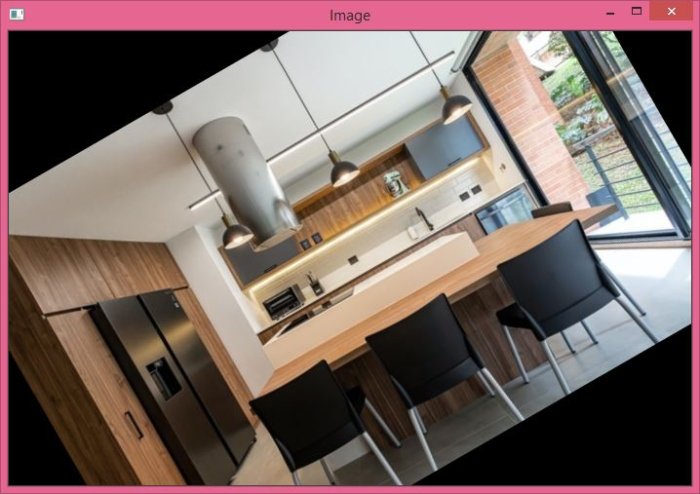
在此程式中,我們將輸入影像逆時針旋轉 30 度。旋轉中心是影像的中點(中心),即 (width/2, height/2)。
# import required libraries
import cv2

# read the input image
img = cv2.imread('interior1.jpg')

# access height and width of the image
height, width, _ = img.shape

# define center of rotation
cr = (width/2,height/2)

# get the rotation matrix
M = cv2.getRotationMatrix2D(cr,30,1)

# apply warpAffine() method to perform image rotation
dst = cv2.warpAffine(img,M,(width,height))

# display the rotated image
cv2.imshow('Image',dst)
cv2.waitKey(0)
cv2.destroyAllWindows()
輸出
執行後,它將生成以下輸出視窗:
請注意,均方誤差是一個標量值。
示例 2
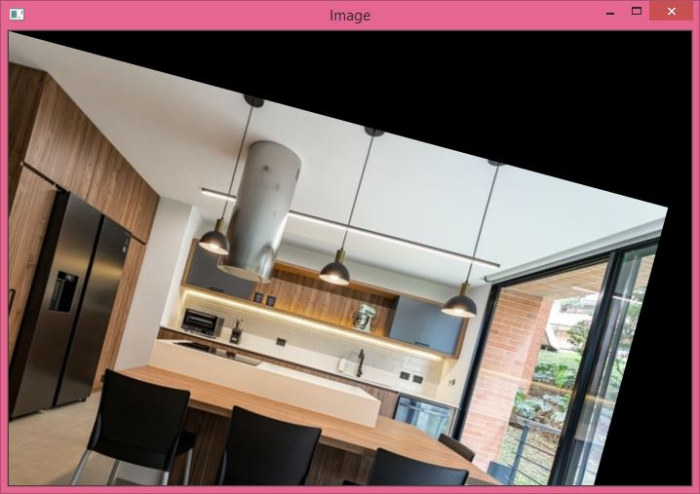
在此程式中,我們將輸入影像順時針旋轉 15 度。旋轉中心為 (0,0)。
import cv2
import numpy as np

img = cv2.imread('interior1.jpg')
h,w, _ = img.shape

M = cv2.getRotationMatrix2D((0,0),-15,1)
dst = cv2.warpAffine(img,M,(w,h))

cv2.imshow('Image',dst)
cv2.waitKey(0)
cv2.destroyAllWindows()
輸出
執行上述 Python 程式時,它將生成以下輸出視窗:

2K+ 次檢視
