
 資料結構
資料結構 網路
網路 關係資料庫管理系統 (RDBMS)
 作業系統
作業系統 Java
Java MS Excel
 iOS
iOS HTML
HTML CSS
CSS Android
 Python
 C 程式設計
 C++
C++ C#
C# MongoDB
 MySQL
MySQL Javascript
 PHP
PHP 物理學
物理學 化學
化學 生物學
生物學 數學
數學 英語
英語 經濟學
經濟學 心理學
心理學 社會學
社會學 時尚研究
時尚研究 法律研究
法律研究如何在 OpenCV Python 中對給定影像執行距離變換?
我們可以使用cv2.distanceTransform()方法執行距離變換。以下是此方法的語法。
語法
cv2.distanceTransform(src, distanceType, maskSize)
此方法接受以下引數:
src - 8 位,單通道(二值)源影像。
distanceType - 距離的型別。
maskSize - 距離變換掩碼的大小。
步驟
要對影像執行距離變換,我們可以按照以下步驟操作:
匯入所需的庫。在以下所有示例中,所需的 Python 庫是OpenCV。確保您已安裝它。
使用cv2.imread()讀取輸入影像。使用此方法讀取的 RGB 影像是 BGR 格式。可以選擇將讀取的 BGR 影像賦值給 img。
現在,使用cv2.cvtColor()函式將此 BGR 影像轉換為灰度影像。可以選擇將轉換後的灰度影像賦值給 gray。
現在對灰度影像應用閾值處理,將其轉換為二值影像。調整第二個引數 (threshValue) 以獲得更好的二值影像。
使用cv2.distanceTransform()對二值影像應用距離變換。它返回距離變換後的影像。將此影像歸一化到 [0,1] 範圍內。
顯示距離變換後的影像。
讓我們來看一些例子,以便更好地理解。
輸入影像
我們將在下面的示例中使用此影像作為輸入檔案。

示例
在此示例中,我們找到輸入影像的距離變換。我們將cv2.DIST_L2作為 distanceType,並將 maskSize 設定為 3。
# Load image in grayscale
import cv2
import numpy as np
import matplotlib.pyplot as plt

# Read the input image
img = cv2.imread('sketch.jpg')

# convert the image to grayscale
gray = cv2.cvtColor(img, cv2.COLOR_BGR2GRAY)

# apply thresholding to convert the grayscale image to a binary image
ret,thresh = cv2.threshold(gray,150,255,cv2.THRESH_BINARY)

# Apply distance transform on the binary image
dist = cv2.distanceTransform(thresh, cv2.DIST_L2, 3)

# Normalize the distance image for range = {0.0, 1.0}

# so we can visualize and threshold it
cv2.normalize(dist, dist, 0, 1.0, cv2.NORM_MINMAX)
cv2.imshow('Distance Transform Image', dist)
cv2.waitKey(0)
cv2.destroyAllWindows()
輸出
執行上面的 Python 程式後,它將生成以下輸出視窗:

示例
在此示例中,我們找到輸入影像的距離變換。我們應用五種不同型別的 distanceType 和 maskSize 為 3。
# import required libraries
import cv2
import matplotlib.pyplot as plt

# Read the input image
img = cv2.imread('sketch.jpg')

# convert the image to grayscale
gray = cv2.cvtColor(img, cv2.COLOR_BGR2GRAY)

# Apply thresholding to convert the grayscale image to a binary image
ret,thresh = cv2.threshold(gray,150,255,cv2.THRESH_BINARY)

# Apply distance transform on the binary image
dist_C = cv2.distanceTransform(thresh, cv2.DIST_C, 3)
dist_L1 = cv2.distanceTransform(thresh, cv2.DIST_L1, 3)
dist_L2 = cv2.distanceTransform(thresh, cv2.DIST_L2, 3)
dist_LP = cv2.distanceTransform(thresh, cv2.DIST_LABEL_PIXEL, 3)
dist_M = cv2.distanceTransform(thresh, cv2.DIST_MASK_3, 3)

# Normalize the distance image for range = {0.0, 1.0}

# so we can visualize and threshold it
cv2.normalize(dist_C, dist_C, 0, 1.0, cv2.NORM_MINMAX)
cv2.normalize(dist_L1, dist_L1, 0, 1.0, cv2.NORM_MINMAX)
cv2.normalize(dist_L2, dist_L2, 0, 1.0, cv2.NORM_MINMAX)
cv2.normalize(dist_LP, dist_LP, 0, 1.0, cv2.NORM_MINMAX)
cv2.normalize(dist_M, dist_M, 0, 1.0, cv2.NORM_MINMAX)

# visualize the distance images
plt.subplot(231),plt.imshow(dist_C, cmap = 'gray')
plt.title('DIST_C'), plt.xticks([]), plt.yticks([])
plt.subplot(232),plt.imshow(dist_L1, cmap = 'gray')
plt.title('DIST_L1'), plt.xticks([]), plt.yticks([])
plt.subplot(233),plt.imshow(dist_L2, cmap = 'gray')
plt.title('DIST_L2'), plt.xticks([]), plt.yticks([])
plt.subplot(234),plt.imshow(dist_LP, cmap = 'gray')
plt.title('DIST_LABEL_PIXEL'), plt.xticks([]), plt.yticks([])
plt.subplot(235),plt.imshow(dist_M, cmap = 'gray')
plt.title('DIST_MASK_3'), plt.xticks([]), plt.yticks([])
plt.show()
輸出
執行上面的 Python 程式後,它將生成以下輸出視窗,顯示應用不同 distanceType 後獲得的不同變換。
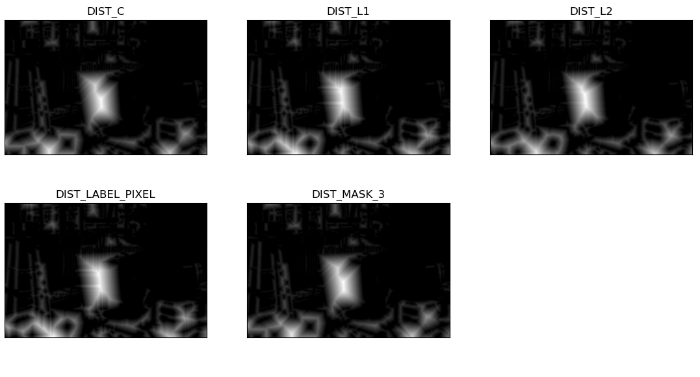
注意這五種distanceType之間的區別。

更新於:2022年12月2日
1K+ 次瀏覽

廣告