
 資料結構
資料結構 網路
網路 關係資料庫管理系統
 作業系統
作業系統 Java
Java MS Excel
 iOS
iOS HTML
HTML CSS
CSS Android
 Python
 C 程式設計
 C++
C++ C#
C# MongoDB
 MySQL
MySQL Javascript
 PHP
PHP 物理
物理 化學
化學 生物
生物 數學
數學 英語
英語 經濟學
經濟學 心理學
心理學 社會學
社會學 時尚研究
時尚研究 法律研究
法律研究如何使用 Python OpenCV 對影像執行 Otsu 閾值分割?
Otsu 閾值分割是一種閾值分割技術。還有其他型別的閾值分割技術,例如簡單閾值分割和自適應閾值分割。
簡單閾值分割技術使用全域性閾值,而自適應閾值分割技術對不同區域使用不同的閾值。
Otsu 閾值分割技術使用全域性閾值,但該閾值不是人為選擇的。它是自動確定的。它對雙峰影像非常有效。雙峰影像是指直方圖有兩個峰值的影像。閾值是這兩個峰值中間的近似值。如果影像不是雙峰的,則此閾值分割方法不準確。
要應用Otsu閾值分割,我們使用額外的標誌cv2.THRESH_OTSU應用簡單的閾值分割cv2.threshold()。請參閱以下語法。
語法
cv2.threshold(img, thresh_val, max_valu, thresh_techniques)
引數
img − 輸入灰度影像。它是一個numpy.ndarray。
thresh_val − 閾值。如果畫素值高於閾值,則分配一個值,否則分配另一個值。
max_valu − 要分配給畫素的最大值
thresh_techniques − 使用的閾值分割技術。我們可以應用任何簡單閾值分割 + Otsu 閾值分割,即cv2.THRESH_BINARY + cv2.THRESH_OTSU
它返回全域性自適應閾值和閾值。
讓我們藉助一些 Python 示例來了解 Otsu 閾值分割
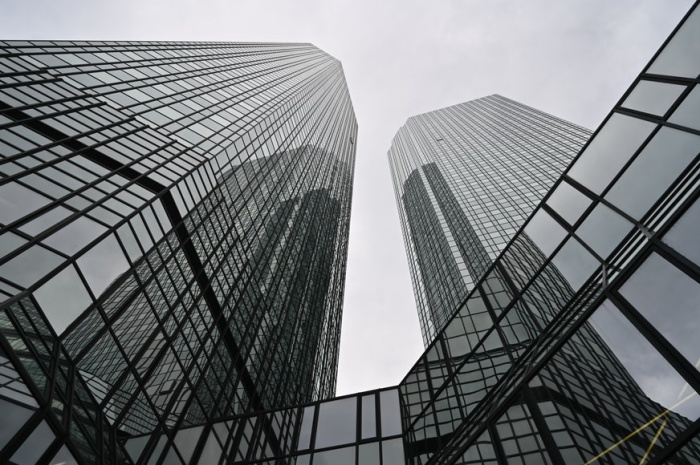
輸入影像
我們將在以下示例中使用此影像作為輸入檔案。
示例 1
在此程式中,我們對輸入影像應用Otsu閾值分割。
# import required libraries
import cv2

# read the input image as a gray image
img = cv2.imread('architecture2.jpg',0)

# Apply Otsu's thresholding
_,th = cv2.threshold(img,0,255,cv2.THRESH_BINARY+cv2.THRESH_OTSU)

# display the output image
cv2.imshow("Otsu's Thresholding", th)
cv2.waitKey(0)
cv2.destroyAllWindows()
輸出
執行以上程式後,將生成以下輸出:
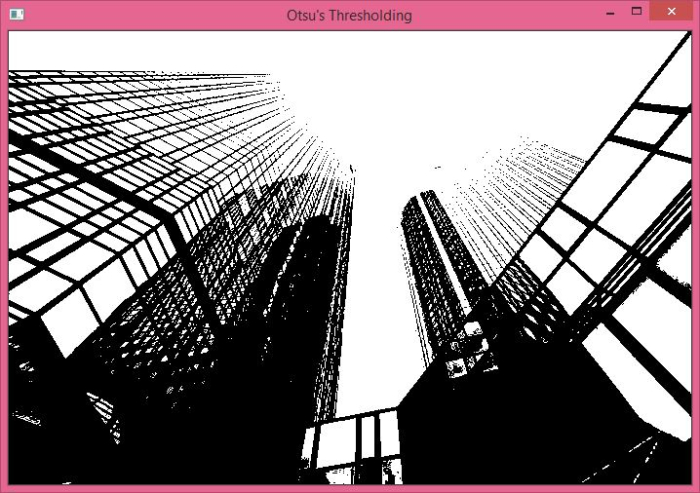
以上輸出顯示了應用 Otsu 閾值分割後的影像。
示例 2
在此程式中,我們對輸入影像應用Otsu閾值分割。我們還應用了全域性閾值分割和高斯濾波 + Otsu 閾值分割。
import cv2

from matplotlib import pyplot as plt
img = cv2.imread('architecture2.jpg',0)

# Apply global (simple) thresholding on image
ret1,th1 = cv2.threshold(img,127,255,cv2.THRESH_BINARY)

# Apply Otsu's thresholding on image
ret2,th2 = cv2.threshold(img,0,255,cv2.THRESH_BINARY+cv2.THRESH_OTSU)

# Apply Otsu's thresholding after Gaussian filtering
blur = cv2.GaussianBlur(img,(5,5),0)
ret3,th3 = cv2.threshold(blur,0,255,cv2.THRESH_BINARY+cv2.THRESH_OTSU)

titles = ['Original Image','Global Thresholding (v=127)',"Otsu's Thresholding",'Gaussian Filter + Otsu']
images = [img,th1,th2,th3]

for i in range(4):
   plt.subplot(2,2,i+1)
   plt.imshow(images[i], 'gray')
   plt.title(titles[i])
   plt.axis("off")
plt.show()
輸出
執行以上程式後,將生成以下輸出:
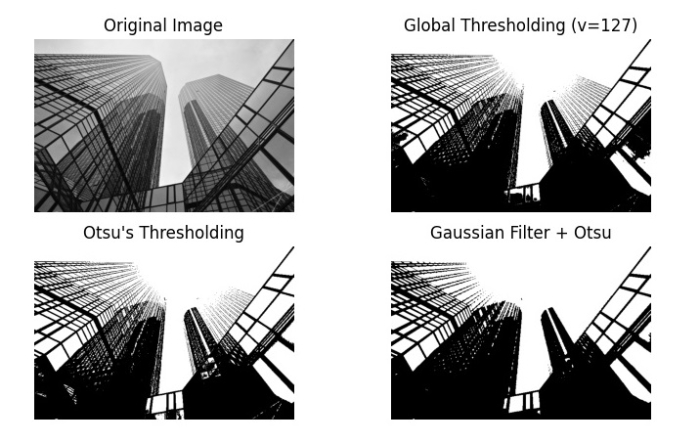
以上輸出顯示了應用全域性閾值分割、Otsu 閾值分割和高斯濾波 + Otsu 閾值分割後的不同影像。

更新於: 2022年9月27日
4K+ 閱讀量

廣告