
 資料結構
資料結構 網路
網路 關係資料庫管理系統 (RDBMS)
 作業系統
作業系統 Java
Java MS Excel
 iOS
iOS HTML
HTML CSS
CSS Android
 Python
 C語言程式設計
 C++
C++ C#
C# MongoDB
 MySQL
MySQL Javascript
 PHP
PHP 物理學
物理學 化學
化學 生物學
生物學 數學
數學 英語
英語 經濟學
經濟學 心理學
心理學 社會學
社會學 時尚研究
時尚研究 法律研究
法律研究如何在OpenCV Python中使用Scharr運算元查詢影像梯度?
使用Scharr運算元,我們可以使用一階導數計算水平和垂直方向的影像梯度。梯度是針對灰度影像計算的。您可以使用cv2.scharr()方法對影像應用Scharr運算。
語法
使用Scharr導數計算影像梯度使用的語法如下:
cv2.Scharr(img, ddepth, xorder, yorder)
引數
img - 原始輸入影像
ddepth - 期望的輸出影像深度。它包含關於輸出影像中儲存的資料型別的資訊。我們使用cv2.CV_64F作為ddepth。它是一個64位浮點opencv型別。
xorder - 水平方向(X方向)的導數階數。對於X方向的一階導數,設定xorder=1,yorder=0。
yorder - 垂直方向(Y方向)的導數階數。對於Y方向的一階導數,設定xorder=0,yorder=1。
步驟
您可以使用以下步驟使用Scharr導數查詢影像梯度:
匯入所需的庫。在所有以下Python示例中,所需的Python庫是OpenCV。確保您已安裝它。
import cv2
使用cv2.imread()讀取輸入影像作為灰度影像。
img = cv2.imread('lines.jpg',0)
使用cv2.Scharr()計算Sobel或拉普拉斯導數。此導數指的是影像梯度。
scharrx = cv2.Scharr(img,cv2.CV_64F,1,0)
使用cv2.imshow()方法顯示影像梯度。
cv2.imshow("Scharr X", scharrx)
cv2.waitKey(0)
cv2.destroyAllWindows()
讓我們來看一些例子,以便更清楚地理解。
示例1
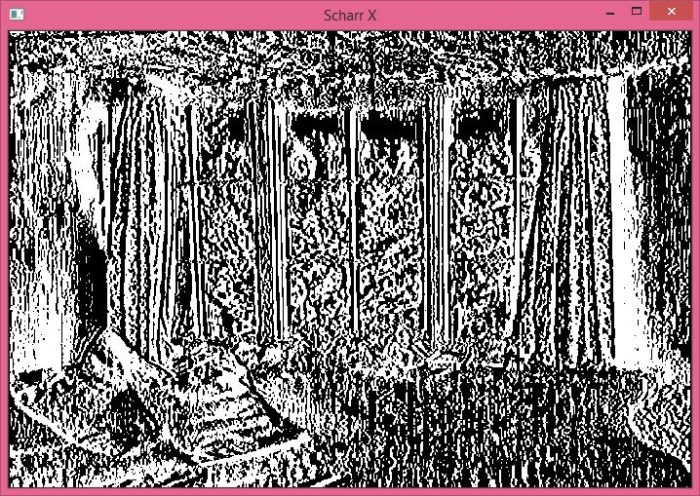
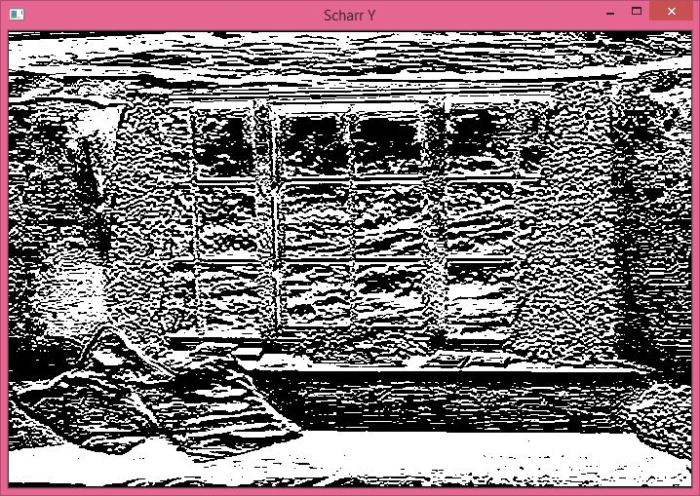
在下面的Python示例中,我們使用Scharr運算元在X(水平)和Y(垂直)方向上計算影像梯度。
# import required libraries
import cv2

# read the input image as a grayscale image
img = cv2.imread('window.jpg',0)

# compute the 1st order Sobel derivative in x direction
scharrx = cv2.Scharr(img,cv2.CV_64F,1,0)

# compute the 1st order Sobel derivative in y direction
scharry = cv2.Scharr(img,cv2.CV_64F,0,1)

# display scharrx and scharry
cv2.imshow("Scharr X", scharrx)
cv2.waitKey(0)
cv2.imshow("Scharr Y", scharry)
cv2.waitKey(0)
cv2.destroyAllWindows()
我們將在上述程式中使用影像“window.jpg”作為輸入檔案。

輸出
執行上述程式後,它將生成以下兩個輸出視窗:“Scharr X”和“Scharr Y”。
示例2
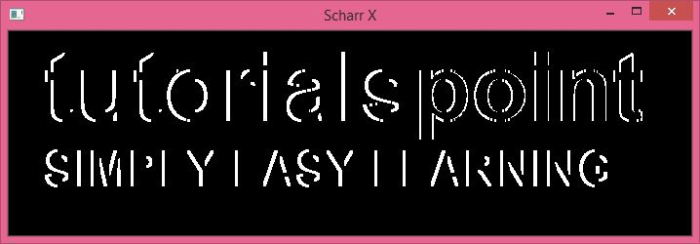
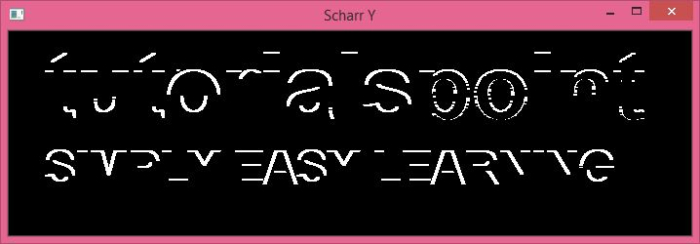
在下面的Python示例中,我們使用Scharr運算元在X(水平)和Y(垂直)方向上計算影像梯度。
# import required libraries
import cv2

# read the input image as a grayscale image
img = cv2.imread('tutorialspoint.png',0)

# compute the 1st order Sobel derivative in x direction
scharrx = cv2.Scharr(img,cv2.CV_64F,1,0)

# compute the 1st order Sobel derivative in y direction
scharry = cv2.Scharr(img,cv2.CV_64F,0,1)

# display scharrx and scharry
cv2.imshow("Scharr X", scharrx)
cv2.waitKey(0)
cv2.imshow("Scharr Y", scharry)
cv2.waitKey(0)
cv2.destroyAllWindows()
我們將在上述程式中使用影像“tutorialspoint.png”作為輸入檔案。

輸出
上述程式執行後將生成以下兩個輸出視窗。

更新於:2022年9月28日
739 次瀏覽

廣告