
 資料結構
資料結構 網路
網路 關係資料庫管理系統 (RDBMS)
 作業系統
作業系統 Java
Java MS Excel
 iOS
iOS HTML
HTML CSS
CSS Android
 Python
 C語言程式設計
 C++
C++ C#
C# MongoDB
 MySQL
MySQL Javascript
 PHP
PHP 物理學
物理學 化學
化學 生物學
生物學 數學
數學 英語
英語 經濟學
經濟學 心理學
心理學 社會學
社會學 服裝設計
服裝設計 法學
法學使用Python和OpenCV在影像中查詢圓形
該OpenCV平臺為Python提供了一個cv2庫。這可用於各種形狀分析,在計算機視覺中非常有用。為了使用OpenCV識別圓形的形狀,我們可以使用cv2.HoughCircles()函式。它使用霍夫變換在灰度影像中查詢圓形。
常用方法
使用OpenCV在影像中查詢圓形的一些常用方法如下:
-
使用霍夫變換OpenCV進行圓檢測
-
使用SimpleBlobDetector進行圓檢測
使用霍夫變換進行圓檢測
霍夫變換是一種流行的圓檢測技術。它的工作原理是將影像轉換到引數空間,其中每個點代表一個可能的圓心。然後,該技術搜尋定義適合影像的圓的最佳引數。
該'cv2.HoughCircles()'函式具有以下語法。
cv2.HoughCircles(image, method, dp, minDist)
其中:
-
method:這是用於檢測圓的方法,預設為cv2.HOUGH_GRADIENT。
-
dp:這是累加器解析度與影像解析度的倒數。
-
minDist:這是檢測到的圓的中心之間的最小距離。
示例
我們將以影像作為輸入。然後複製它並應用此變換函式以識別輸出中的圓。
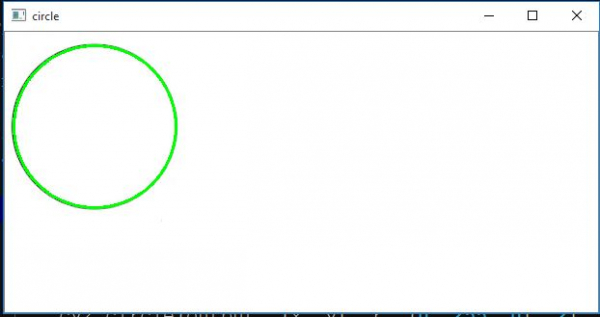
下面的程式檢測影像檔案中是否存在圓。如果存在圓,則會突出顯示它。
import cv2
import numpy as np
image = cv2.imread('circle_ellipse_2.JPG')
output = image.copy()
img = cv2.cvtColor(image, cv2.COLOR_BGR2GRAY)
# Find circles
circles = cv2.HoughCircles(img, cv2.HOUGH_GRADIENT, 1.3, 100)
# If some circle is found
if circles is not None:
   # Get the (x, y, r) as integers
   circles = np.round(circles[0, :]).astype("int")
   print(circles)
   # loop over the circles
   for (x, y, r) in circles:
      cv2.circle(output, (x, y), r, (0, 255, 0), 2)
# show the output image
cv2.imshow("circle",output)
cv2.waitKey(0)
輸入影像

輸出
程式碼將列印圓的座標(93,98)和半徑(84畫素)。
[[93 98 84]]
我們得到以下輸出:
使用SimpleBlobDetector進行圓檢測
SimpleBlobDetector演算法是另一種在影像中檢測圓的方法,它檢測影像中的斑點(或感興趣區域)。此方法透過掃描影像以查詢符合特定條件(例如最小尺寸、圓度和凸度)的斑點來工作。
步驟包括
執行SimpleBlobDetector演算法所涉及的步驟如下。
-
使用OpenCV的imread()函式讀取影像。
-
將輸入影像轉換為灰度。
-
使用cv2.SimpleBlobDetector_create()函式建立一個物件。
-
使用SimpleBlobDetector物件的detect()函式檢測影像中的斑點。
-
使用檢測到的斑點中心和半徑在原始影像上繪製圓。
示例
在下面的示例程式碼中,我們首先使用imread()函式載入影像,然後使用cvtColor()函式將其轉換為灰度。然後,我們使用SimpleBlobDetector_create()函式建立一個SimpleBlobDetector物件,並使用detect()函式檢測影像中的斑點。
import cv2
import numpy as np

# Load image
img = cv2.imread('circles.jpg')

# Convert the image to grayscale
gray = cv2.cvtColor(img, cv2.COLOR_BGR2GRAY)

# Create a SimpleBlobDetector object
detector = cv2.SimpleBlobDetector_create()

# Detect blobs in the image
keypoints = detector.detect(gray)

# Draw circles on the original image
for keypoint in keypoints:
    x = int(keypoint.pt[0])
    y = int(keypoint.pt[1])
    r = int(keypoint.size / 2)
    cv2.circle(img, (x, y), r, (0, 255, 0), 2)

# Display the image
cv2.imshow("Detected Circles", img)
cv2.waitKey(0)
cv2.destroyAllWindows()

6K+ 次瀏覽
