
 資料結構
資料結構 網路
網路 RDBMS
RDBMS 作業系統
作業系統 Java
Java MS Excel
 iOS
iOS HTML
HTML CSS
CSS Android
 Python
 C 程式設計
 C++
C++ C#
C# MongoDB
 MySQL
MySQL Javascript
 PHP
PHP 物理學
物理學 化學
化學 生物學
生物學 數學
數學 英語
英語 經濟學
經濟學 心理學
心理學 社會科學
社會科學 時尚研究
時尚研究 法律研究
法律研究使用 OpenCV 在影像中檢測輪廓
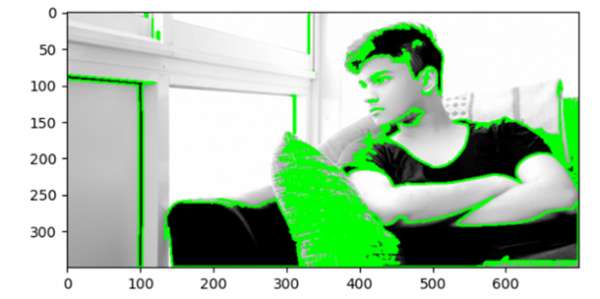
在此程式中,我們將檢測影像中的輪廓。輪廓可以簡單地解釋為連線具有相同顏色或強度的所有連續點的曲線。輪廓是形狀分析、物體檢測及識別中一種有用的工具。
原始影像
演算法
Step 1: Import OpenCV.
Step 2: Import matplotlib.
Step 3: Read the image.
Step 4: Convert the image from bgr2rgb.
Step 5: Convert the rgb image to grayscale.
Step 4: Perform thresholding on the image.
Step 5: Find contours on the image.
Step 6: Draw contours on the image.
Step 7: Display the output.
示例程式碼
import cv2
import matplotlib.pyplot as plt

image = cv2.imread('testimage.jpg')
image = cv2.cvtColor(image, cv2.COLOR_BGR2RGB)
gray = cv2.cvtColor(image, cv2.COLOR_RGB2GRAY)
ret, binary = cv2.threshold(gray, 127,255, cv2.THRESH_BINARY_INV)
contours, hierarchy = cv2.findContours(binary, cv2.RETR_TREE, cv2.CHAIN_APPROX_SIMPLE)

image = cv2.drawContours(image, contours, -1, (0,255,0), 2)
plt.imshow(image)
plt.show()
輸出

更新於:2021 年 3 月 17 日
649 次瀏覽

廣告