
 資料結構
資料結構 網路
網路 關係型資料庫管理系統 (RDBMS)
 作業系統
作業系統 Java
Java MS Excel
 iOS
iOS HTML
HTML CSS
CSS Android
 Python
 C 程式設計
 C++
C++ C#
C# MongoDB
 MySQL
MySQL Javascript
 PHP
PHP 物理學
物理學 化學
化學 生物學
生物學 數學
數學 英語
英語 經濟學
經濟學 心理學
心理學 社會學
社會學 時尚研究
時尚研究 法律研究
法律研究使用 Prewitt、Scharr 和 Sobel 運算元進行邊緣檢測
在數字影像處理中,用於突出顯示數字影像中物體邊界/輪廓的技術稱為邊緣檢測。我們可以使用 MATLAB 執行此操作。為此,MATLAB 庫中定義了幾個不同的內建函式和運算元。
在本教程中,我將解釋三個這樣的運算元,即“Prewitt 運算元”、“Scharr 運算元”和“Sobel 運算元”。這三個運算元都是 MATLAB 庫中常用的基於梯度的邊緣檢測運算元。
在討論這些用於邊緣檢測的運算元之前,讓我們首先簡要概述一下邊緣檢測技術。
什麼是邊緣檢測?
邊緣檢測是數字影像處理中用於檢測數字影像中物體邊界的過程。
在邊緣檢測過程中,影像中發生快速強度變化的區域會被突出顯示。
在影像處理領域,邊緣檢測非常重要,因為它有助於物體識別、影像分割、提取影像中的重要特徵、影像質量增強、影像壓縮等等。
它常用於各種領域,例如工業應用中的質量控制、醫學成像中的腫瘤檢測、計算機視覺中的物體檢測(例如自動駕駛汽車、機器人等)、遙感、影像編輯等等。
現在,讓我們討論如何在 MATLAB 中使用“Prewitt 運算元”、“Scharr 運算元”和“Sobel 運算元”進行邊緣檢測。
在 MATLAB 中使用 Prewitt 運算元進行邊緣檢測
Prewitt 運算元是一種基於梯度的邊緣檢測運算元,用於檢測數字影像中物體的邊界。為了檢測和突出顯示邊緣,Prewitt 運算元近似於每個畫素處的影像強度的梯度。
從技術上講,Prewitt 運算元使用兩個 3×3 卷積核來檢測邊緣。一個用於檢測水平邊緣,另一個用於檢測影像中物體的垂直邊緣。這些核如下所示。
水平核
-1  0  1
-1  0  1
-1  0  1
垂直核
0  0  0
1  1  1
這些 Prewitt 核與影像進行卷積以計算每個畫素處的梯度強度。其中,水平核計算從左到右的梯度強度變化,即沿水平方向。而垂直核計算從上到下的梯度強度變化,即沿垂直方向。最後,將兩個梯度影像組合起來,得到具有突出邊緣的結果影像。
Prewitt 運算元語法
在 MATLAB 中,要將 Prewitt 運算元應用於影像以檢測邊緣,可以使用“imfilter”函式。它將具有以下語法
out_img = imfilter(in_img, prewitt_kernel);
這裡,“in_img”是要執行邊緣檢測的輸入影像。“kernel”是 Prewitt 運算元核。
示例 (1)
以下示例演示了 Prewitt 運算元在檢測影像中邊緣的實現。
% MATLAB code to edge detection using Prewitt operator
% Load the input image
in_img = imread('https://tutorialspoint.tw/assets/questions/media/14304-1687425236.jpg');

% Convert input image to grayscale
gray_img = rgb2gray(in_img);

% Convert the image to double precision for calculation
gray_img = double(gray_img);

% Specify the Prewitt operator kernels
h_kernel = [-1, 0, 1; -1, 0, 1; -1, 0, 1];	% Horizontal Kernel
v_kernel = [-1, -1, -1; 0, 0, 0; 1, 1, 1];	% Vertical Kernel

% Use the Prewitt operator kernels to calculate gradient intensities
h_gradient = imfilter(gray_img, h_kernel);
v_gradient = imfilter(gray_img, v_kernel);

% Calculate the gradient magnitude
gradient_magnitude = sqrt(h_gradient.^2 + v_gradient.^2);

% Display the orignal and edge detected images
figure;
subplot(2, 1, 1);
imshow(in_img);
title('Original Image');

subplot(2, 1, 2);
imshow(uint8(gradient_magnitude));
title('Prewitt Edge Detected Image');
輸出
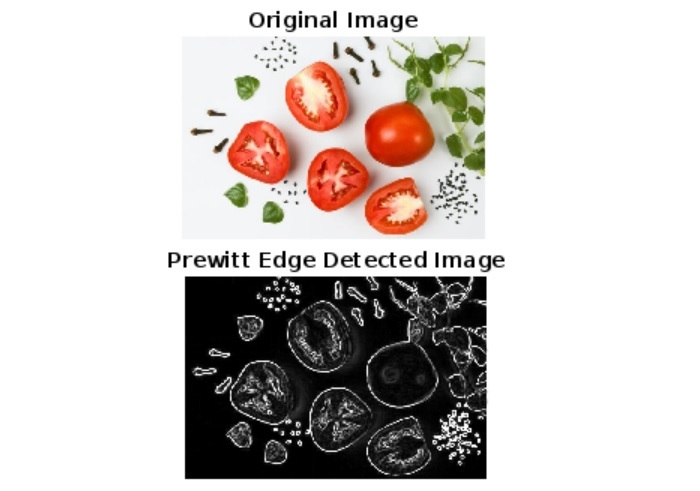
程式碼說明
在這個 MATLAB 示例中,我們首先讀取輸入影像,然後將其轉換為灰度圖和雙精度以進行計算。之後,我們定義水平和垂直 Prewitt 核,並使用“imfilter”函式將 Prewitt 運算元應用於輸入影像以進行邊緣檢測。
接下來,我們計算梯度幅值,這基本上是影像中檢測到的物體邊緣的視覺化。最後,我們使用“imshow”函式顯示原始影像和邊緣檢測影像。
在 MATLAB 中使用 Scharr 運算元進行邊緣檢測
與 Prewitt 運算元類似,Scharr 運算元是 MATLAB 中用於檢測影像中物體邊界的另一種邊緣檢測運算元。
此運算元特別用於必須檢測對角線邊緣的情況,因為它具有更多旋轉對稱的邊緣檢測特性。因此,Scharr 運算元在邊緣檢測中提供了相對更好的結果。
但是,它也是一個基於梯度的邊緣檢測運算元,並使用兩個 3×3 卷積核來近似影像每個畫素處的梯度強度。這裡,一個 Scharr 核用於檢測水平邊緣,而另一個用於檢測垂直邊緣。這些 Scharr 核如下所示。
水平 Scharr 核
-3  0  3
-10  0  10
-3  0  3
垂直 Scharr 核
-3  -10  -3
0  0  0
3  10  3
這兩個核與影像進行卷積以檢測輸入影像中物體的邊緣。
Scharr 運算元語法
在 MATLAB 中,Scharr 運算元是使用“imfilter”函式應用的,該函式具有以下語法:
out_img = imfilter(in_img, scharr_kernel);
現在,讓我們瞭解如何在 MATLAB 中實現程式碼以使用 Scharr 運算元執行邊緣檢測。
示例 (2)
% MATLAB code to perform edge detection using Scharr operator
% Load the input image
in_img = imread('https://tutorialspoint.tw/assets/questions/media/14304-1687425236.jpg');

% Convert the input image to grayscale
gray_img = rgb2gray(in_img);

% Convert the image to double precision for better calculation
gray_img = double(gray_img);

% Specify the Scharr operator kernels
h_kernel = [-3, 0, 3; -10, 0, 10; -3, 0, 3];	% Horizontal kernel
v_kernel = [-3, -10, -3; 0, 0, 0; 3, 10, 3];	% Vertical kernel

% Use the Scharr operator kernels to calculate gradients in image
h_gradient = imfilter(gray_img, h_kernel);
v_gradient = imfilter(gray_img, v_kernel);

% Calculate the gradient magnitude
gradient_magnitude = sqrt(h_gradient.^2 + v_gradient.^2);

% Display the original image and the edge detected image
figure;
subplot(2, 1, 1);
imshow(in_img);
title('Original Image');

subplot(2, 1, 2);
imshow(uint8(gradient_magnitude));
title('Scharr Edge Detected Image');
輸出
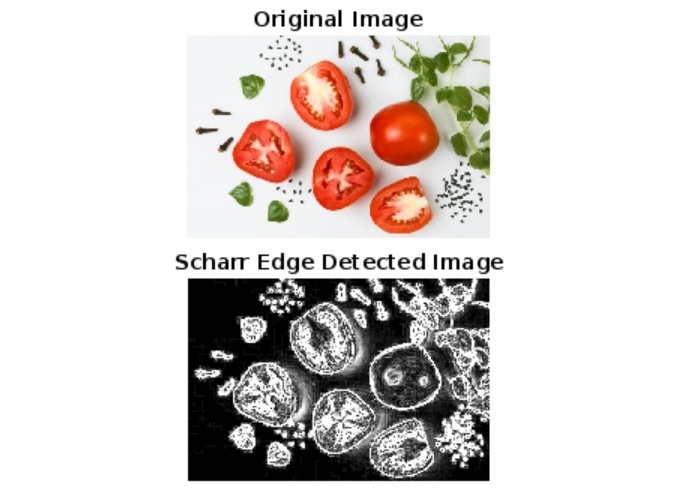
程式碼說明
此程式碼的實現類似於 Prewitt 運算元的程式碼。唯一的區別在於,在此示例中,用於邊緣檢測的核是 Scharr 運算元核。從輸出影像可以清楚地看出,Scharr 運算元提供了更好的結果。
現在讓我們瞭解如何使用 Sobel 運算元來檢測影像中物體的邊緣。
在 MATLAB 中使用 Sobel 運算元進行邊緣檢測
與 Prewitt 和 Scharr 運算元類似,Sobel 運算元也是數字影像處理中用於檢測影像中物體邊界的基於梯度的邊緣檢測運算元。此運算元也使用兩個 3×3 卷積核,即水平 Sobel 核和垂直 Sobel 核。這些 Sobel 核如下所示。
水平 Sobel 核
-1  0  1
-2  0  2
-1  0  1
垂直 Sobel 核
-1 -2 -1
 0  0  0
 1  2  1
使用 Sobel 運算元檢測邊緣的過程與 Prewitt 和 Scharr 運算元的過程類似。
Sobel 運算元語法
在 MATLAB 中,Sobel 運算元是使用“imfilter”函式應用的。為此,使用以下語法:
out_img = imfilter(in_img, sobel_kernel);
現在讓我們舉一個例子來了解 Sobel 運算元在檢測影像中邊緣的使用。
示例 (3)
% MATLAB code to detect edges using Sobel operator
% Load the input image
in_img = imread('https://tutorialspoint.tw/assets/questions/media/14304-1687425236.jpg');

% Convert the input image to grayscale
gray_img = rgb2gray(in_img);

% Convert the grayscale image to double precision
gray_img = double(gray_img);

% Specify the Sobel operator kernels
h_kernel = [-1, 0, 1; -2, 0, 2; -1, 0, 1];	% Horizontal kernel
v_kernel = [-1, -2, -1; 0, 0, 0; 1, 2, 1];	% Vertical kernel

% Use the Sobel operator kernels to calculate gradients
h_gradient = imfilter(gray_img, h_kernel);
v_gradient = imfilter(gray_img, v_kernel);

% Calculate the gradient magnitude
gradient_magnitude = sqrt(h_gradient.^2 + v_gradient.^2);

% Display the original image and the edge detected image
figure;
subplot(2, 1, 1);
imshow(in_img);
title('Original Image');

subplot(2, 1, 2);
imshow(uint8(gradient_magnitude));
title('Sobel Edge Detected Image');
輸出
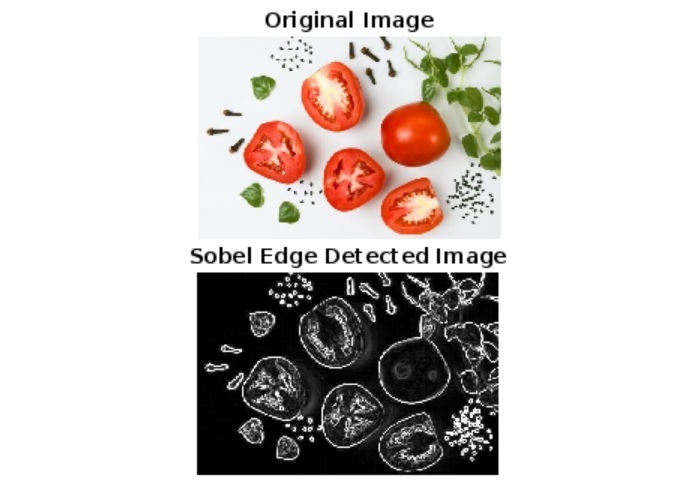
程式碼說明
程式碼實現和執行與上述兩個示例類似。在這裡,我們僅使用 Sobel 運算元核來檢測邊緣。
結論
在本教程中,我藉助示例程式解釋了所有這些運算元。總之,Prewitt、Scharr 和 Sobel 運算元用於使用 MATLAB 對數字影像中物體的邊緣進行檢測。

1K+ 次檢視
