
 資料結構
資料結構 網路
網路 關係型資料庫管理系統
 作業系統
作業系統 Java
Java Microsoft Excel
 iOS
iOS HTML
HTML CSS
CSS Android
 Python
 C 程式設計
 C++
C++ C#
C# MongoDB
 MySQL
MySQL Javascript
 PHP
PHP 物理
物理 化學
化學 生物
生物 數學
數學 英語
英語 經濟學
經濟學 心理學
心理學 社會科學
社會科學 時尚研究
時尚研究 法律研究
法律研究如何用 tkinter 根據滑鼠座標畫一條線?
為了根據滑鼠座標畫一條線,我們需要建立一個函式來獲取每次滑鼠點選的座標,進而繪製兩相鄰點之間的線。我們來舉個例子,看看可以如何完成。
步驟 -
匯入 tkinter 庫並建立一個 tkinter 幀例項。
使用 geometry 方法設定幀的大小。
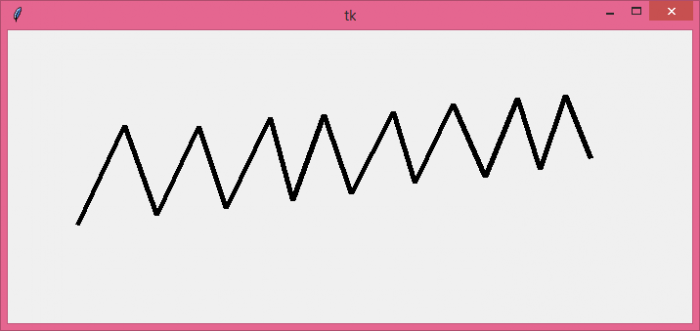
建立一個使用者自定義方法 "draw_line",用於獲取每一次滑鼠點選的 x 和 y 座標。然後使用 Canvas 的 create_line() 方法在兩相鄰點之間繪製一條線。
將滑鼠左鍵點選繫結到 draw_line 方法。
最後,執行應用程式視窗的 mainloop。
示例
# Import the library
import tkinter as tk

# Create an instance of tkinter
win = tk.Tk()

# Window size
win.geometry("700x300")

# Method to draw line between two consecutive points
def draw_line(e):
   x, y = e.x, e.y
   if canvas.old_coords:
      x1, y1 = canvas.old_coords
      canvas.create_line(x, y, x1, y1, width=5)
   canvas.old_coords = x, y

canvas = tk.Canvas(win, width=700, height=300)
canvas.pack()
canvas.old_coords = None

# Bind the left button the mouse.
win.bind('<ButtonPress-1>', draw_line)

win.mainloop()
輸出
它將追蹤滑鼠左鍵點選並繪製每兩相鄰點之間的一條線。

更新時間: 2021 年 10 月 26 日
3K+ 次檢視

廣告