
 資料結構
資料結構 網路
網路 關係型資料庫管理系統
 作業系統
作業系統 Java
Java MS Excel
 iOS
iOS HTML
HTML CSS
CSS Android
 Python
 C 程式設計
 C++
C++ C#
C# MongoDB
 MySQL
MySQL Javascript
 PHP
PHP 物理學
物理學 化學
化學 生物學
生物學 數學
數學 英語
英語 經濟學
經濟學 心理學
心理學 社會學
社會學 服裝設計
服裝設計 法律研究
法律研究如何在 Python 中使用 Bokeh 庫視覺化雙軸?
Bokeh 是一個用於資料視覺化的 Python 包。它是一個開源專案。Bokeh 使用 HTML 和 JavaScript 渲染其繪圖。這表明它在處理基於 Web 的儀表板時很有用。
Matplotlib 和 Seaborn 生成靜態繪圖,而 Bokeh 生成互動式繪圖。這意味著當用戶與這些繪圖互動時,它們會相應地改變。
繪圖可以嵌入為 Flask 或 Django 啟用的 Web 應用程式的輸出。Jupyter notebook 也可以用於渲染這些繪圖。
在 Windows 命令提示符下安裝 Bokeh
pip3 install bokeh
在 Anaconda 提示符下安裝 Bokeh
conda install bokeh
讓我們看一個例子 -
示例
From numpy import pi, arange, sin, linspace
x = arange(−2.5*pi, 2.5*pi, 0.15)
y = sin(x)
y2 = linspace(0, 176, len(y))
from bokeh.plotting import output_file, figure, show
from bokeh.models import LinearAxis, Range1d
my_fig = figure(title='Twin Axis plot',plot_width = 300, plot_height = 300, y_range = (−0.7, 0.7))
my_fig.line(x, y, color = "blue")
my_fig.extra_y_ranges = {"y2": Range1d(start = 0, end = 100)}
my_fig.add_layout(LinearAxis(y_range_name = "y2"), 'right')
my_fig.line(x, y2, color = "cyan", y_range_name = "y2")
show(my_fig)
輸出
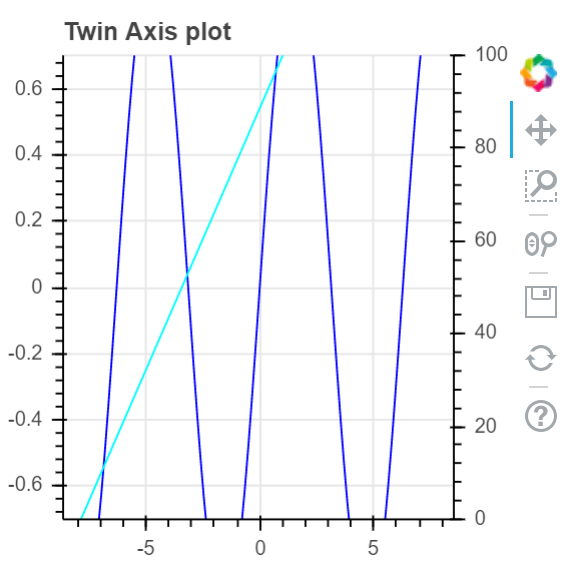
解釋
匯入併為所需的包設定別名。
呼叫 figure 函式並設定繪圖寬度和高度。
使用 NumPy 生成資料。
呼叫 'output_file' 函式以指定將生成的 html 檔案的名稱。
呼叫 Bokeh 中的 'line' 函式,並傳入資料。
使用 'show' 函式顯示繪圖。

更新於: 2021年1月18日
209 次檢視

廣告