
- Cordova 教程
- Cordova - 首頁
- Cordova - 概述
- Cordova - 環境設定
- Cordova - 第一個應用程式
- Cordova - Config.xml 檔案
- Cordova - 儲存
- Cordova - 事件
- Cordova - 返回按鈕
- Cordova - Plugman
- Cordova - 電池狀態
- Cordova - 相機
- Cordova - 聯絡人
- Cordova - 裝置
- Cordova - 加速計
- Cordova - 裝置方向
- Cordova - 對話方塊
- Cordova - 檔案系統
- Cordova - 檔案傳輸
- Cordova - 地理位置
- Cordova - 全球化
- Cordova - InAppBrowser
- Cordova - 媒體
- Cordova - 媒體捕獲
- Cordova - 網路資訊
- Cordova - 啟動畫面
- Cordova - 振動
- Cordova - 白名單
- Cordova - 最佳實踐
- Cordova 有用資源
- Cordova - 快速指南
- Cordova - 有用資源
- Cordova - 討論
Cordova - 加速計
加速計外掛也稱為device-motion。它用於跟蹤三維空間中的裝置運動。
步驟 1 - 安裝加速計外掛
我們將使用cordova-CLI安裝此外掛。在命令提示符視窗中鍵入以下程式碼。
C:\Users\username\Desktop\CordovaProject>cordova plugin add cordova-plugindevice-motion
步驟 2 - 新增按鈕
在此步驟中,我們將在index.html檔案中新增兩個按鈕。一個用於獲取當前加速度,另一個用於監視加速度變化。
<button id = "getAcceleration">GET ACCELERATION</button>
<button id = "watchAcceleration">WATCH ACCELERATION</button>
步驟 3 - 新增事件監聽器
現在讓我們為按鈕新增事件監聽器到index.js中的onDeviceReady函式。
document.getElementById("getAcceleration").addEventListener("click", getAcceleration);
document.getElementById("watchAcceleration").addEventListener(
   "click", watchAcceleration);
步驟 4 - 建立函式
現在,我們將建立兩個函式。第一個函式用於獲取當前加速度,第二個函式監視加速度,並且關於加速度的資訊將每三秒觸發一次。我們還將新增由setTimeout函式包裝的clearWatch函式,以在指定的時間段後停止監視加速度。frequency引數用於每三秒觸發回撥函式。
function getAcceleration() {
   navigator.accelerometer.getCurrentAcceleration(
      accelerometerSuccess, accelerometerError);

   function accelerometerSuccess(acceleration) {
      alert('Acceleration X: ' + acceleration.x + '\n' +
         'Acceleration Y: ' + acceleration.y + '\n' +
         'Acceleration Z: ' + acceleration.z + '\n' +
         'Timestamp: '      + acceleration.timestamp + '\n');
   };

   function accelerometerError() {
      alert('onError!');
   };
}

function watchAcceleration() {
   var accelerometerOptions = {
      frequency: 3000
   }
   var watchID = navigator.accelerometer.watchAcceleration(
      accelerometerSuccess, accelerometerError, accelerometerOptions);

   function accelerometerSuccess(acceleration) {
      alert('Acceleration X: ' + acceleration.x + '\n' +
         'Acceleration Y: ' + acceleration.y + '\n' +
         'Acceleration Z: ' + acceleration.z + '\n' +
         'Timestamp: '      + acceleration.timestamp + '\n');

      setTimeout(function() {
         navigator.accelerometer.clearWatch(watchID);
      }, 10000);
   };

   function accelerometerError() {
      alert('onError!');
   };

}
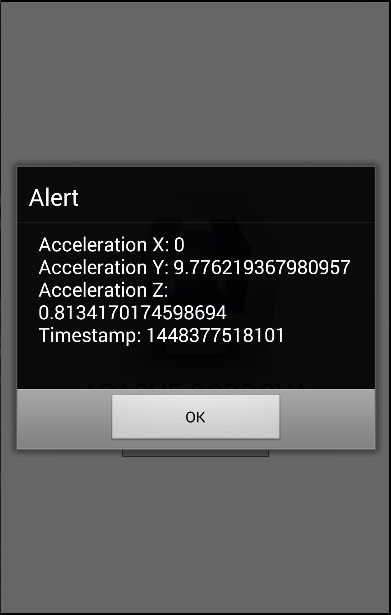
現在,如果我們按下獲取加速度按鈕,我們將獲得當前加速度值。如果我們按下監視加速度按鈕,警報將每三秒觸發一次。顯示第三個警報後,將呼叫clearWatch函式,並且我們不會再收到任何警報,因為我們將超時設定為 10000 毫秒。
廣告