
- BigQuery 教程
- BigQuery - 首頁
- BigQuery - 概述
- BigQuery - 初始設定
- BigQuery 與本地 SQL 引擎的比較
- BigQuery - Google Cloud Console
- BigQuery - Google Cloud 層次結構
- 什麼是 Dremel?
- 什麼是 BigQuery Studio?
- BigQuery - 資料集
- BigQuery - 表
- BigQuery - 檢視
- BigQuery - 建立表
- BigQuery - 基本模式設計
- BigQuery - 修改表
- BigQuery - 複製表
- 刪除和恢復表
- BigQuery - 填充表
- 標準 SQL 與傳統 SQL
- BigQuery - 編寫第一個查詢
- BigQuery - CRUD 操作
- 分割槽和叢集
- BigQuery - 資料型別
- BigQuery - 複雜資料型別
- BigQuery - STRUCT 資料型別
- BigQuery - ARRAY 資料型別
- BigQuery - JSON 資料型別
- BigQuery - 表元資料
- BigQuery - 使用者自定義函式
- 連線到外部資料來源
- 整合計劃查詢
- 整合 BigQuery API
- BigQuery - 整合 Airflow
- 整合連線的 Sheets
- 整合資料傳輸
- BigQuery - 物化檢視
- BigQuery - 角色和許可權
- BigQuery - 查詢最佳化
- BigQuery - BI 引擎
- 監控使用情況和效能
- BigQuery - 資料倉庫
- 挑戰和最佳實踐
- BigQuery 資源
- BigQuery - 快速指南
- BigQuery - 資源
- BigQuery - 討論
BigQuery - Google Cloud Console
由於 BigQuery 是一個基於雲的資料倉庫和查詢工具,因此可以透過Google Cloud Console隨時隨地訪問。與本地資料庫(例如PostgreSQL或MySQL)不同,Google 沒有為 BigQuery 建立應用程式。相反,BigQuery 存在於 Google Cloud Console 中的“雲端”。
Google Cloud Console:所有 GCP 應用程式的首頁
如果您已建立 Google 帳戶並關聯了 GCP 專案,則可以訪問 Google Cloud Console。
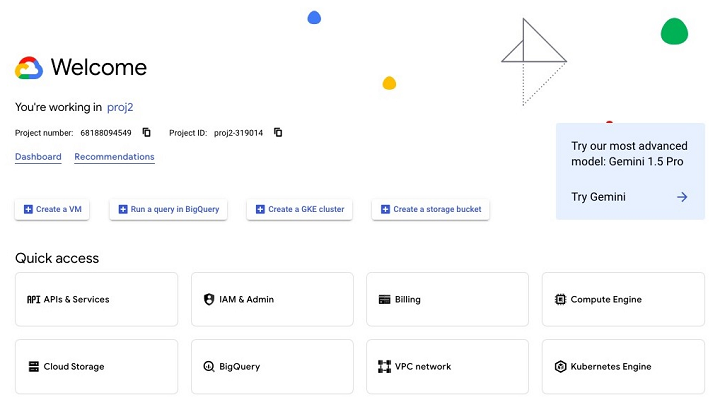
要導航到 BigQuery,您可以在搜尋欄中鍵入“BigQuery”,或從 Google Cloud Console 左側的彈出選單中選擇它,您可以在“分析”類別下找到它。
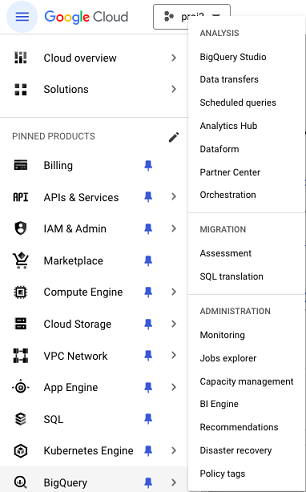
為了確保在本教程中始終可以訪問,建議您將其固定,以將“BigQuery”指定為您的環境中固定的產品。
透過控制檯,您可以訪問 BigQuery 的所有方面,包括:
- BigQuery Studio
- BigQuery API
- 與 BigQuery 相關的日誌和錯誤
- BigQuery 時隙使用的賬單
正如您會設定 IDE 以滿足您的舒適度和效率標準一樣,強烈建議您花時間自定義您的 Google Cloud Console 體驗,以便能夠快速可靠地訪問相關的 BigQuery 資源。
廣告