
- ArangoDB 教程
- ArangoDB - 首頁
- 多模型首選資料庫
- ArangoDB – 優勢
- 基本概念和術語
- ArangoDB – 系統需求
- ArangoDB – 命令列
- ArangoDB - Web 介面
- ArangoDB - 示例案例場景
- 資料模型和建模
- ArangoDB - 資料庫方法
- ArangoDB - CRUD 操作
- 使用 Web 介面進行 CRUD 操作
- 使用 AQL 查詢資料
- ArangoDB - AQL 示例查詢
- ArangoDB – 如何部署
- ArangoDB 有用資源
- ArangoDB - 快速指南
- ArangoDB - 有用資源
- ArangoDB - 討論
ArangoDB - 系統需求
在本章中,我們將討論 ArangoDB 的系統需求。
ArangoDB 的系統需求如下:
- 安裝了 Ubuntu 的 VPS 伺服器
- RAM:1 GB;CPU:2.2 GHz
在本教程中,所有命令都在一個 1GB RAM、一個 2.2 GHz 處理器速度的 Ubuntu 16.04 (xenial) 例項上測試。本教程中所有 arangosh 命令都針對 ArangoDB 3.1.27 版本進行了測試。
如何安裝 ArangoDB?
在本節中,我們將瞭解如何安裝 ArangoDB。ArangoDB 針對許多作業系統和發行版預構建。有關更多詳細資訊,請參閱 ArangoDB 文件。如前所述,在本教程中,我們將使用 Ubuntu 16.04x64。
第一步是下載其儲存庫的公鑰:
# wget https://www.arangodb.com/repositories/arangodb31/
xUbuntu_16.04/Release.key
輸出
--2017-09-03 12:13:24-- https://www.arangodb.com/repositories/arangodb31/xUbuntu_16.04/Release.key
Resolving https://www.arangodb.com/
(www.arangodb.com)... 104.25.1 64.21, 104.25.165.21,
2400:cb00:2048:1::6819:a415, ...
Connecting to https://www.arangodb.com/
(www.arangodb.com)|104.25. 164.21|:443... connected.
HTTP request sent, awaiting response... 200 OK
Length: 3924 (3.8K) [application/pgpkeys]
Saving to: ‘Release.key’
Release.key 100%[===================>] 3.83K - .-KB/s in 0.001s
2017-09-03 12:13:25 (2.61 MB/s) - ‘Release.key’ saved [39 24/3924]
重要的是,您應該看到輸出結束時儲存的 **Release.key**。
讓我們使用以下程式碼行安裝儲存的金鑰:
# sudo apt-key add Release.key
輸出
OK
執行以下命令以新增 apt 儲存庫並更新索引:
# sudo apt-add-repository 'deb
https://www.arangodb.com/repositories/arangodb31/xUbuntu_16.04/ /'
# sudo apt-get update
最後一步,我們可以安裝 ArangoDB:
# sudo apt-get install arangodb3
輸出
Reading package lists... Done
Building dependency tree
Reading state information... Done
The following package was automatically installed and is no longer required:
grub-pc-bin
Use 'sudo apt autoremove' to remove it.
The following NEW packages will be installed:
arangodb3
0 upgraded, 1 newly installed, 0 to remove and 17 not upgraded.
Need to get 55.6 MB of archives.
After this operation, 343 MB of additional disk space will be used.
按 **Enter**。現在 ArangoDB 的安裝過程將開始:
Get:1 https://www.arangodb.com/repositories/arangodb31/xUbuntu_16.04
arangodb3 3.1.27 [55.6 MB]
Fetched 55.6 MB in 59s (942 kB/s)
Preconfiguring packages ...
Selecting previously unselected package arangodb3.
(Reading database ... 54209 files and directories currently installed.)
Preparing to unpack .../arangodb3_3.1.27_amd64.deb ...

Unpacking arangodb3 (3.1.27) ...
Processing triggers for systemd (229-4ubuntu19) ...
Processing triggers for ureadahead (0.100.0-19) ...
Processing triggers for man-db (2.7.5-1) ...
Setting up arangodb3 (3.1.27) ...
Database files are up-to-date.
當 ArangoDB 的安裝即將完成時,將出現以下螢幕:
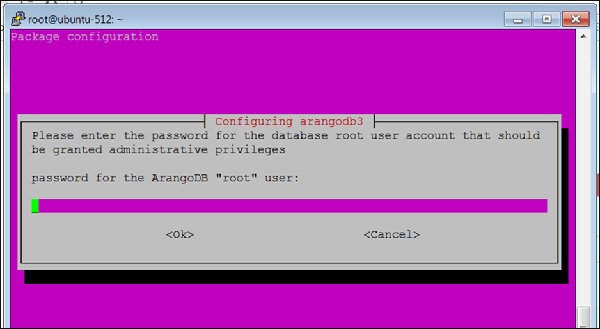
在這裡,系統將提示您為 ArangoDB **root** 使用者提供密碼。請仔細記下它。
當出現以下對話方塊時,選擇 **yes** 選項:
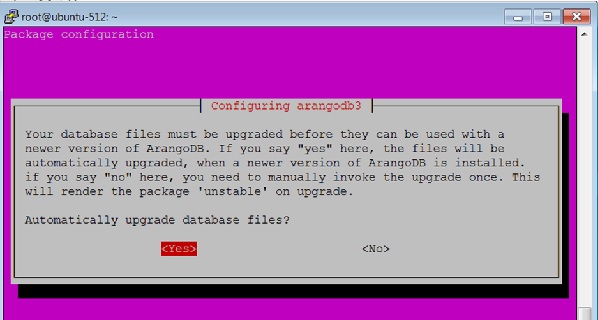
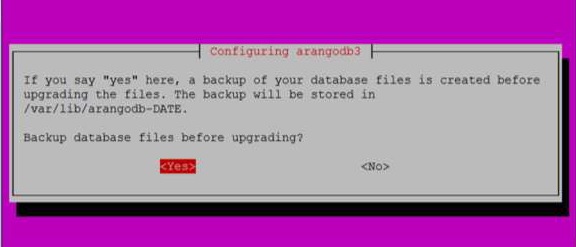
當您如上對話方塊中點選 **Yes** 時,將出現以下對話方塊。在此處點選 **Yes**。
您還可以使用以下命令檢查 ArangoDB 的狀態:
# sudo systemctl status arangodb3
輸出
arangodb3.service - LSB: arangodb
Loaded: loaded (/etc/init.d/arangodb3; bad; vendor pre set: enabled)
Active: active (running) since Mon 2017-09-04 05:42:35 UTC;
4min 46s ago
Docs: man:systemd-sysv-generator(8)
Process: 2642 ExecStart=/etc/init.d/arangodb3 start (code = exited,
status = 0/SUC
Tasks: 22
Memory: 158.6M
CPU: 3.117s
CGroup: /system.slice/arangodb3.service
├─2689 /usr/sbin/arangod --uid arangodb
--gid arangodb --pid-file /va
└─2690 /usr/sbin/arangod --uid arangodb
--gid arangodb --pid-file /va
Sep   04 05:42:33   ubuntu-512  systemd[1]:        Starting LSB:  arangodb...
Sep   04 05:42:33   ubuntu-512  arangodb3[2642]:  * Starting arango database server a
Sep   04 05:42:35   ubuntu-512  arangodb3[2642]:   {startup} starting up in daemon mode
Sep   04 05:42:35   ubuntu-512  arangodb3[2642]:   changed working directory for child
Sep   04 05:42:35   ubuntu-512  arangodb3[2642]:   ...done.
Sep   04 05:42:35   ubuntu-512  systemd[1]:        StartedLSB: arang odb.
Sep   04 05:46:59   ubuntu-512  systemd[1]:        Started LSB: arangodb. lines 1-19/19 (END)
ArangoDB 現在可以使用了。
要呼叫 arangosh 終端,請在終端中鍵入以下命令:
# arangosh
輸出
Please specify a password:
提供安裝時建立的 **root** 密碼:
_
__ _ _ __ __ _ _ __ __ _ ___ | |
/ | '__/ _ | ’ \ / ` |/ _ / | ’
| (| | | | (| | | | | (| | () _ \ | | |
_,|| _,|| ||_, |_/|/| ||
|__/
arangosh (ArangoDB 3.1.27 [linux] 64bit, using VPack 0.1.30, ICU 54.1, V8
5.0.71.39, OpenSSL 1.0.2g 1 Mar 2016)

Copyright (c) ArangoDB GmbH

Pretty printing values.
Connected to ArangoDB 'http+tcp://127.0.0.1:8529' version: 3.1.27 [server],
database: '_system', username: 'root'

Please note that a new minor version '3.2.2' is available
Type 'tutorial' for a tutorial or 'help' to see common examples
127.0.0.1:8529@_system> exit
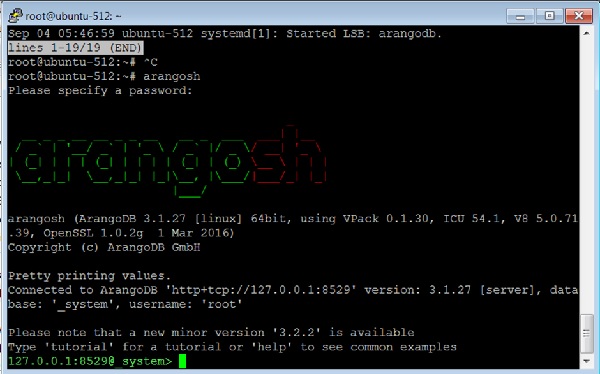
要退出 ArangoDB,請鍵入以下命令:
127.0.0.1:8529@_system> exit
輸出
Uf wiederluege! Na shledanou! Auf Wiedersehen! Bye Bye! Adiau! ¡Hasta luego!
Εις το επανιδείν!

להתראות ! Arrivederci! Tot ziens! Adjö! Au revoir! さようなら До свидания! Até
Breve! !خداحافظ
廣告