
- ArangoDB 教程
- ArangoDB - 首頁
- 多模型首選資料庫
- ArangoDB – 優勢
- 基本概念與術語
- ArangoDB – 系統需求
- ArangoDB – 命令列
- ArangoDB - Web 介面
- ArangoDB - 示例案例
- 資料模型與建模
- ArangoDB - 資料庫方法
- ArangoDB - 增刪改查操作
- 使用 Web 介面進行增刪改查操作
- 使用 AQL 查詢資料
- ArangoDB - AQL 示例查詢
- ArangoDB – 如何部署
- ArangoDB 有用資源
- ArangoDB - 快速指南
- ArangoDB - 有用資源
- ArangoDB - 討論
ArangoDB - 增刪改查操作
在本節中,我們將學習 Arangosh 的不同操作。
以下是 Arangosh 中可能的操作:
- 建立文件集合
- 建立文件
- 讀取文件
- 更新文件
讓我們從建立一個新的資料庫開始。我們將使用以下程式碼行建立一個新的資料庫:
127.0.0.1:8529@_system> db._createDatabase("song_collection")
true
以下程式碼行將幫助您切換到新的資料庫:
127.0.0.1:8529@_system> db._useDatabase("song_collection")
true
提示符將切換到“@@song_collection”
127.0.0.1:8529@song_collection>

從這裡我們將學習 CRUD 操作。讓我們在新的資料庫中建立一個集合:
127.0.0.1:8529@song_collection> db._createDocumentCollection('songs')
輸出
[ArangoCollection 4890, "songs" (type document, status loaded)]
127.0.0.1:8529@song_collection>
讓我們向我們的“songs”集合新增一些文件(JSON 物件)。
我們以以下方式新增第一個文件:
127.0.0.1:8529@song_collection> db.songs.save({title: "A Man's Best Friend",
lyricist: "Johnny Mercer", composer: "Johnny Mercer", Year: 1950, _key:
"A_Man"})
輸出
{
   "_id" : "songs/A_Man",
   "_key" : "A_Man",
   "_rev" : "_VjVClbW---"
}
讓我們向資料庫新增其他文件。這將幫助我們學習查詢資料的過程。您可以複製這些程式碼並將其貼上到 Arangosh 中以模擬該過程:
127.0.0.1:8529@song_collection> db.songs.save(
   {
      title: "Accentchuate The Politics",
      lyricist: "Johnny Mercer",
      composer: "Harold Arlen", Year: 1944,
      _key: "Accentchuate_The"
   }
)

{
   "_id" : "songs/Accentchuate_The",
   "_key" : "Accentchuate_The",
   "_rev" : "_VjVDnzO---"
}

127.0.0.1:8529@song_collection> db.songs.save(
   {
      title: "Affable Balding Me",
      lyricist: "Johnny Mercer",
      composer: "Robert Emmett Dolan",
      Year: 1950,
      _key: "Affable_Balding"
   }
)
{
   "_id" : "songs/Affable_Balding",
   "_key" : "Affable_Balding",
   "_rev" : "_VjVEFMm---"
}
如何讀取文件
可以使用_key或文件控制代碼來檢索文件。如果不需要遍歷集合本身,請使用文件控制代碼。如果您有集合,則文件函式易於使用:
127.0.0.1:8529@song_collection> db.songs.document("A_Man");
{
   "_key" : "A_Man",
   "_id" : "songs/A_Man",
   "_rev" : "_VjVClbW---",
   "title" : "A Man's Best Friend",
   "lyricist" : "Johnny Mercer",
   "composer" : "Johnny Mercer",
   "Year" : 1950
}
如何更新文件
有兩種選項可用於更新儲存的資料:replace和update。
update 函式修補文件,將其與給定的屬性合併。另一方面,replace 函式將用新文件替換以前的文件。即使提供了完全不同的屬性,替換仍然會發生。我們首先觀察一個非破壞性更新,更新歌曲中的“Production”屬性:
127.0.0.1:8529@song_collection> db.songs.update("songs/A_Man",{production:
"Top Banana"});
輸出
{
   "_id" : "songs/A_Man",
   "_key" : "A_Man",
   "_rev" : "_VjVOcqe---",
   "_oldRev" : "_VjVClbW---"
}
現在讓我們讀取更新後的歌曲屬性:
127.0.0.1:8529@song_collection> db.songs.document('A_Man');
輸出
{
   "_key" : "A_Man",
   "_id" : "songs/A_Man",
   "_rev" : "_VjVOcqe---",
   "title" : "A Man's Best Friend",
   "lyricist" : "Johnny Mercer",
   "composer" : "Johnny Mercer",
   "Year" : 1950,
   "production" : "Top Banana"
}
可以使用update函式輕鬆更新大型文件,尤其是在屬性很少的情況下。
相反,replace函式在與同一文件一起使用時將廢除您的資料。
127.0.0.1:8529@song_collection> db.songs.replace("songs/A_Man",{production:
"Top Banana"});
現在讓我們使用以下程式碼行檢查我們剛剛更新的歌曲:
127.0.0.1:8529@song_collection> db.songs.document('A_Man');
輸出
{
   "_key" : "A_Man",
   "_id" : "songs/A_Man",
   "_rev" : "_VjVRhOq---",
   "production" : "Top Banana"
}
現在,您可以觀察到文件不再具有原始資料。
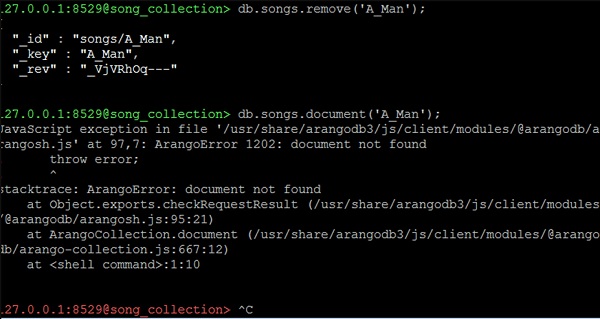
如何刪除文件
remove 函式與文件控制代碼結合使用以從集合中刪除文件:
127.0.0.1:8529@song_collection> db.songs.remove('A_Man');
現在讓我們使用以下程式碼行檢查我們剛剛刪除的歌曲屬性:
127.0.0.1:8529@song_collection> db.songs.document('A_Man');
我們將得到如下異常錯誤作為輸出:
JavaScript exception in file
'/usr/share/arangodb3/js/client/modules/@arangodb/arangosh.js' at 97,7:
ArangoError 1202: document not found
! throw error;
! ^
stacktrace: ArangoError: document not found

at Object.exports.checkRequestResult
(/usr/share/arangodb3/js/client/modules/@arangodb/arangosh.js:95:21)

at ArangoCollection.document
(/usr/share/arangodb3/js/client/modules/@arangodb/arango-collection.js:667:12)
at <shell command>:1:10
廣告