
- WebdriverIO 教程
- WebdriverIO - 首頁
- WebdriverIO - 簡介
- WebdriverIO - 預備條件
- WebdriverIO - 架構
- WebdriverIO - NodeJS 入門
- WebdriverIO - NPM 安裝
- WebdriverIO - VS Code 安裝
- WebdriverIO - package.json
- WebdriverIO - Mocha 安裝
- Selenium 獨立伺服器安裝
- WebdriverIO - 配置檔案生成
- WebdriverIO - VS Code 智慧感知
- WebdriverIO - wdio.conf.js 檔案
- WebdriverIO - XPath 定位器
- WebdriverIO - CSS 定位器
- WebdriverIO - 連結文字定位器
- WebdriverIO - ID 定位器
- WebdriverIO - 標籤名定位器
- WebdriverIO - 類名定位器
- WebdriverIO - 名稱定位器
- 斷言的 Expect 語句
- WebdriverIO - 順利執行流程
- WebdriverIO - 常用瀏覽器命令
- WebdriverIO - 處理瀏覽器大小
- WebdriverIO - 瀏覽器導航命令
- 處理複選框和下拉選單
- WebdriverIO - 滑鼠操作
- 處理子視窗/彈出視窗
- WebdriverIO - 隱藏元素
- WebdriverIO - 框架
- WebdriverIO - 拖放
- WebdriverIO - 雙擊
- WebdriverIO - Cookie
- WebdriverIO - 處理單選按鈕
- Web元素上的 Chai 斷言
- WebdriverIO - 多個視窗/標籤頁
- WebdriverIO - 滾動操作
- WebdriverIO - 警報
- WebdriverIO - 除錯程式碼
- WebdriverIO - 捕獲螢幕截圖
- WebdriverIO - JavaScript 執行器
- WebdriverIO - 等待
- WebdriverIO - 並行執行測試
- WebdriverIO - 資料驅動測試
- 從命令列引數執行測試
- 使用 Mocha 選項執行測試
- 從 Allure 生成 HTML 報告
- WebdriverIO 有用資源
- WebdriverIO - 快速指南
- WebdriverIO - 有用資源
- WebdriverIO - 討論
WebdriverIO - 順利執行流程
讓我們建立一個簡單的順利執行流程來演示如何建立一個基本的 WebdriverIO 測試:
步驟 1 - 安裝 NodeJS。如何在執行此安裝的詳細資訊在標題為“NodeJS 入門”的章節中詳細介紹。
步驟 2 - 安裝 NPM。如何在執行此安裝的詳細資訊在標題為“NPM 安裝”的章節中詳細介紹。
步驟 3 - 安裝 VS Code。如何在執行此安裝的詳細資訊在標題為“VS Code 安裝”的章節中詳細介紹。
步驟 4 - 建立配置檔案。如何在執行此安裝的詳細資訊在標題為“配置檔案生成”的章節中詳細介紹。
步驟 5 - 建立一個規範檔案。如何在執行此安裝的詳細資訊在標題為“Mocha 安裝”的章節中詳細介紹。
步驟 6 - 在建立的 Mocha 規範檔案中新增以下程式碼。
// test suite name
describe('Tutorialspoint application', function(){
   //test case
   it('Happy Flow', function(){
      // launch url
      browser.url('https://tutorialspoint.tw/about/about_careers.htm')
      //identify element with link text then click
      $("=Team").click()
      //verify URL of next page with assertion
      expect(browser).toHaveUrlContaining('team')
   });
});
步驟 7 - 使用以下命令執行配置檔案 - wdio.conf.js 檔案:
npx wdio run wdio.conf.js
如何在建立配置檔案的詳細資訊在標題為“wdio.conf.js 檔案”和標題為“配置檔案生成”的章節中詳細討論。
您的計算機上將出現以下螢幕:
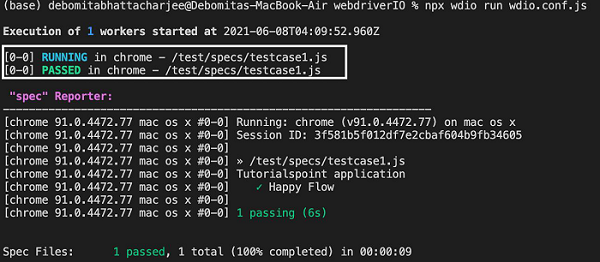
步驟 8 - 進一步調查輸出後,我們將看到規範檔案 testcase1.js 中的測試標記為 PASSED。
測試執行的瀏覽器版本和作業系統、會話 ID、規範檔案名、測試套件名稱 - Tutorialspoint 應用程式、測試用例名稱 - 順利執行流程、測試執行持續時間等,也已記錄在控制檯中。
廣告