
vlcj - 播放影片
VLC 播放器發現
vlcj 類庫提供了一個類,用於使用以下語法自動發現系統中已安裝的 VLC 播放器。
EmbeddedMediaPlayerComponent mediaPlayerComponent = = new EmbeddedMediaPlayerComponent();
載入影片
現在,我們可以使用以下語法輕鬆地使用媒體在我們的應用程式中載入影片。
mediaPlayerComponent.mediaPlayer().media().startPaused(path);
播放影片
現在,我們可以使用以下語法輕鬆地使用控制元件在我們的應用程式中播放影片。
mediaPlayerComponent.mediaPlayer().controls().play();
示例
在 Eclipse 中,開啟 環境設定 章節中建立的 mediaPlayer 專案。
使用以下程式碼更新 App.java。
App.java
package com.tutorialspoint.media;

import java.awt.BorderLayout;
import java.awt.event.ActionEvent;
import java.awt.event.ActionListener;
import java.awt.event.WindowAdapter;
import java.awt.event.WindowEvent;

import javax.swing.JButton;
import javax.swing.JFrame;
import javax.swing.JPanel;
import javax.swing.UIManager;

import uk.co.caprica.vlcj.player.component.EmbeddedMediaPlayerComponent;

public class App extends JFrame {
   private static final long serialVersionUID = 1L;
   private static final String TITLE = "My First Media Player";
   private static final String VIDEO_PATH = "D:\\Downloads\\sunset-beach.mp4";
   private final EmbeddedMediaPlayerComponent mediaPlayerComponent;
   private JButton playButton;

   public App(String title) {
      super(title);
      mediaPlayerComponent = new EmbeddedMediaPlayerComponent();
   }
   public void initialize() {
      this.setBounds(100, 100, 600, 400);
      this.setDefaultCloseOperation(JFrame.EXIT_ON_CLOSE);
      this.addWindowListener(new WindowAdapter() {
         @Override
         public void windowClosing(WindowEvent e) {
            mediaPlayerComponent.release();
            System.exit(0);
         }
      });
      JPanel contentPane = new JPanel();
      contentPane.setLayout(new BorderLayout());
      contentPane.add(mediaPlayerComponent, BorderLayout.CENTER);

      JPanel controlsPane = new JPanel();
      playButton = new JButton("Play");
      controlsPane.add(playButton);
      contentPane.add(controlsPane, BorderLayout.SOUTH);
      playButton.addActionListener(new ActionListener() {
         public void actionPerformed(ActionEvent e) {
            mediaPlayerComponent.mediaPlayer().controls().play();
         }
      });
      this.setContentPane(contentPane);
      this.setVisible(true);
   }
   public void loadVideo(String path) {
      mediaPlayerComponent.mediaPlayer().media().startPaused(path);
   }
   public static void main( String[] args ){
      try {
         UIManager.setLookAndFeel(
         UIManager.getSystemLookAndFeelClassName());
      }
      catch (Exception e) {
         System.out.println(e);
      }
      App application = new App(TITLE);
      application.initialize();
      application.setVisible(true);
      application.loadVideo(VIDEO_PATH);
   }
}
右鍵單擊檔案並選擇以 Java 應用程式身份執行,從而執行應用程式。如果一切正常,在成功啟動後,它應顯示以下結果。
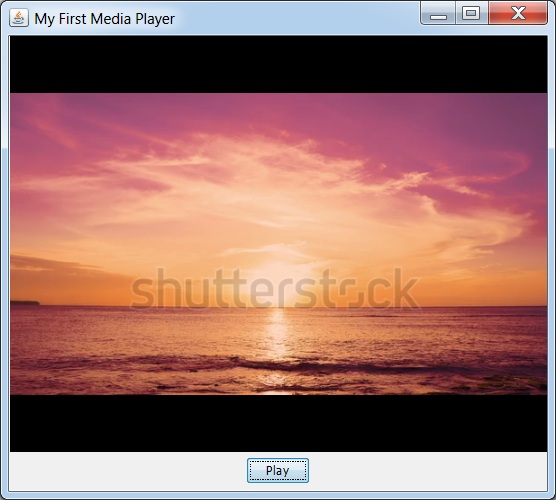
點選播放按鈕,影片將開始播放。
廣告