
vlcj - 暫停影片
我們進一步改進應用程式,其中我們將 `vlcj 播放影片` 章節更新為可暫停影片功能。
暫停影片
現在,我們可以輕鬆使用以下語法在應用程式中暫停影片:−
mediaPlayerComponent.mediaPlayer().controls().pause();
示例
在 Eclipse 中開啟 `環境設定` 章節中建立的 mediaPlayer 專案。
使用以下程式碼更新 App.java−
App.java
package com.tutorialspoint.media;

import java.awt.BorderLayout;
import java.awt.event.ActionEvent;
import java.awt.event.ActionListener;
import java.awt.event.WindowAdapter;
import java.awt.event.WindowEvent;
import javax.swing.JButton;
import javax.swing.JFrame;
import javax.swing.JPanel;
import javax.swing.UIManager;
import uk.co.caprica.vlcj.player.component.EmbeddedMediaPlayerComponent;

public class App extends JFrame {
   private static final long serialVersionUID = 1L;
   private static final String TITLE = "My First Media Player";
   private static final String VIDEO_PATH = "D:\\Downloads\\sunset-beach.mp4";
   private final EmbeddedMediaPlayerComponent mediaPlayerComponent;
   private JButton playButton;
   private JButton pauseButton;

   public App(String title) {
      super(title);
      mediaPlayerComponent = new EmbeddedMediaPlayerComponent();
   }
   public void initialize() {
      this.setBounds(100, 100, 600, 400);
      this.setDefaultCloseOperation(JFrame.EXIT_ON_CLOSE);
      this.addWindowListener(new WindowAdapter() {
         @Override
         public void windowClosing(WindowEvent e) {
            mediaPlayerComponent.release();
            System.exit(0);
         }
      });
      JPanel contentPane = new JPanel();
      contentPane.setLayout(new BorderLayout());
      contentPane.add(mediaPlayerComponent, BorderLayout.CENTER);
      JPanel controlsPane = new JPanel();
      playButton = new JButton("Play");
      controlsPane.add(playButton);
      pauseButton = new JButton("Pause");
      controlsPane.add(pauseButton);
      contentPane.add(controlsPane, BorderLayout.SOUTH);
      playButton.addActionListener(new ActionListener() {
         public void actionPerformed(ActionEvent e) {
            mediaPlayerComponent.mediaPlayer().controls().play();
         }
      });
      pauseButton.addActionListener(new ActionListener() {
         public void actionPerformed(ActionEvent e) {
            mediaPlayerComponent.mediaPlayer().controls().pause();
         }
      });
      this.setContentPane(contentPane);
      this.setVisible(true);
   }
   public void loadVideo(String path) {
      mediaPlayerComponent.mediaPlayer().media().startPaused(path);
   }
   public static void main( String[] args ){
      try {
         UIManager.setLookAndFeel(
         UIManager.getSystemLookAndFeelClassName());
      }
      catch (Exception e) {
         System.out.println(e);
      }
      App application = new App(TITLE);
      application.initialize();
      application.setVisible(true);
      application.loadVideo(VIDEO_PATH);
   }
}
右鍵單擊該檔案並選擇 “以 Java 應用程式執行” 來執行該應用程式。如果一切正常,則成功啟動後應顯示以下結果:−
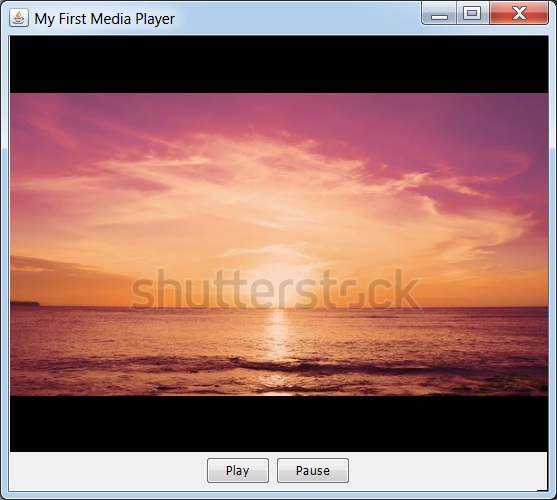
單擊播放按鈕,影片將開始播放,然後單擊暫停按鈕。現在影片將被暫停。
廣告