- Spring MVC 基礎
- Spring MVC - 首頁
- Spring MVC - 概述
- Spring MVC - 環境搭建
- Spring MVC - HelloWorld 示例
- Spring MVC - 表單處理
- Spring MVC - 表單處理
- Spring MVC - 頁面重定向
- Spring MVC - 靜態頁面
- Spring MVC - 表單標籤庫
- Spring MVC - 文字框
- Spring MVC - 密碼框
- Spring MVC - 文字區域
- Spring MVC - 複選框
- Spring MVC - 多個複選框
- Spring MVC - 單選按鈕
- Spring MVC - 多個單選按鈕
- Spring MVC - 下拉列表
- Spring MVC - 列表框
- Spring MVC - 隱藏域
- Spring MVC - 錯誤處理
- Spring MVC - 檔案上傳
- Spring MVC - 處理器對映
- Bean名稱URL處理器對映
- 控制器類名處理器對映
- 簡單URL處理器對映
- Spring MVC - 控制器
- Spring MVC - 多動作控制器
- 屬性方法名解析器
- 引數方法名解析器
- 可引數化檢視控制器
- Spring MVC - 檢視解析器
- 內部資源檢視解析器
- Spring MVC - Xml檢視解析器
- 資源束檢視解析器
- 多個解析器對映
- Spring MVC - 整合
- Spring MVC - Hibernate Validator
- Spring MVC - 生成RSS Feed
- Spring MVC - 生成XML
- Spring MVC - 生成JSON
- Spring MVC - 生成Excel
- Spring MVC - 生成PDF
- Spring MVC - 使用log4j
- Spring 常見問題解答
- Spring - 常見問題解答
- Spring 有用資源
- Spring MVC - 快速指南
- Spring MVC - 有用資源
- Spring MVC - 討論
Spring MVC - 錯誤處理示例
以下示例展示瞭如何在Spring Web MVC框架中使用錯誤處理和驗證器處理表單。首先,我們需要一個可用的Eclipse IDE,並按照以下步驟開發一個基於Spring Web框架的動態表單Web應用程式。
| 步驟 | 描述 |
|---|---|
| 1 | 建立一個名為HelloWeb的專案,包名為com.tutorialspoint,具體步驟請參考Spring MVC - HelloWorld章節。 |
| 2 | 在com.tutorialspoint包下建立Java類Student,StudentController和StudentValidator。 |
| 3 | 在jsp子資料夾下建立檢視檔案addStudent.jsp和result.jsp。 |
| 4 | 最後一步是建立原始碼和配置檔案的內容,並匯出應用程式,具體說明如下。 |
Student.java
package com.tutorialspoint;

public class Student {
   private Integer age;
   private String name;
   private Integer id;

   public void setAge(Integer age) {
      this.age = age;
   }
   public Integer getAge() {
      return age;
   }

   public void setName(String name) {
      this.name = name;
   }
   public String getName() {
      return name;
   }

   public void setId(Integer id) {
      this.id = id;
   }
   public Integer getId() {
      return id;
   }
}
StudentValidator.java
package com.tutorialspoint;

import org.springframework.validation.Errors;
import org.springframework.validation.ValidationUtils;
import org.springframework.validation.Validator;

public class StudentValidator implements Validator {

   @Override
   public boolean supports(Class<?> clazz) {
      return Student.class.isAssignableFrom(clazz);
   }

   @Override
   public void validate(Object target, Errors errors) {
      ValidationUtils.rejectIfEmptyOrWhitespace(errors,
         "name", "required.name","Field name is required.");
   }
}
StudentController.java
package com.tutorialspoint;

import org.springframework.beans.factory.annotation.Autowired;
import org.springframework.beans.factory.annotation.Qualifier;
import org.springframework.stereotype.Controller;
import org.springframework.ui.Model;
import org.springframework.validation.BindingResult;
import org.springframework.validation.Validator;
import org.springframework.validation.annotation.Validated;
import org.springframework.web.bind.WebDataBinder;
import org.springframework.web.bind.annotation.InitBinder;
import org.springframework.web.bind.annotation.ModelAttribute;
import org.springframework.web.bind.annotation.RequestMapping;
import org.springframework.web.bind.annotation.RequestMethod;
import org.springframework.web.servlet.ModelAndView;

@Controller
public class StudentController {

   @Autowired
   @Qualifier("studentValidator")
   private Validator validator;

   @InitBinder
   private void initBinder(WebDataBinder binder) {
      binder.setValidator(validator);
   }

   @RequestMapping(value = "/addStudent", method = RequestMethod.GET)
   public ModelAndView student() {
      return new ModelAndView("addStudent", "command", new Student());
   }

   @ModelAttribute("student")
   public Student createStudentModel() {
      return new Student();
   }

   @RequestMapping(value = "/addStudent", method = RequestMethod.POST)
   public String addStudent(@ModelAttribute("student") @Validated Student student,
      BindingResult bindingResult, Model model) {

      if (bindingResult.hasErrors()) {
         return "addStudent";
      }
      model.addAttribute("name", student.getName());
      model.addAttribute("age", student.getAge());
      model.addAttribute("id", student.getId());

      return "result";
   }
}
HelloWeb-servlet.xml
<beans xmlns = "http://www.springframework.org/schema/beans"
   xmlns:context = "http://www.springframework.org/schema/context"
   xmlns:xsi = "http://www.w3.org/2001/XMLSchema-instance"
   xsi:schemaLocation = "
   http://www.springframework.org/schema/beans
   http://www.springframework.org/schema/beans/spring-beans-3.0.xsd
   http://www.springframework.org/schema/context
   http://www.springframework.org/schema/context/spring-context-3.0.xsd">

   <context:component-scan base-package = "com.tutorialspoint" />

   <bean class = "org.springframework.web.servlet.view.InternalResourceViewResolver">
      <property name = "prefix" value = "/WEB-INF/jsp/" />
      <property name = "suffix" value = ".jsp" />
   </bean>

   <bean id = "studentValidator" class = "com.tutorialspoint.StudentValidator" />
</beans>
這裡,對於第一個服務方法**student()**,我們在ModelAndView物件中傳遞了一個空的Student物件,名稱為“command”,因為如果您在JSP檔案中使用<form:form>標籤,Spring框架期望一個名為“command”的物件。因此,當呼叫student()方法時,它會返回**addStudent.jsp**檢視。
第二個服務方法**addStudent()**將針對**HelloWeb/addStudent** URL上的POST方法呼叫。您將根據提交的資訊準備模型物件。最後,服務方法將返回“result”檢視,這將導致渲染result.jsp。如果使用驗證器生成錯誤,則返回相同的檢視“addStudent”,Spring會自動將錯誤訊息從**BindingResult**注入檢視中。
addStudent.jsp
<%@taglib uri = "http://www.springframework.org/tags/form" prefix = "form"%>
<html>
   <head>
      <title>Spring MVC Form Handling</title>
   </head>
   <style>
      .error {
         color: #ff0000;
      }

      .errorblock {
         color: #000;
         background-color: #ffEEEE;
         border: 3px solid #ff0000;
         padding: 8px;
         margin: 16px;
      }
   </style>

   <body>
      <h2>Student Information</h2>
      <form:form method = "POST" action = "/HelloWeb/addStudent" commandName = "student">
      <form:errors path = "*" cssClass = "errorblock" element = "div" />
         <table>
            <tr>
               <td><form:label path = "name">Name</form:label></td>
               <td><form:input path = "name" /></td>
               <td><form:errors path = "name" cssClass = "error" /></td>
            </tr>
            <tr>
               <td><form:label path = "age">Age</form:label></td>
               <td><form:input path = "age" /></td>
            </tr>
            <tr>
               <td><form:label path = "id">id</form:label></td>
               <td><form:input path = "id" /></td>
            </tr>
            <tr>
               <td colspan = "2">
               <input type = "submit" value = "Submit"/>
               </td>
            </tr>
         </table>
      </form:form>
   </body>
</html>
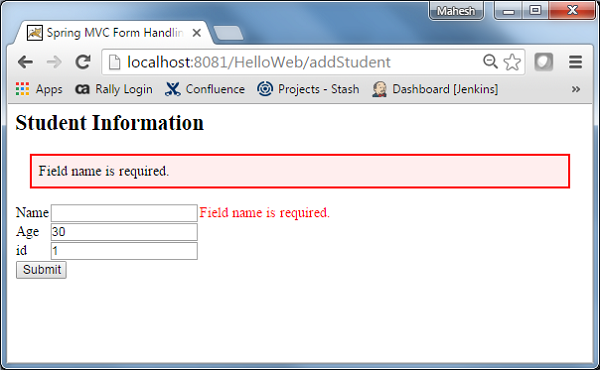
這裡我們使用**<form:errors />**標籤,path="*"屬性來渲染錯誤訊息。例如
<form:errors path = "*" cssClass = "errorblock" element = "div" />
它將渲染所有輸入驗證的錯誤訊息。
我們使用**<form:errors />**標籤,path="name"屬性來渲染name欄位的錯誤訊息。例如
<form:errors path = "name" cssClass = "error" />
它將渲染name欄位驗證的錯誤訊息。
result.jsp
<%@taglib uri = "http://www.springframework.org/tags/form" prefix = "form"%>
<html>
   <head>
      <title>Spring MVC Form Handling</title>
   </head>
   <body>

      <h2>Submitted Student Information</h2>
      <table>
         <tr>
            <td>Name</td>
            <td>${name}</td>
         </tr>
         <tr>
            <td>Age</td>
            <td>${age}</td>
         </tr>
         <tr>
           <td>ID</td>
           <td>${id}</td>
         </tr>
      </table>
   </body>
</html>
建立完原始碼和配置檔案後,匯出應用程式。右鍵單擊應用程式,使用**匯出→WAR檔案**選項,並將**HelloWeb.war**檔案儲存到Tomcat的webapps資料夾中。
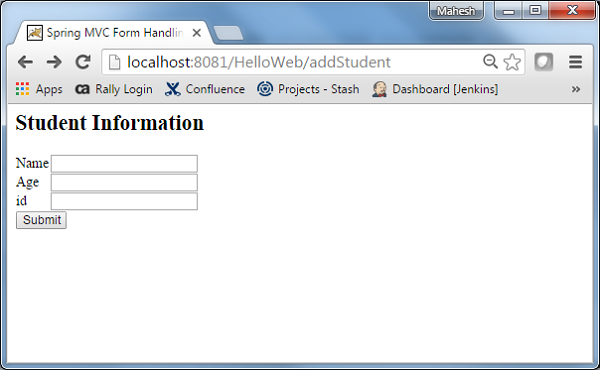
現在,啟動Tomcat伺服器,並確保您可以使用標準瀏覽器訪問webapps資料夾中的其他網頁。嘗試URL - **https://:8080/HelloWeb/addStudent**,如果Spring Web應用程式一切正常,您將看到以下螢幕。
提交所需資訊後,單擊提交按鈕提交表單。如果Spring Web應用程式一切正常,您將看到以下螢幕。