
- Spring Security 教程
- Spring Security - 首頁
- Spring Security - 簡介
- Spring Security - 架構
- Spring Security - 專案模組
- Spring Security - 環境搭建
- Spring Security - 表單登入
- Spring Security - 自定義表單登入
- Spring Security - 登出
- Spring Security - 記住我
- Spring Security - 重定向
- Spring Security - 標籤庫
- Spring Security - XML 配置
- Spring Security - 認證提供程式
- Spring Security - 基本認證
- Spring Security - AuthenticationFailureHandler
- Spring Security - JWT
- Spring Security - 獲取使用者資訊
- Spring Security - Maven
- Spring Security - 預設密碼編碼器
- Spring Security – 密碼編碼
- Spring Security - 方法級別
- Spring Security 有用資源
- Spring Security - 快速指南
- Spring Security - 有用資源
- Spring Security - 討論
Spring Security - 密碼編碼
在 Spring Security 5 之前,開發人員可以使用記憶體中的密碼作為明文,但是隨著 Spring Security 中密碼相關增強功能的出現,現在 Spring Security 不支援明文密碼。如果我們確實需要故意實現它,則需要使用 '{noop}' 作為字首。請考慮以下安全配置。
@Bean
protected UserDetailsService userDetailsService() {
   UserDetails user = User.builder()
      .username("user")
      .password("{noop}user123") // password stored as plain text
      .roles("USER")
      .build();
   UserDetails admin = User.builder()
      .username("admin")
      .password("{noop}admin123")
      .roles("USER", "ADMIN") // password stored as plain text
      .build();
   return new InMemoryUserDetailsManager(user, admin);
}
在這裡,Spring Security 使用 NoOpPasswordEncoder 作為預設密碼編碼器來驗證配置的使用者。但是,這種方法不建議用於生產環境,因為 NoOpPasswordEncoder 已棄用且不安全。
使用密碼編碼器
始終建議使用良好的密碼編碼器來加密記憶體中的密碼。BCryptPasswordEncoder 就是這樣一個內建的密碼編碼器,它將密碼以 BCrypt 編碼格式儲存在記憶體中。
@Bean
protected UserDetailsService userDetailsService() {
   UserDetails user = User.builder()
      .username("user")
      .password(passwordEncoder().encode("user123")) // encode the password
      .roles("USER")
      .build();
   UserDetails admin = User.builder()
      .username("admin")
      .password(passwordEncoder().encode("admin123")) // encode the password
      .roles("USER", "ADMIN")
      .build();
   return new InMemoryUserDetailsManager(user, admin);
}

// Create a new Password Encoder
@Bean
protected PasswordEncoder passwordEncoder() {
   return new BCryptPasswordEncoder();
}
對於永續性密碼儲存,我們應該使用密碼編碼器對密碼進行編碼,然後將其儲存在資料庫中。BCryptPasswordEncoder 使用隨機鹽並建立長度為 60 的編碼密碼。以下是 BCrypt 編碼密碼的示例
$2a$10$acaXGauv/3buNdwQWeOgu.iab3LLDclrH64xVMsSxd9Lp/otgUfMm
這裡每個欄位都用 $ 符號分隔。以下是每個欄位的詳細資訊。
2a - 表示編碼演算法為 bcrypt
10 - 表示演算法的強度
前 22 個字元 - 鹽
其餘 31 個字元 - 明文密碼的雜湊版本
讓我們開始使用 Spring Security 進行實際程式設計。在開始使用 Spring 框架編寫示例之前,您必須確保已正確設定 Spring 環境,如Spring Security - 環境搭建章節中所述。我們還假設您對 Spring Tool Suite IDE 有些瞭解。
現在讓我們繼續編寫一個基於 Spring MVC 的應用程式,該應用程式由 Maven 管理,它將要求使用者登入,對使用者進行身份驗證,然後使用 Spring Security 表單登入功能提供登出選項。
使用 Spring Initializr 建立專案
Spring Initializr 是開始 Spring Boot 專案的好方法。它提供了一個易於使用的使用者介面來建立專案、新增依賴項、選擇 Java 執行時等。它生成一個骨架專案結構,下載後可以在 Spring Tool Suite 中匯入,然後我們可以繼續使用現成的專案結構。
我們選擇一個 Maven 專案,將專案命名為 formlogin,Java 版本為 21。新增以下依賴項:
Spring Web
Spring Security
Spring Boot DevTools
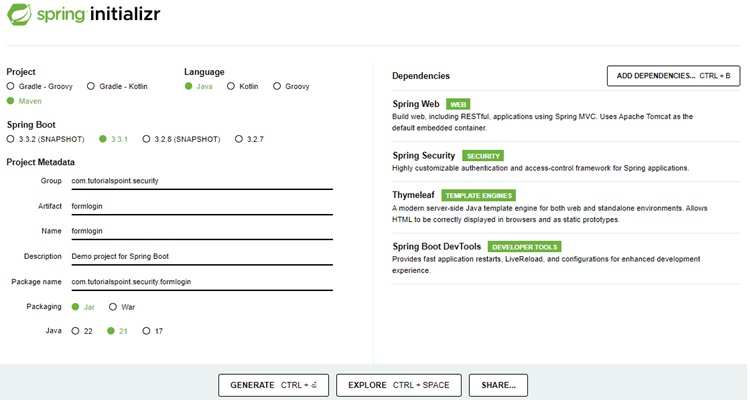
Thymeleaf 是 Java 的模板引擎。它允許我們快速開發靜態或動態網頁以在瀏覽器中呈現。它具有極高的可擴充套件性,允許我們詳細定義和自定義模板的處理過程。此外,我們可以點選此連結瞭解更多關於 Thymeleaf 的資訊。
讓我們繼續生成我們的專案並下載它。然後我們將其解壓縮到我們選擇的資料夾中,並使用任何 IDE 開啟它。我將使用Spring Tools Suite 4。它可以從https://springframework.tw/tools網站免費下載,並針對 Spring 應用程式進行了最佳化。
包含所有相關依賴項的 pom.xml
讓我們看看我們的 pom.xml 檔案。它應該看起來與此類似:
pom.xml
<?xml version="1.0" encoding="UTF-8"?>
<project xmlns="http://maven.apache.org/POM/4.0.0" xmlns:xsi="http://www.w3.org/2001/XMLSchema-instance"
xsi:schemaLocation="http://maven.apache.org/POM/4.0.0 https://maven.apache.org/xsd/maven-4.0.0.xsd">
   <modelVersion>4.0.0</modelVersion>
   <parent>
      <groupId>org.springframework.boot</groupId>
      <artifactId>spring-boot-starter-parent</artifactId>
      <version>3.3.1</version>
      <relativePath/> <!-- lookup parent from repository -->
   </parent>
   <groupId>com.tutorialspoint.security</groupId>
   <artifactId>formlogin</artifactId>
   <version>0.0.1-SNAPSHOT</version>
   <name>formlogin</name>
   <description>Demo project for Spring Boot</description>
   <url/>
   <licenses>
      <license/>
   </licenses>
   <developers>
      <developer/>
   </developers>
   <scm>
      <connection/>
      <developerConnection/>
      <tag/>
      <url/>
   </scm>
   <properties>
      <java.version>21</java.version>
   </properties>
   <dependencies>
      <dependency>
         <groupId>org.springframework.boot</groupId>
         <artifactId>spring-boot-starter-security</artifactId>
      </dependency>
      <dependency>
         <groupId>org.springframework.boot</groupId>
         <artifactId>spring-boot-starter-thymeleaf</artifactId>
      </dependency>
      <dependency>
         <groupId>org.springframework.boot</groupId>
         <artifactId>spring-boot-starter-web</artifactId>
      </dependency>
      <dependency>
         <groupId>org.thymeleaf.extras</groupId>
         <artifactId>thymeleaf-extras-springsecurity6</artifactId>
      </dependency>
      <dependency>
         <groupId>org.springframework.boot</groupId>
         <artifactId>spring-boot-devtools</artifactId>
         <scope>runtime</scope>
         <optional>true</optional>
      </dependency>
      <dependency>
         <groupId>org.springframework.boot</groupId>
         <artifactId>spring-boot-starter-test</artifactId>
         <scope>test</scope>
      </dependency>
      <dependency>
         <groupId>org.springframework.security</groupId>
         <artifactId>spring-security-test</artifactId>
         <scope>test</scope>
      </dependency>
   </dependencies>
   <build>
      <plugins>
         <plugin>
            <groupId>org.springframework.boot</groupId>
            <artifactId>spring-boot-maven-plugin</artifactId>
         </plugin>
      </plugins>
   </build>
</project>
Spring Security 配置類
在我們的 config 包中,我們建立了 WebSecurityConfig 類。我們將使用此類進行我們的安全配置,因此讓我們用 @Configuration 註解和 @EnableWebSecurity 註解它。結果,Spring Security 知道將此類視為配置類。正如我們所看到的,Spring 使配置應用程式變得非常容易。
WebSecurityConfig
package com.tutorialspoint.security.formlogin.config;

import org.springframework.context.annotation.Bean;
import org.springframework.context.annotation.Configuration;
import org.springframework.security.config.annotation.web.builders.HttpSecurity;
import org.springframework.security.config.annotation.web.configuration.EnableWebSecurity;
import org.springframework.security.config.annotation.web.configurers.AbstractHttpConfigurer;
import org.springframework.security.core.userdetails.User;
import org.springframework.security.core.userdetails.UserDetails;
import org.springframework.security.core.userdetails.UserDetailsService;
import org.springframework.security.crypto.bcrypt.BCryptPasswordEncoder;
import org.springframework.security.crypto.password.PasswordEncoder;
import org.springframework.security.provisioning.InMemoryUserDetailsManager;
import org.springframework.security.web.SecurityFilterChain;

@Configuration
@EnableWebSecurity
public class WebSecurityConfig  {

   @Bean
   protected UserDetailsService userDetailsService() {
      UserDetails user = User.builder()
         .username("user")
         .password(passwordEncoder().encode("user123")) // encode the password
         .roles("USER")
         .build();
      UserDetails admin = User.builder()
         .username("admin")
         .password(passwordEncoder().encode("admin123")) // encode the password
         .roles("USER", "ADMIN")
         .build();
      // print the encoded password
      System.out.println("Encoded Password for User: " + user.getPassword());
      return new InMemoryUserDetailsManager(user, admin);
   }

   // Password Encoder
   @Bean
   protected PasswordEncoder passwordEncoder() {
      return new BCryptPasswordEncoder();
   }

   // Security Configuration
   @Bean
   protected SecurityFilterChain filterChain(HttpSecurity http) throws Exception {
      return http
         .csrf(AbstractHttpConfigurer::disable)
         .authorizeHttpRequests(
            request -> request.requestMatchers("/login").permitAll()
            .requestMatchers("/**").authenticated()
         )
         .formLogin(form -> form.loginPage("/login")
            .defaultSuccessUrl("/")
            .failureUrl("/login?error=true")
            .permitAll())
         .rememberMe(config -> config.key("123456")
         .tokenValiditySeconds(3600))
         .logout(config -> config
            .logoutUrl("/logout")
            .logoutSuccessUrl("/login")
			.invalidateHttpSession(true)
            .deleteCookies("JSESSIONID"))
         .build();
   }
}
控制器類
在這個類中,我們為 "/" 端點和 "/login" 端點建立了一個對映,用於此應用程式的首頁和登入頁。
AuthController.java
package com.tutorialspoint.security.formlogin.controllers;

import org.springframework.stereotype.Controller;
import org.springframework.web.bind.annotation.GetMapping;

@Controller
public class AuthController {
   @GetMapping("/")
   public String home() {
      return "index";
   }
   @GetMapping("/login")
   public String login() {
      return "login";
   }
}
檢視
讓我們在/src/main/resources/templates資料夾中建立 index.html,其內容如下,作為主頁並顯示登入使用者名稱。
index.html
<!DOCTYPE html>
<html xmlns="http://www.w3.org/1999/xhtml"
   xmlns:th="https://www.thymeleaf.org"
   xmlns:sec="https://www.thymeleaf.org/thymeleaf-extras-springsecurity3">
   <head>
      <title>
         Hello World!
      </title>
   </head>
   <body>
      <h1 th:inline="text">Hello <span sec:authentication="name"></span>!</h1>
      <form th:action="@{/logout}" method="post">
         <input type="submit" value="Sign Out"/>
      </form>
   </body>
<html>
login.html
讓我們在/src/main/resources/templates資料夾中建立 login.html,其內容如下,作為登入頁。我們使用預設名稱username、password和remember-me作為文字欄位。如果名稱不同,我們也需要在 Spring Security 配置類中設定相同的名稱。
<!DOCTYPE html>
<html xmlns="http://www.w3.org/1999/xhtml"
   xmlns:th="https://www.thymeleaf.org"
   xmlns:sec="https://www.thymeleaf.org/thymeleaf-extras-springsecurity3">
   <head>
      <title>Spring Security Example</title>
   </head>
   <body>
      <div th:if="${param.error}">
         <p>Bad Credentials</p>
      </div>
      <div th:if="${param.logout}">You have been logged out.</div>
      <form th:action="@{/login}" method="post">
         <h1>Please sign in</h1>
         <table>
            <tr>
               <td><label for="username"><b>Username</b></label></td>
               <td><input type="text" placeholder="Enter Username" name="username" id="username" required></td>
            </tr>
            <tr>
               <td><label for="password"><b>Password</b></label></td>
               <td><input type="password" placeholder="Enter Password" name="password" id="password" required></td>
            </tr>
            <tr>
               <td><label for="remember-me"><b>Remember Me</b></label> </td>
               <td><input type="checkbox" name="remember-me" /></td>
            </tr>
            <tr>
               <td> </td>
               <td><input type="submit"  value="Sign In" /></td>
            </tr>
         </table>
      </form>
   </body>
</html>
在登入表單中,我們使用 POST 方法登入,同時使用名稱和 ID 為username、password和remember-me複選框的輸入欄位。如果選中複選框,則使用者登入應用程式時將建立記住我的 Cookie。
執行應用程式
由於我們所有元件都已準備好,讓我們執行應用程式。右鍵單擊專案,選擇Run As,然後選擇Spring Boot App。
它將啟動應用程式,並且應用程式啟動後,我們可以在 Eclipse 控制檯中看到輸出。
輸出
  .   ____          _            __ _ _
 /\\ / ___'_ __ _ _(_)_ __  __ _ \ \ \ \
( ( )\___ | '_ | '_| | '_ \/ _` | \ \ \ \
 \\/  ___)| |_)| | | | | || (_| |  ) ) ) )
  '  |____| .__|_| |_|_| |_\__, | / / / /
 =========|_|==============|___/=/_/_/_/

[32m :: Spring Boot :: [39m              [2m (v3.3.1)[0;39m

[2m2024-08-09T15:44:25.364+05:30[0;39m [32m INFO[0;39m [35m11300[0;39m [2m---[0;39m [2m[formlogin] [  restartedMain][0;39m [2m[0;39m[36mc.t.s.formlogin.FormloginApplication    [0;39m [2m:[0;39m Starting FormloginApplication using Java 21.0.3 with PID 11300 (E:\security\formlogin\target\classes started by Tutorialspoint in E:\security\formlogin)
[2m2024-08-09T15:44:25.364+05:30[0;39m [32m INFO[0;39m [35m11300[0;39m [2m---[0;39m [2m[formlogin] [  restartedMain][0;39m [2m[0;39m[36mc.t.s.formlogin.FormloginApplication    [0;39m [2m:[0;39m No active profile set, falling back to 1 default profile: "default"
ut[2m2024-08-09T15:44:25.598+05:30[0;39m [32m INFO[0;39m [35m11300[0;39m [2m---[0;39m [2m[formlogin] [  restartedMain][0;39m [2m[0;39m[36mo.s.b.w.embedded.tomcat.TomcatWebServer [0;39m [2m:[0;39m Tomcat initialized with port 8080 (http)
[2m2024-08-09T15:44:25.600+05:30[0;39m [32m INFO[0;39m [35m11300[0;39m [2m---[0;39m [2m[formlogin] [  restartedMain][0;39m [2m[0;39m[36mo.apache.catalina.core.StandardService  [0;39m [2m:[0;39m Starting service [Tomcat]
[2m2024-08-09T15:44:25.600+05:30[0;39m [32m INFO[0;39m [35m11300[0;39m [2m---[0;39m [2m[formlogin] [  restartedMain][0;39m [2m[0;39m[36mo.apache.catalina.core.StandardEngine   [0;39m [2m:[0;39m Starting Servlet engine: [Apache Tomcat/10.1.25]
[2m2024-08-09T15:44:25.615+05:30[0;39m [32m INFO[0;39m [35m11300[0;39m [2m---[0;39m [2m[formlogin] [  restartedMain][0;39m [2m[0;39m[36mo.a.c.c.C.[Tomcat].[localhost].[/]      [0;39m [2m:[0;39m Initializing Spring embedded WebApplicationContext
[2m2024-08-09T15:44:25.615+05:30[0;39m [32m INFO[0;39m [35m11300[0;39m [2m---[0;39m [2m[formlogin] [  restartedMain][0;39m [2m[0;39m[36mw.s.c.ServletWebServerApplicationContext[0;39m [2m:[0;39m Root WebApplicationContext: initialization completed in 249 ms
[2m2024-08-09T15:44:25.845+05:30[0;39m [32m INFO[0;39m [35m11300[0;39m [2m---[0;39m [2m[formlogin] [  restartedMain][0;39m [2m[0;39m[36mr$InitializeUserDetailsManagerConfigurer[0;39m [2m:[0;39m Global AuthenticationManager configured with UserDetailsService bean with name userDetailsService
[2m2024-08-09T15:44:25.854+05:30[0;39m [32m INFO[0;39m [35m11300[0;39m [2m---[0;39m [2m[formlogin] [  restartedMain][0;39m [2m[0;39m[36mo.s.b.a.w.s.WelcomePageHandlerMapping   [0;39m [2m:[0;39m Adding welcome page template: index
[2m2024-08-09T15:44:25.928+05:30[0;39m [32m INFO[0;39m [35m11300[0;39m [2m---[0;39m [2m[formlogin] [  restartedMain][0;39m [2m[0;39m[36mo.s.b.d.a.OptionalLiveReloadServer      [0;39m [2m:[0;39m LiveReload server is running on port 35729
[2m2024-08-09T15:44:25.937+05:30[0;39m [32m INFO[0;39m [35m11300[0;39m [2m---[0;39m [2m[formlogin] [  restartedMain][0;39m [2m[0;39m[36mo.s.b.w.embedded.tomcat.TomcatWebServer [0;39m [2m:[0;39m Tomcat started on port 8080 (http) with context path '/'
[2m2024-08-09T15:44:25.940+05:30[0;39m [32m INFO[0;39m [35m11300[0;39m [2m---[0;39m [2m[formlogin] [  restartedMain][0;39m [2m[0;39m[36mc.t.s.formlogin.FormloginApplication    [0;39m [2m:[0;39m Started FormloginApplication in 0.597 seconds (process running for 14092.035)
[2m2024-08-09T15:44:25.942+05:30[0;39m [32m INFO[0;39m [35m11300[0;39m [2m---[0;39m [2m[formlogin] [  restartedMain][0;39m [2m[0;39m[36m.ConditionEvaluationDeltaLoggingListener[0;39m [2m:[0;39m Condition evaluation unchanged
[2m2024-08-09T15:44:57.018+05:30[0;39m [32m INFO[0;39m [35m11300[0;39m [2m---[0;39m [2m[formlogin] [   File Watcher][0;39m [2m[0;39m[36mrtingClassPathChangeChangedEventListener[0;39m [2m:[0;39m Restarting due to 1 class path change (0 additions, 0 deletions, 1 modification)

  .   ____          _            __ _ _
 /\\ / ___'_ __ _ _(_)_ __  __ _ \ \ \ \
( ( )\___ | '_ | '_| | '_ \/ _` | \ \ \ \
 \\/  ___)| |_)| | | | | || (_| |  ) ) ) )
  '  |____| .__|_| |_|_| |_\__, | / / / /
 =========|_|==============|___/=/_/_/_/

[32m :: Spring Boot :: [39m              [2m (v3.3.1)[0;39m

[2m2024-08-09T15:44:57.123+05:30[0;39m [32m INFO[0;39m [35m11300[0;39m [2m---[0;39m [2m[formlogin] [  restartedMain][0;39m [2m[0;39m[36mc.t.s.formlogin.FormloginApplication    [0;39m [2m:[0;39m Starting FormloginApplication using Java 21.0.3 with PID 11300 (E:\security\formlogin\target\classes started by Tutorialspoint in E:\security\formlogin)
[2m2024-08-09T15:44:57.123+05:30[0;39m [32m INFO[0;39m [35m11300[0;39m [2m---[0;39m [2m[formlogin] [  restartedMain][0;39m [2m[0;39m[36mc.t.s.formlogin.FormloginApplication    [0;39m [2m:[0;39m No active profile set, falling back to 1 default profile: "default"
[2m2024-08-09T15:44:57.274+05:30[0;39m [32m INFO[0;39m [35m11300[0;39m [2m---[0;39m [2m[formlogin] [  restartedMain][0;39m [2m[0;39m[36mo.s.b.w.embedded.tomcat.TomcatWebServer [0;39m [2m:[0;39m Tomcat initialized with port 8080 (http)
[2m2024-08-09T15:44:57.275+05:30[0;39m [32m INFO[0;39m [35m11300[0;39m [2m---[0;39m [2m[formlogin] [  restartedMain][0;39m [2m[0;39m[36mo.apache.catalina.core.StandardService  [0;39m [2m:[0;39m Starting service [Tomcat]
[2m2024-08-09T15:44:57.275+05:30[0;39m [32m INFO[0;39m [35m11300[0;39m [2m---[0;39m [2m[formlogin] [  restartedMain][0;39m [2m[0;39m[36mo.apache.catalina.core.StandardEngine   [0;39m [2m:[0;39m Starting Servlet engine: [Apache Tomcat/10.1.25]
[2m2024-08-09T15:44:57.293+05:30[0;39m [32m INFO[0;39m [35m11300[0;39m [2m---[0;39m [2m[formlogin] [  restartedMain][0;39m [2m[0;39m[36mo.a.c.c.C.[Tomcat].[localhost].[/]      [0;39m [2m:[0;39m Initializing Spring embedded WebApplicationContext
[2m2024-08-09T15:44:57.293+05:30[0;39m [32m INFO[0;39m [35m11300[0;39m [2m---[0;39m [2m[formlogin] [  restartedMain][0;39m [2m[0;39m[36mw.s.c.ServletWebServerApplicationContext[0;39m [2m:[0;39m Root WebApplicationContext: initialization completed in 168 ms

Encoded Password for User: $2a$10$acaXGauv/3buNdwQWeOgu.iab3LLDclrH64xVMsSxd9Lp/otgUfMm

[2m2024-08-09T15:44:57.485+05:30[0;39m [32m INFO[0;39m [35m11300[0;39m [2m---[0;39m [2m[formlogin] [  restartedMain][0;39m [2m[0;39m[36mr$InitializeUserDetailsManagerConfigurer[0;39m [2m:[0;39m Global AuthenticationManager configured with UserDetailsService bean with name userDetailsService
[2m2024-08-09T15:44:57.489+05:30[0;39m [32m INFO[0;39m [35m11300[0;39m [2m---[0;39m [2m[formlogin] [  restartedMain][0;39m [2m[0;39m[36mo.s.b.a.w.s.WelcomePageHandlerMapping   [0;39m [2m:[0;39m Adding welcome page template: index
[2m2024-08-09T15:44:57.531+05:30[0;39m [32m INFO[0;39m [35m11300[0;39m [2m---[0;39m [2m[formlogin] [  restartedMain][0;39m [2m[0;39m[36mo.s.b.d.a.OptionalLiveReloadServer      [0;39m [2m:[0;39m LiveReload server is running on port 35729
[2m2024-08-09T15:44:57.539+05:30[0;39m [32m INFO[0;39m [35m11300[0;39m [2m---[0;39m [2m[formlogin] [  restartedMain][0;39m [2m[0;39m[36mo.s.b.w.embedded.tomcat.TomcatWebServer [0;39m [2m:[0;39m Tomcat started on port 8080 (http) with context path '/'
[2m2024-08-09T15:44:57.542+05:30[0;39m [32m INFO[0;39m [35m11300[0;39m [2m---[0;39m [2m[formlogin] [  restartedMain][0;39m [2m[0;39m[36mc.t.s.formlogin.FormloginApplication    [0;39m [2m:[0;39m Started FormloginApplication in 0.439 seconds (process running for 14123.637)
[2m2024-08-09T15:44:57.543+05:30[0;39m [32m INFO[0;39m [35m11300[0;39m [2m---[0;39m [2m[formlogin] [  restartedMain][0;39m [2m[0;39m[36m.ConditionEvaluationDeltaLoggingListener[0;39m [2m:[0;39m Condition evaluation unchanged