
- Spring Security 教程
- Spring Security - 首頁
- Spring Security - 簡介
- Spring Security - 架構
- Spring Security - 專案模組
- Spring Security - 環境搭建
- Spring Security - 表單登入
- Spring Security - 自定義表單登入
- Spring Security - 登出
- Spring Security - 記住我
- Spring Security - 重定向
- Spring Security - 標籤庫
- Spring Security - XML 配置
- Spring Security - 認證提供者
- Spring Security - 基本認證
- Spring Security - AuthenticationFailureHandler
- Spring Security - JWT
- Spring Security - 獲取使用者資訊
- Spring Security - Maven
- Spring Security - 預設密碼編碼器
- Spring Security – 密碼編碼
- Spring Security - 方法級別
- Spring Security 有用資源
- Spring Security - 快速指南
- Spring Security - 有用資源
- Spring Security - 討論
Spring Security - 獲取使用者資訊
Spring Security 在使用者認證後會在 SecurityContext 中提供使用者資訊。我們可以通過幾種方式檢索使用者詳細資訊。讓我們逐一討論。
使用 SecurityContextHolder
SecurityContextHolder 提供對安全上下文的靜態訪問,可用於獲取 Authentication 例項。一旦 Authentication 例項可用,我們就可以像下面所示輕鬆獲取使用者名稱
Authentication authentication = SecurityContextHolder.getContext().getAuthentication();
String username = authentication.getName();
這種方法適用於任何類檢索使用者詳細資訊,而不限於控制器類。
使用 Principal
我們可以將 Principal 作為控制器類方法的引數,然後可以使用它來獲取使用者名稱稱,如下所示
@Controller
public class AuthController {
...
@GetMapping("/admin")
public String admin(Principal principal) {
   String username = principal.getName();
   System.out.println("AuthController.admin()::Username: " + username);
   ...
}
使用 Authetication
我們可以將 Authentication 作為控制器類方法的引數,然後可以使用它來獲取使用者名稱稱和角色,如下所示
@Controller
public class AuthController {
...
@GetMapping("/admin")
public String admin(Authentication authentication) {
   String username = authentication.getName();
   System.out.println("AuthController.admin()::Username: " + username);

   UserDetails userDetails = (UserDetails) authentication.getPrincipal();
   System.out.println("User Role: " + userDetails.getAuthorities());
   ...
}
使用 HttpServletRequest
我們可以將 HttpServletRequest 作為控制器類方法的引數來獲取 UserPrincipal,然後可以使用它來獲取使用者名稱稱,如下所示
@Controller
public class AuthController {
...
@GetMapping("/admin")
public String admin(HttpServletRequest request) {
   Principal principal = request.getUserPrincipal();
   String username = principal.getName();
   System.out.println("AuthController.admin()::Username: " + username);
   ...
}
使用 @AuthenticationPrincipal 註解注入 UserDetails
我們可以在控制器類方法中使用 @AuthenticationPrincipal 註解來獲取 UserDetails,然後可以使用它來獲取使用者名稱稱,如下所示
@Controller
public class AuthController {
...
@GetMapping("/admin")
public String admin(@AuthenticationPrincipal UserDetails userDetails) {
   String username = userDetails.getUsername();
   System.out.println("AuthController.admin()::Username: " + username);
   ...
}
使用 Thymeleaf 模板引擎
Thymeleaf 是一個伺服器端 Web 模板引擎,並提供與 Spring MVC 的輕鬆整合。我們可以指定身份驗證標籤來獲取使用者名稱,如下所示
<!DOCTYPE html>
<html xmlns="http://www.w3.org/1999/xhtml"
   xmlns:th="https://www.thymeleaf.org"
   xmlns:sec="https://www.thymeleaf.org/thymeleaf-extras-springsecurity6">
   ...
      <h1 th:inline="text">Hello <span sec:authentication="name"></span>!</h1>
   ...
<html>
我們需要新增以下 thymeleaf spring 依賴項以將 thymeleaf 與 Spring security 整合。
<dependency>
   <groupId>org.springframework.boot</groupId>
   <artifactId>spring-boot-starter-thymeleaf</artifactId>
</dependency>
<dependency>
   <groupId>org.thymeleaf.extras</groupId>
   <artifactId>thymeleaf-extras-springsecurity6</artifactId>
</dependency>
現在讓我們看看以下完整程式碼中各種選項的實際操作。
在開始使用 Spring 框架編寫第一個示例之前,您必須確保已正確設定 Spring 環境,如 Spring Security - 環境搭建 章節中所述。我們還假設您對 Spring Tool Suite IDE 有基本的瞭解。
現在讓我們繼續編寫一個基於 Spring MVC 的應用程式,該應用程式由 Maven 管理,它將要求使用者登入、對使用者進行身份驗證,然後提供使用 Spring Security 表單登入功能登出的選項。
使用 Spring Initializr 建立專案
Spring Initializr 是開始 Spring Boot 專案的好方法。它提供了一個易於使用的使用者介面來建立專案、新增依賴項、選擇 Java 執行時等。它生成一個骨架專案結構,下載後可以在 Spring Tool Suite 中匯入,然後我們可以繼續使用我們的現成專案結構。
我們選擇一個 Maven 專案,將專案命名為 formlogin,Java 版本為 21。添加了以下依賴項
Spring Web
Spring Security
Spring Boot DevTools
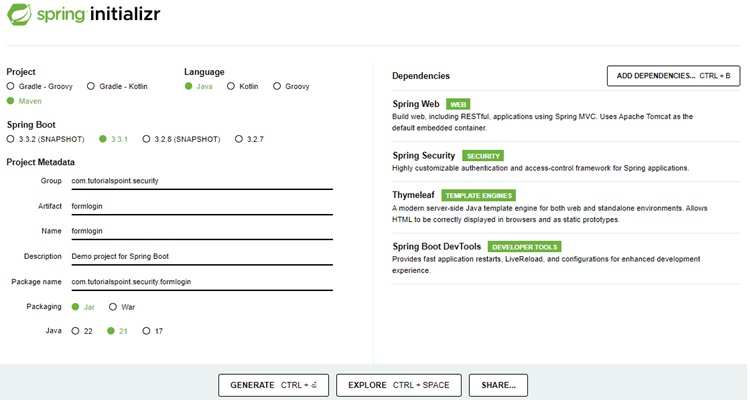
Thymeleaf 是一個用於 Java 的模板引擎。它允許我們快速開發靜態或動態網頁以在瀏覽器中呈現。它具有極強的擴充套件性,允許我們詳細定義和自定義模板的處理過程。此外,我們可以透過點選此 連結 瞭解更多關於 Thymeleaf 的資訊。
讓我們繼續生成我們的專案並下載它。然後我們將其解壓縮到我們選擇的資料夾中,並使用任何 IDE 開啟它。我將使用 Spring Tools Suite 4。它可以從 https://springframework.tw/tools 網站免費下載,並針對 Spring 應用程式進行了最佳化。
包含所有相關依賴項的 pom.xml
讓我們看一下我們的 pom.xml 檔案。它應該看起來與此類似 -
pom.xml
<?xml version="1.0" encoding="UTF-8"?>
<project xmlns="http://maven.apache.org/POM/4.0.0" xmlns:xsi="http://www.w3.org/2001/XMLSchema-instance"
xsi:schemaLocation="http://maven.apache.org/POM/4.0.0 https://maven.apache.org/xsd/maven-4.0.0.xsd">
   <modelVersion>4.0.0</modelVersion>
   <parent>
      <groupId>org.springframework.boot</groupId>
      <artifactId>spring-boot-starter-parent</artifactId>
      <version>3.3.1</version>
      <relativePath/> <!-- lookup parent from repository -->
   </parent>
   <groupId>com.tutorialspoint.security</groupId>
   <artifactId>formlogin</artifactId>
   <version>0.0.1-SNAPSHOT</version>
   <name>formlogin</name>
   <description>Demo project for Spring Boot</description>
   <url/>
   <licenses>
      <license/>
   </licenses>
   <developers>
      <developer/>
   </developers>
   <scm>
      <connection/>
      <developerConnection/>
      <tag/>
      <url/>
   </scm>
   <properties>
      <java.version>21</java.version>
   </properties>
   <dependencies>
      <dependency>
         <groupId>org.springframework.boot</groupId>
         <artifactId>spring-boot-starter-security</artifactId>
      </dependency>
      <dependency>
         <groupId>org.springframework.boot</groupId>
         <artifactId>spring-boot-starter-thymeleaf</artifactId>
      </dependency>
      <dependency>
         <groupId>org.springframework.boot</groupId>
         <artifactId>spring-boot-starter-web</artifactId>
      </dependency>
      <dependency>
         <groupId>org.thymeleaf.extras</groupId>
         <artifactId>thymeleaf-extras-springsecurity6</artifactId>
      </dependency>
      <dependency>
         <groupId>org.springframework.boot</groupId>
         <artifactId>spring-boot-devtools</artifactId>
         <scope>runtime</scope>
         <optional>true</optional>
      </dependency>
      <dependency>
         <groupId>org.springframework.boot</groupId>
         <artifactId>spring-boot-starter-test</artifactId>
         <scope>test</scope>
      </dependency>
      <dependency>
         <groupId>org.springframework.security</groupId>
         <artifactId>spring-security-test</artifactId>
         <scope>test</scope>
      </dependency>
   </dependencies>
   <build>
      <plugins>
         <plugin>
            <groupId>org.springframework.boot</groupId>
            <artifactId>spring-boot-maven-plugin</artifactId>
         </plugin>
      </plugins>
   </build>
</project>
Spring Security 配置類
在我們的 config 包中,我們建立了 WebSecurityConfig 類。我們將使用此類進行我們的安全配置,因此讓我們使用 @Configuration 註解和 @EnableWebSecurity 對其進行註釋。因此,Spring Security 知道將此類視為一個配置類。正如我們所看到的,Spring 使配置應用程式變得非常容易。
WebSecurityConfig
package com.tutorialspoint.security.formlogin.config;

import org.springframework.context.annotation.Bean;
import org.springframework.context.annotation.Configuration;
import org.springframework.security.config.annotation.web.builders.HttpSecurity;
import org.springframework.security.config.annotation.web.configuration.EnableWebSecurity;
import org.springframework.security.config.annotation.web.configurers.AbstractHttpConfigurer;
import org.springframework.security.core.userdetails.User;
import org.springframework.security.core.userdetails.UserDetails;
import org.springframework.security.core.userdetails.UserDetailsService;
import org.springframework.security.crypto.bcrypt.BCryptPasswordEncoder;
import org.springframework.security.crypto.password.PasswordEncoder;
import org.springframework.security.provisioning.InMemoryUserDetailsManager;
import org.springframework.security.web.SecurityFilterChain;

@Configuration
@EnableWebSecurity
public class WebSecurityConfig  {

   @Bean
   protected UserDetailsService userDetailsService() {
      UserDetails user = User.builder()
         .username("user")
         .password(passwordEncoder().encode("user123"))
         .roles("USER")
         .build();
      UserDetails admin = User.builder()
         .username("admin")
         .password(passwordEncoder().encode("admin123"))
         .roles("USER", "ADMIN")
         .build();
      return new InMemoryUserDetailsManager(user, admin);
   }

   @Bean
   protected PasswordEncoder passwordEncoder() {
      return new BCryptPasswordEncoder();
   }

   @Bean
   protected SecurityFilterChain filterChain(HttpSecurity http) throws Exception {
      return http
         .csrf(AbstractHttpConfigurer::disable)
         .authorizeHttpRequests(
            request -> request.requestMatchers("/login").permitAll()
         .requestMatchers("/**").authenticated()
      )
      .formLogin(form -> form.loginPage("/login")
      .defaultSuccessUrl("/")
      .failureUrl("/login?error=true")
      .permitAll())
      .logout(config -> config
      .logoutUrl("/logout")
      .logoutSuccessUrl("/login"))
      .build();
   }
}
控制器類
在這個類中,我們為該應用程式的索引、登入、管理員頁面建立了多個端點的對映。
AuthController
package com.tutorialspoint.security.formlogin.controllers;

import java.security.Principal;

import org.springframework.security.core.Authentication;
import org.springframework.security.core.annotation.AuthenticationPrincipal;
import org.springframework.security.core.context.SecurityContextHolder;
import org.springframework.security.core.userdetails.UserDetails;
import org.springframework.stereotype.Controller;
import org.springframework.web.bind.annotation.GetMapping;

import jakarta.servlet.http.HttpServletRequest;

@Controller
public class AuthController {
   @GetMapping("/")
   public String home(Authentication authentication, HttpServletRequest request) {
      // get username from Authetication instance
      String username = authentication.getName();
      System.out.println("AuthController.home()::Username: " + username);

      // get principal instance from Authentication instance to get user role
      UserDetails userDetails = (UserDetails) authentication.getPrincipal();
      System.out.println("User Role: " + userDetails.getAuthorities());

      // get principal instance from HTTP Request
      Principal principal = request.getUserPrincipal();
      // get username
      username = principal.getName();

      System.out.println("AuthController.home()::principal.getName(): " + username);
      return "index";
   }

   @GetMapping("/login")
   public String login() {
      return "login";
   }
   @GetMapping("/user")
   public String user() {
      // get authentication instance from Security Context
      Authentication authentication = SecurityContextHolder.getContext().getAuthentication();
      // get the user name
      String username = authentication.getName();
      System.out.println("AuthController.user()::Username: " + username);
      return "user";
   }
   @GetMapping("/admin")
   public String admin(Principal principal, @AuthenticationPrincipal UserDetails userDetails) {
      // get the username from principal instance
      String username = principal.getName();
      System.out.println("AuthController.admin()::Username: " + username);

      // get the username from userdetails instance
      username = userDetails.getUsername();
      System.out.println("AuthController.admin()::userDetails.getUsername(): " + username);
      return "admin";
   }
}
檢視
在 /src/main/resources/templates 資料夾中建立 index.html,其內容如下,用作主頁。
index.html
<!DOCTYPE html>
<html xmlns="http://www.w3.org/1999/xhtml"
   xmlns:th="https://www.thymeleaf.org"
   xmlns:sec="https://www.thymeleaf.org/thymeleaf-extras-springsecurity6">
   <head>
      <title>
         Hello World!
      </title>
   </head>
   <body>
      <h1 th:inline="text">Hello World!</h1>
      <a href="/logout" alt="logout">Sign Out</a>
   </body>
<html>
在 /src/main/resources/templates 資料夾中建立 user.html,其內容如下,用作使用者頁面。
user.html
<!DOCTYPE html>
<html xmlns="http://www.w3.org/1999/xhtml"
   xmlns:th="https://www.thymeleaf.org"
   xmlns:sec="https://www.thymeleaf.org/thymeleaf-extras-springsecurity6">
   <head>
      <title>
         Hello User!
      </title>
   </head>
   <body>
      <p>User Dashboard</p>
      <h1 th:inline="text">Hello <span sec:authentication="name"></span>!</h1>
      <a href="/logout" alt="logout">Sign Out</a>
   </body>
<html>
在 /src/main/resources/templates 資料夾中建立 admin.html,其內容如下,用作管理員頁面。
admin.html
<!DOCTYPE html>
<html xmlns="http://www.w3.org/1999/xhtml"
   xmlns:th="https://www.thymeleaf.org"
   xmlns:sec="https://www.thymeleaf.org/thymeleaf-extras-springsecurity6">
   <head>
      <title>
         Hello User!
      </title>
   </head>
   <body>
      <p>User Dashboard</p>
      <h1 th:inline="text">Hello <span sec:authentication="name"></span>!</h1>
      <a href="/logout" alt="logout">Sign Out</a>
   </body>
<html>
執行應用程式
由於我們所有元件都已準備就緒,因此讓我們執行應用程式。右鍵單擊專案,選擇 Run As,然後選擇 Spring Boot App。
它將啟動應用程式,並且在應用程式啟動後,我們可以執行 localhost:8080 以檢查更改。
輸出
現在開啟 localhost:8080,您可以看到登入頁面。
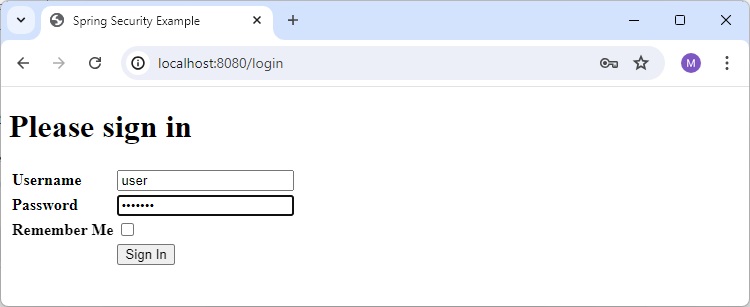
主頁
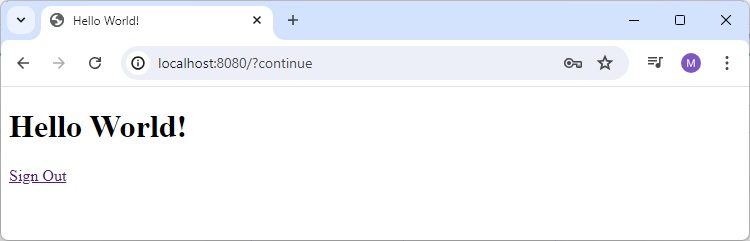
檢查主頁日誌
現在檢查應用程式日誌。除了 Spring Boot 日誌之外,它還將包含以下條目
AuthController.home()::Username: user
User Role: [ROLE_USER]
AuthController.home()::principal.getName(): user
使用者頁面
現在開啟 localhost:8080/user,您可以在應用程式日誌中檢查以下日誌。
AuthController.user()::Username: user
您也可以檢查 html 中顯示的使用者名稱。
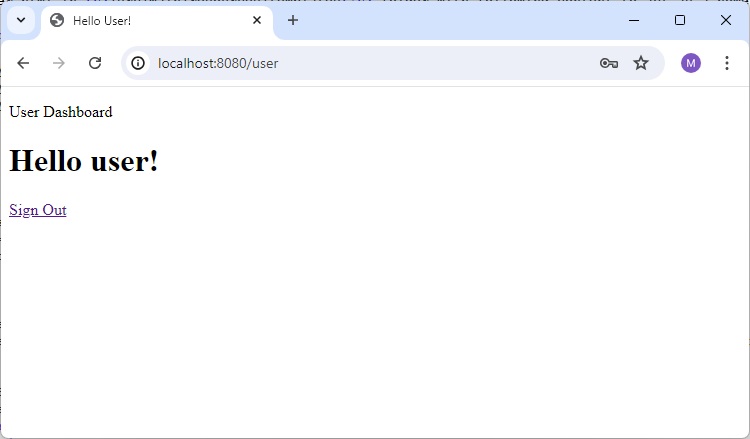
管理員頁面
現在開啟 localhost:8080/admin,您可以在應用程式日誌中檢查以下日誌。
AuthController.admin()::Username: user
AuthController.admin()::userDetails.getUsername(): user