
- SAP BPC 教程
- SAP BPC - 首頁
- SAP BPC - 概述
- SAP BPC - 術語
- SAP BPC - 應用
- SAP BPC - 模型設計
- SAP BPC - 資料載入
- SAP BPC - 報表
- SAP BPC - 計劃
- SAP BPC - 業務邏輯
- SAP BPC - 業務功能
- SAP BPC - 流程流程管理
- SAP BPC - Word 整合
- SAP BPC - PowerPoint 整合
- SAP BPC - 重要工具
- SAP BPC - 業務流程
- SAP BPC - 自定義選單
- SAP BPC - 合併
- SAP BPC - 準備抵銷
- SAP BPC - 配置抵銷
- SAP BPC - 嵌入式環境
- SAP BPC - 安全性
- SAP BPC - 熱分析
- SAP BPC - Park N Go
- SAP BPC 有用資源
- SAP BPC - 面試問題
- SAP BPC - 快速指南
- SAP BPC - 有用資源
- SAP BPC - 討論
SAP BPC - Word 整合
將 BPC 與 MS Word 整合並建立報表更容易。BPC 10.0 能夠直接整合並使用 Microsoft Word 和 PowerPoint 進行報表。
NetWeaver 的 BPC 10.0 版本可幫助您將 BPC 功能與 Microsoft Word、Excel 和 PowerPoint 的豐富功能相結合。使用 Office 版 BPC,您可以使用 Microsoft 的所有預設功能,並且工作表、簡報可以直接連結到 BPC 資料庫。
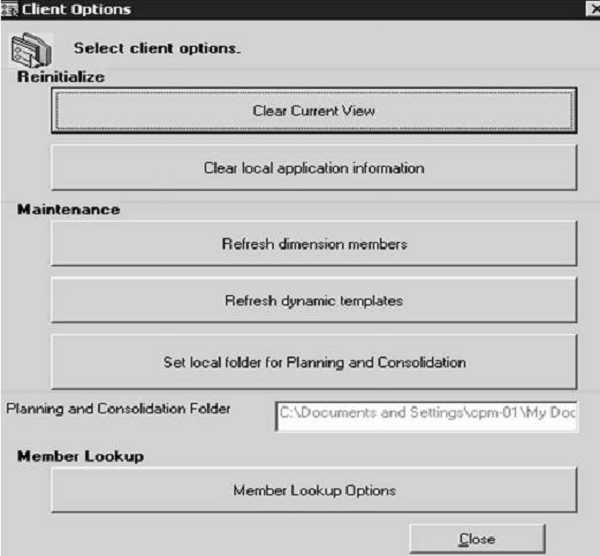
可以執行以下任務來維護客戶端。
- 重置當前檢視欄
- 清除本地應用程式資訊
- 重新整理維度成員
- 重新整理動態模板
- 為客戶端設定計劃和合並的本地資料夾
您可以透過 BPC Web → 可用介面列表開啟這些介面

從 Microsoft Word 釋出
轉到檔案 - 另存為。選擇“將網頁另存為”,如下面的螢幕截圖所示。

輸入檔名並選擇指向 BPC 應用程式集位置的 Web 資料夾。
您可以從以下目錄中選擇 -
- AppSetPublications - 用於應用於 AppSet 中所有應用程式的出版物。
- [application] - 用於釋出特定應用程式。
- _private - 使用者特定。
選擇目錄後,單擊“儲存”圖示。
廣告