
- PyQt 教程
- PyQt - 首頁
- PyQt - 簡介
- PyQt - 環境配置
- PyQt - Hello World
- PyQt - 主要類
- PyQt - 使用Qt Designer
- PyQt - 元物件
- PyQt 訊號與槽
- PyQt - 訊號和槽
- PyQt - 支援和訊號
- PyQt - 未繫結和已繫結訊號
- PyQt - 使用PyQtSignal建立新的訊號
- PyQt - 連線、斷開和發射訊號
- PyQt - 槽裝飾器
- PyQt - 槽連線
- PyQt 佈局
- PyQt - 佈局管理
- PyQt - QBoxLayout
- PyQt - QGridLayout
- PyQt - QFormLayout
- PyQt - QHBoxLayout
- PyQt - QVBoxLayout
- PyQt - QStackedLayout
- PyQt - QGraphicsGridLayout
- PyQt - QGraphicsAnchorLayout
- PyQt - QGraphicsLayout
- PyQt - QGraphicsLinearLayout
- PyQt 基本部件
- PyQt - 基本部件
- PyQt - QLabel部件
- PyQt - QLineEdit部件
- PyQt - QPushButton部件
- PyQt - QRadioButton部件
- PyQt - QCheckBox部件
- PyQt - QComboBox部件
- PyQt - QSpinBox部件
- PyQt - QMessageBox
- PyQt - QDialogButtonBox部件
- PyQt - QFontComboBox部件
- PyQt - QDoubleSpinBox部件
- PyQt - QToolBox部件
- PyQt - QDialog類
- PyQt - QMessageBox
- PyQt - 多文件介面
- PyQt - 拖放
- PyQt 繪圖API
- PyQt - 繪圖API
- PyQt 資料庫
- PyQt - 資料庫處理
- PyQt 核心知識
- PyQt - BrushStyle 常量
- PyQt - QClipboard
- PyQt - QPixmap類
- PyQt 有用資源
- PyQt - 快速指南
- PyQt - 有用資源
- PyQt - 討論
PyQt - QInputDialog部件
這是一個預配置的對話方塊,帶有一個文字欄位和兩個按鈕,“確定”和“取消”。當用戶點選“確定”按鈕或按下 Enter 鍵後,父視窗會收集文字框中的輸入。
使用者輸入可以是數字、字串或列表中的專案。還會顯示一個提示使用者應該做什麼的標籤。
QInputDialog 類具有以下靜態方法來接受使用者的輸入:
| 序號 | 方法及描述 |
|---|---|
| 1 |
getInt() 建立一個用於輸入整數的微調框。 |
| 2 |
getDouble() 可以輸入浮點數的微調框。 |
| 3 |
getText() 一個簡單的行編輯欄位用於輸入文字。 |
| 4 |
getItem() 一個組合框,使用者可以從中選擇專案。 |
示例
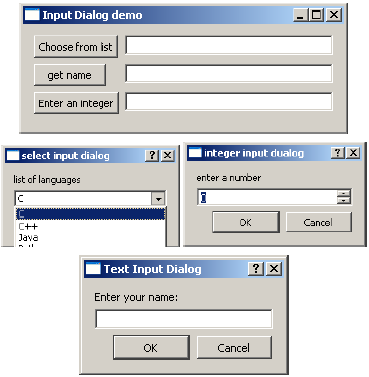
以下示例實現了輸入對話方塊功能。頂級視窗有三個按鈕。它們的 clicked() 訊號透過連線的槽彈出 InputDialog。
items = ("C", "C++", "Java", "Python")

item, ok = QInputDialog.getItem(self, "select input dialog",
   "list of languages", items, 0, False)

   if ok and item:
      self.le.setText(item)

   def gettext(self):
      text, ok = QInputDialog.getText(self, 'Text Input Dialog', 'Enter your name:')
      if ok:
         self.le1.setText(str(text))

   def getint(self):
      num,ok = QInputDialog.getInt(self,"integer input dualog","enter a number")

      if ok:
         self.le2.setText(str(num))
完整的程式碼如下:
import sys
from PyQt4.QtCore import *
from PyQt4.QtGui import *

class inputdialogdemo(QWidget):
   def __init__(self, parent = None):
      super(inputdialogdemo, self).__init__(parent)

      layout = QFormLayout()
      self.btn = QPushButton("Choose from list")
      self.btn.clicked.connect(self.getItem)

      self.le = QLineEdit()
      layout.addRow(self.btn,self.le)
      self.btn1 = QPushButton("get name")
      self.btn1.clicked.connect(self.gettext)

      self.le1 = QLineEdit()
      layout.addRow(self.btn1,self.le1)
      self.btn2 = QPushButton("Enter an integer")
      self.btn2.clicked.connect(self.getint)

      self.le2 = QLineEdit()
      layout.addRow(self.btn2,self.le2)
      self.setLayout(layout)
      self.setWindowTitle("Input Dialog demo")

   def getItem(self):
      items = ("C", "C++", "Java", "Python")

      item, ok = QInputDialog.getItem(self, "select input dialog",
         "list of languages", items, 0, False)

      if ok and item:
         self.le.setText(item)

   def gettext(self):
      text, ok = QInputDialog.getText(self, 'Text Input Dialog', 'Enter your name:')

      if ok:
         self.le1.setText(str(text))

   def getint(self):
      num,ok = QInputDialog.getInt(self,"integer input dualog","enter a number")

      if ok:
         self.le2.setText(str(num))

def main():
   app = QApplication(sys.argv)
   ex = inputdialogdemo()
   ex.show()
   sys.exit(app.exec_())

if __name__ == '__main__':
   main()
以上程式碼產生以下輸出:
廣告