
- PyQt 教程
- PyQt - 首頁
- PyQt - 簡介
- PyQt - 環境搭建
- PyQt - Hello World
- PyQt - 主要類
- PyQt - 使用 Qt Designer
- PyQt - 元物件
- PyQt 訊號與槽
- PyQt - 訊號和槽
- PyQt - 支援和訊號
- PyQt - 未繫結和繫結訊號
- PyQt - 使用 PyQtSignal 建立新訊號
- PyQt - 連線、斷開和發射訊號
- PyQt - 槽裝飾器
- PyQt - 槽連線
- PyQt 佈局
- PyQt - 佈局管理
- PyQt - QBoxLayout
- PyQt - QGridLayout
- PyQt - QFormLayout
- PyQt - QHBoxLayout
- PyQt - QVBoxLayout
- PyQt - QStackedLayout
- PyQt - QGraphicsGridLayout
- PyQt - QGraphicsAnchorLayout
- PyQt - QGraphicsLayout
- PyQt - QGraphicsLinearLayout
- PyQt 基本控制元件
- PyQt - 基本控制元件
- PyQt - QLabel 控制元件
- PyQt - QLineEdit 控制元件
- PyQt - QPushButton 控制元件
- PyQt - QRadioButton 控制元件
- PyQt - QCheckBox 控制元件
- PyQt - QComboBox 控制元件
- PyQt - QSpinBox 控制元件
- PyQt - QMessageBox
- PyQt - QDialogButtonBox 控制元件
- PyQt - QFontComboBox 控制元件
- PyQt - QDoubleSpinBox 控制元件
- PyQt - QToolBox 控制元件
- PyQt - QDialog 類
- PyQt - QMessageBox
- PyQt - 多文件介面
- PyQt - 拖放操作
- PyQt 繪圖 API
- PyQt - 繪圖 API
- PyQt 資料庫
- PyQt - 資料庫處理
- PyQt 核心知識
- PyQt - BrushStyle 常量
- PyQt - QClipboard
- PyQt - QPixmap 類
- PyQt 有用資源
- PyQt - 快速指南
- PyQt - 有用資源
- PyQt - 討論
PyQt - QFormLayout 類
QFormLayout 是一種建立兩列表單的便捷方式,其中每一行都包含一個與標籤關聯的輸入欄位。按照慣例,左側列包含標籤,右側列包含輸入欄位。
以下是 addRow() 方法和 addLayout() 方法的三個過載,它們常用。
| 序號 | 方法及描述 |
|---|---|
| 1 |
addRow(QLabel, QWidget) 新增一行,包含標籤和輸入欄位 |
| 2 |
addRow(QLabel, QLayout) 在第二列新增子佈局 |
| 3 |
addRow(QWidget) 新增一個跨越兩列的控制元件 |
PyQt 中的文字容器和單選按鈕
LineEdit() 方法建立一個單行文字輸入控制元件容器,而 QRadioButton() 建立選項選擇。這裡,下面的程式使用以下元件構建 GUI 表單 - 使用 QLabel() 的控制元件、使用 QRadioButton() 的單選按鈕和使用 QPushButton() 建立的可點選按鈕。
示例
在這個示例中,程式在第一行添加了一個 LineEdit 欄位用於輸入姓名。然後,它在下一行的第二列中添加了一個包含兩個地址欄位的垂直盒子佈局。接下來,在第三行的第二列中添加了一個包含兩個單選按鈕欄位的水平盒子佈局物件。第四行顯示了兩個按鈕“提交”和“取消”。
import sys
from PyQt6.QtCore import *
from PyQt6.QtGui import *
from PyQt6.QtWidgets import *

def window():
   app = QApplication(sys.argv)
   win = QWidget()

   l1 = QLabel("Name")
   nm = QLineEdit()

   l2 = QLabel("Address")
   add1 = QLineEdit()
   add2 = QLineEdit()
   fbox = QFormLayout()
   fbox.addRow(l1, nm)
   vbox = QVBoxLayout()

   vbox.addWidget(add1)
   vbox.addWidget(add2)
   fbox.addRow(l2, vbox)

   # Create a button group for the radio buttons
   gender_group = QButtonGroup()

   r1 = QRadioButton("Male")
   r2 = QRadioButton("Female")

   # Add the radio buttons to the group
   gender_group.addButton(r1)
   gender_group.addButton(r2)

   hbox = QHBoxLayout()
   hbox.addWidget(r1)
   hbox.addWidget(r2)
   hbox.addStretch()
   fbox.addRow(QLabel("Sex"), hbox)
   fbox.addRow(QPushButton("Submit"), QPushButton("Cancel"))

   win.setLayout(fbox)
   win.setWindowTitle("PyQt")
   win.show()
   sys.exit(app.exec())

if __name__ == '__main__':
   window()
輸出
以上程式碼產生以下輸出:

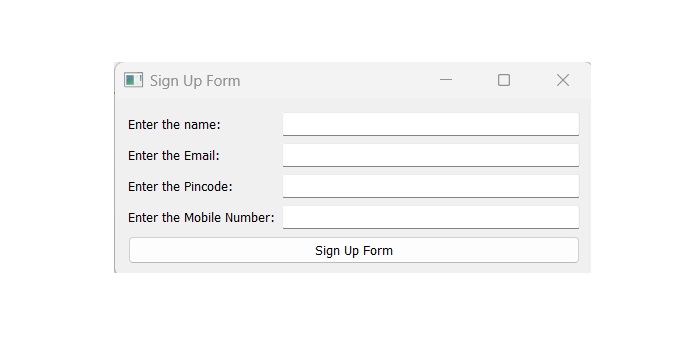
使用 QFormLayout 類建立登錄檔單
每個網站都會構建一個登錄檔單來儲存資料。它允許使用者從多個位置使用資訊登錄檔單。這裡,我們使用 addrow() 方法向註冊頁面新增新的標籤,並使用 show() 方法顯示結果。
示例
在這個示例中,我們演示瞭如何使用 QFormLayout 類建立登錄檔單。
import sys
from PyQt6.QtWidgets import QApplication, QWidget, QPushButton, QLineEdit,  QFormLayout
class MainWindow(QWidget):
   def __init__(self, *args, **kwargs):
      super().__init__(*args, **kwargs)

      self.setWindowTitle('Sign Up Form')

      layout = QFormLayout()
      self.setLayout(layout)

      layout.addRow('Enter the name:', QLineEdit(self))
      layout.addRow('Enter the Email:', QLineEdit(self))
      layout.addRow('Enter the Pincode:', QLineEdit(self, echoMode=QLineEdit.EchoMode.Password))
      layout.addRow('Enter the Mobile Number:', QLineEdit(self))
      layout.addRow(QPushButton('Sign Up Form'))

      # show the window
      self.show()
if __name__ == '__main__':
   app = QApplication(sys.argv)
   window = MainWindow()
   sys.exit(app.exec())
輸出
執行程式碼後,我們在 PyQt 視窗中得到登錄檔單的結果:
廣告