
 資料結構
資料結構 網路
網路 RDBMS
RDBMS 作業系統
作業系統 Java
Java MS Excel
 iOS
iOS HTML
HTML CSS
CSS Android
 Python
 C 程式設計
 C++
C++ C#
C# MongoDB
 MySQL
MySQL Javascript
 PHP
PHP 物理
物理 化學
化學 生物
生物 數學
數學 英語
英語 經濟學
經濟學 心理學
心理學 社會學
社會學 時尚教程
時尚教程 法律教程
法律教程在 Matplotlib 中繪製迴歸圖和殘差圖
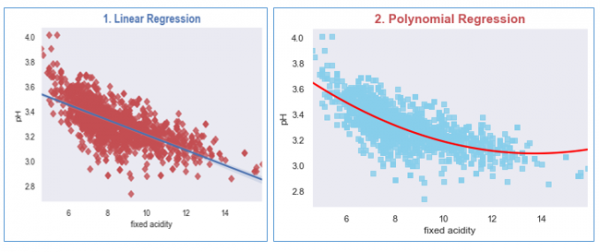
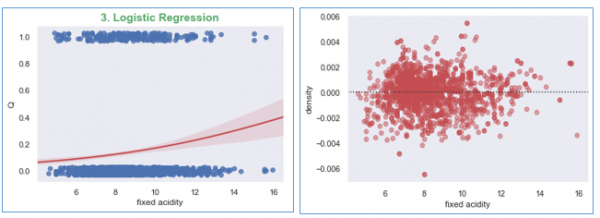
為了建立給定變數聯合分佈的觀測值之間的簡單關係,我們可以使用 Seaborn 來建立迴歸模型的圖。
要使用迴歸模型對資料集進行擬合,我們首先必須在 Python 中匯入必要的庫。
我們將為每個迴歸模型建立圖:(a) 線性迴歸、(b) 多項式迴歸和 (c) 邏輯迴歸。
在此示例中,我們將使用可從此處訪問的葡萄酒質量資料集,https://archive.ics.uci.edu/ml/datasets/wine+quality
示例
import matplotlib.pyplot as plt
import seaborn as sns
from scipy.stats import pearsonr
sns.set(style="dark", color_codes=True)

#import the dataset
wine_quality = pd.read_csv('winequality-red.csv', delimiter=';')

#Plotting Linear Regression
R, p = pearsonr(wine_quality['fixed acidity'], wine_quality.pH)
g1 = sns.regplot(x='fixed acidity', y='pH', data=wine_quality, truncate=True, ci=99,
marker='D', scatter_kws={'color': 'r'});
textstr = '$\mathrm{pearson}\hspace{0.5}\mathrm{R}^2=%.2f$
$\mathrm{pval}=%.2e$ '% (R**2, p)
props = dict(boxstyle='round', facecolor='wheat', alpha=0.5)
g1.text(0.55, 0.95, textstr, fontsize=14, va='top', bbox=props)
plt.title('1. Linear Regression', size=15, color='b', weight='bold')

#Let us Plot the Polynomial Regression plot for the wine dataset
g2 = sns.regplot(x='fixed acidity', y='pH', data=wine_quality, order=2, ci=None,
   marker='s', scatter_kws={'color': 'skyblue'},
   line_kws={'color': 'red'});
plt.title('2. Polynomial Regression', size=15, color='r', weight='bold')

#Now plotting the Logistic Regression
wine_quality['Q'] = wine_quality['quality'].map({'Low': 0, 'Med': 0, 'High':1})
g2 = sns.regplot(x='fixed acidity', y='Q', logistic=True,
   n_boot=750, y_jitter=.03, data=wine_quality,
   line_kws={'color': 'r'})
plt.show();

#Now plot the residual plot
g3 = sns.residplot(x='fixed acidity', y='density', order=2,
   data=wine_quality, scatter_kws={'color': 'r',
   'alpha': 0.5});
plt.show();
執行以上程式碼將生成如下輸出:
輸出

更新時間:23-Feb-2021
2K+ 瀏覽量

廣告