
PDFBox - 讀取文字
在上一章中,我們瞭解瞭如何向現有的 PDF 文件新增文字。在本章中,我們將討論如何從現有的 PDF 文件中讀取文字。
從現有 PDF 文件中提取文字
提取文字是 PDF Box 庫的主要功能之一。您可以使用 **PDFTextStripper** 類的 **getText()** 方法提取文字。此類從給定的 PDF 文件中提取所有文字。
以下是從現有 PDF 文件中提取文字的步驟。
步驟 1:載入現有 PDF 文件
使用 **PDDocument** 類的靜態方法 **load()** 載入現有 PDF 文件。此方法接受檔案物件作為引數,由於這是一個靜態方法,您可以使用類名呼叫它,如下所示。
File file = new File("path of the document")
PDDocument document = PDDocument.load(file);
步驟 2:例項化 PDFTextStripper 類
**PDFTextStripper** 類提供從 PDF 文件檢索文字的方法,因此,例項化此類,如下所示。
PDFTextStripper pdfStripper = new PDFTextStripper();
步驟 3:檢索文字
您可以使用 **PDFTextStripper** 類的 **getText()** 方法讀取/檢索 PDF 文件中頁面的內容。為此方法,您需要將文件物件作為引數傳遞。此方法檢索給定文件中的文字並以字串物件的形式返回。
String text = pdfStripper.getText(document);
步驟 4:關閉文件
最後,使用 **PDDocument** 類的 **close()** 方法關閉文件,如下所示。
document.close();
示例
假設我們有一個 PDF 文件,其中包含一些文字,如下所示。
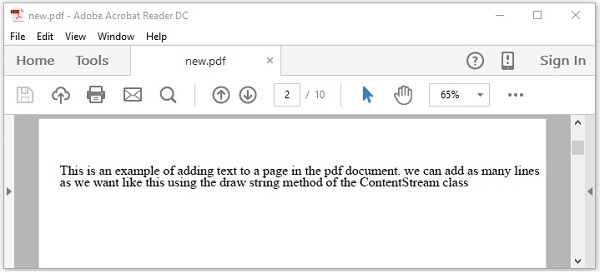
此示例演示如何從上述 PDF 文件中讀取文字。在這裡,我們將建立一個 Java 程式並載入名為 **new.pdf** 的 PDF 文件,該文件儲存在路徑 **C:/PdfBox_Examples/** 中。將此程式碼儲存在名為 **ReadingText.java** 的檔案中。
import java.io.File;
import java.io.IOException;

import org.apache.pdfbox.pdmodel.PDDocument;
import org.apache.pdfbox.text.PDFTextStripper;
public class ReadingText {

   public static void main(String args[]) throws IOException {

      //Loading an existing document
      File file = new File("C:/PdfBox_Examples/new.pdf");
      PDDocument document = PDDocument.load(file);

      //Instantiate PDFTextStripper class
      PDFTextStripper pdfStripper = new PDFTextStripper();

      //Retrieving text from PDF document
      String text = pdfStripper.getText(document);
      System.out.println(text);

      //Closing the document
      document.close();

   }
}
使用以下命令從命令提示符編譯並執行儲存的 Java 檔案。
javac ReadingText.java
java ReadingText
執行後,上述程式從給定的 PDF 文件中檢索文字並顯示如下。
This is an example of adding text to a page in the pdf document. we can add as many lines
as we want like this using the ShowText() method of the ContentStream class.
廣告