
PDFBox - 文件屬性
與其他檔案一樣,PDF文件也具有文件屬性。這些屬性是鍵值對。每個屬性都提供有關文件的特定資訊。
以下是PDF文件的屬性:
| 序號 | 屬性及描述 |
|---|---|
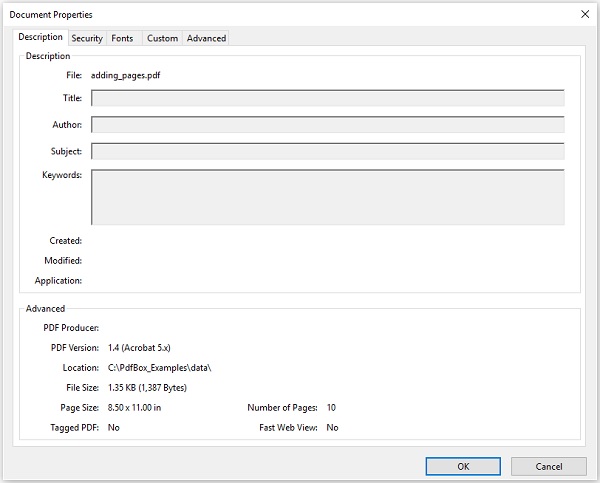
| 1 | 檔案 此屬性儲存檔案的名稱。 |
| 2 | 標題 使用此屬性,您可以設定文件的標題。 |
| 3 | 作者 使用此屬性,您可以設定文件的作者姓名。 |
| 4 | 主題 使用此屬性,您可以指定PDF文件的主題。 |
| 5 | 關鍵詞 使用此屬性,您可以列出可以搜尋文件的關鍵詞。 |
| 6 | 建立日期 使用此屬性,您可以設定文件的建立日期。 |
| 7 | 修改日期 使用此屬性,您可以設定文件的修改日期。 |
| 8 | 應用程式 使用此屬性,您可以設定文件的應用程式。 |
以下是PDF文件文件屬性表的螢幕截圖。(此處應插入截圖)
設定文件屬性
PDFBox提供了一個名為PDDocumentInformation的類。此類具有一組setter和getter方法。
此類的setter方法用於將值設定為文件的各種屬性,getter方法用於檢索這些值。
以下是PDDocumentInformation類的setter方法:
| 序號 | 方法及描述 |
|---|---|
| 1 | setAuthor(String author) 此方法用於設定名為Author的PDF文件屬性的值。 |
| 2 | setTitle(String title) 此方法用於設定名為Title的PDF文件屬性的值。 |
| 3 | setCreator(String creator) 此方法用於設定名為Creator的PDF文件屬性的值。 |
| 4 | setSubject(String subject) 此方法用於設定名為Subject的PDF文件屬性的值。 |
| 5 | setCreationDate(Calendar date) 此方法用於設定名為CreationDate的PDF文件屬性的值。 |
| 6 | setModificationDate(Calendar date) 此方法用於設定名為ModificationDate的PDF文件屬性的值。 |
| 7 | setKeywords(String keywords list) 此方法用於設定名為Keywords的PDF文件屬性的值。 |
示例
PDFBox提供了一個名為PDDocumentInformation的類,此類提供各種方法。這些方法可以設定文件的各種屬性並檢索它們。
此示例演示如何向PDF文件新增作者、標題、日期和主題等屬性。這裡,我們將建立一個名為doc_attributes.pdf的PDF文件,向其中新增各種屬性,並將其儲存在C:/PdfBox_Examples/路徑中。將此程式碼儲存在名為AddingAttributes.java的檔案中。
import java.io.IOException;
import java.util.Calendar;
import java.util.GregorianCalendar;

import org.apache.pdfbox.pdmodel.PDDocument;
import org.apache.pdfbox.pdmodel.PDDocumentInformation;
import org.apache.pdfbox.pdmodel.PDPage;

public class AddingDocumentAttributes {
   public static void main(String args[]) throws IOException {

      //Creating PDF document object
      PDDocument document = new PDDocument();

      //Creating a blank page
      PDPage blankPage = new PDPage();

      //Adding the blank page to the document
      document.addPage( blankPage );

      //Creating the PDDocumentInformation object
      PDDocumentInformation pdd = document.getDocumentInformation();

      //Setting the author of the document
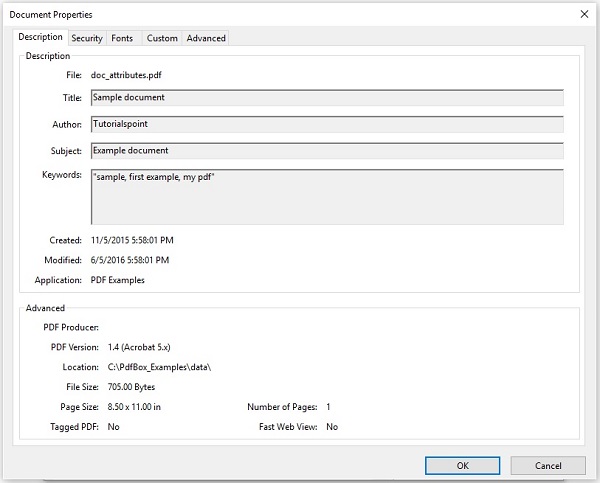
      pdd.setAuthor("Tutorialspoint");

      // Setting the title of the document
      pdd.setTitle("Sample document");

      //Setting the creator of the document
      pdd.setCreator("PDF Examples");

      //Setting the subject of the document
      pdd.setSubject("Example document");

      //Setting the created date of the document
      Calendar date = new GregorianCalendar();
      date.set(2015, 11, 5);
      pdd.setCreationDate(date);
      //Setting the modified date of the document
      date.set(2016, 6, 5);
      pdd.setModificationDate(date);

      //Setting keywords for the document
      pdd.setKeywords("sample, first example, my pdf");

      //Saving the document
      document.save("C:/PdfBox_Examples/doc_attributes.pdf");

      System.out.println("Properties added successfully ");

      //Closing the document
      document.close();

   }
}
使用以下命令從命令提示符編譯並執行儲存的Java檔案。(此處應插入編譯執行命令)
javac AddingAttributes.java
java AddingAttributes
執行後,上述程式將所有指定的屬性新增到文件中,並顯示以下訊息。(此處應插入執行結果資訊)
Properties added successfully
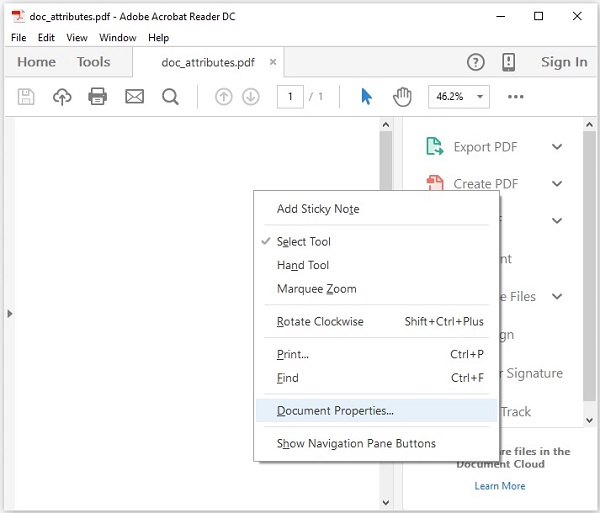
現在,如果您訪問指定的路徑,您可以在其中找到建立的PDF。右鍵單擊文件並選擇文件屬性選項,如下所示。(此處應插入截圖)
這將為您提供文件屬性視窗,您可以在此處觀察文件的所有屬性是否已設定為指定的值。
檢索文件屬性
您可以使用PDDocumentInformation類提供的getter方法檢索文件的屬性。
以下是PDDocumentInformation類的getter方法:
| 序號 | 方法及描述 |
|---|---|
| 1 | getAuthor() 此方法用於檢索名為Author的PDF文件屬性的值。 |
| 2 | getTitle() 此方法用於檢索名為Title的PDF文件屬性的值。 |
| 3 | getCreator() 此方法用於檢索名為Creator的PDF文件屬性的值。 |
| 4 | getSubject() 此方法用於檢索名為Subject的PDF文件屬性的值。 |
| 5 | getCreationDate() 此方法用於檢索名為CreationDate的PDF文件屬性的值。 |
| 6 | getModificationDate() 此方法用於檢索名為ModificationDate的PDF文件屬性的值。 |
| 7 | getKeywords() 此方法用於檢索名為Keywords的PDF文件屬性的值。 |
示例
此示例演示如何檢索現有PDF文件的屬性。這裡,我們將建立一個Java程式並載入儲存在C:/PdfBox_Examples/路徑中的名為doc_attributes.pdf的PDF文件,並檢索其屬性。將此程式碼儲存在名為RetrivingDocumentAttributes.java的檔案中。
import java.io.File;
import java.io.IOException;

import org.apache.pdfbox.pdmodel.PDDocument;
import org.apache.pdfbox.pdmodel.PDDocumentInformation;

public class RetrivingDocumentAttributes {
   public static void main(String args[]) throws IOException {

      //Loading an existing document
      File file = new File("C:/PdfBox_Examples/doc_attributes.pdf")
      PDDocument document = PDDocument.load(file);
      //Getting the PDDocumentInformation object
      PDDocumentInformation pdd = document.getDocumentInformation();

      //Retrieving the info of a PDF document
      System.out.println("Author of the document is :"+ pdd.getAuthor());
      System.out.println("Title of the document is :"+ pdd.getTitle());
      System.out.println("Subject of the document is :"+ pdd.getSubject());

      System.out.println("Creator of the document is :"+ pdd.getCreator());
      System.out.println("Creation date of the document is :"+ pdd.getCreationDate());
      System.out.println("Modification date of the document is :"+
         pdd.getModificationDate());
      System.out.println("Keywords of the document are :"+ pdd.getKeywords());

      //Closing the document
      document.close();
   }
}
使用以下命令從命令提示符編譯並執行儲存的Java檔案。(此處應插入編譯執行命令)
javac RetrivingDocumentAttributes.java
java RetrivingDocumentAttributes
執行後,上述程式檢索文件的所有屬性並顯示它們,如下所示。(此處應插入執行結果資訊)
Author of the document is :Tutorialspoint
Title of the document is :Sample document
Subject of the document is :Example document
Creator of the document is :PDF Examples
Creation date of the document is :11/5/2015
Modification date of the document is :6/5/2016
Keywords of the document are :sample, first example, my pdf