
- JFreeChart 教程
- JFreeChart - 主頁
- JFreeChart - 概覽
- JFreeChart - 安裝
- JFreeChart - 架構
- JFreeChart - 引用的 API
- JFreeChart - 餅形圖
- JFreeChart - 條形圖
- JFreeChart - 折線圖
- JFreeChart - XY 圖
- JFreeChart - 3D 圖/條形圖
- JFreeChart- 氣泡圖
- JFreeChart - 時間序列圖
- JFreeChart - 檔案介面
- JFreeChart - 資料庫介面
- JFreeChart 有用資源
- JFreeChart - 快速指南
- JFreeChart - 有用資源
- JFreeChart - 討論
JFreeChart - 檔案介面
到目前為止,我們已經學習瞭如何使用 JFreeChart API 使用靜態資料建立各種型別的圖表。但是,在生產環境中,資料將以預定義格式的文字檔案形式提供,或者直接來自資料庫。
本章將解釋如何從給定位置的給定文字檔案中讀取簡單資料,然後使用 JFreeChart 來建立你選擇的圖表。
業務資料
考慮我們有一個名為 mobile.txt 的檔案,其中有不同的移動品牌及其銷售額(每天的單位)用簡單的逗號 (,) 分隔 −
Iphone 5S, 20
Samsung Grand, 20
MOTO G, 40  Nokia
Lumia, 10
基於檔案的圖表生成
以下是基於 mobile.txt 中提供的資訊建立餅形圖的程式碼 −
import java.io.*;

import java.util.StringTokenizer;

import org.jfree.chart.ChartUtilities;
import org.jfree.chart.ChartFactory;
import org.jfree.chart.JFreeChart;
import org.jfree.data.general.DefaultPieDataset;

public class PieChart_File {

   public static void main( String[ ] args )throws Exception {

      String mobilebrands[ ] = {
         "IPhone 5s" ,
         "SamSung Grand" ,
         "MotoG" ,
         "Nokia Lumia"
      };

      InputStream in = new FileInputStream( new File( "C:/temp/test.txt" ) );
      BufferedReader reader = new BufferedReader(new InputStreamReader(in ) );
      StringBuilder out = new StringBuilder();
      String line;
      DefaultPieDataset dataset = new DefaultPieDataset();

      while (( line = reader.readLine() ) != null ) {
         out.append( line );
      }

      StringTokenizer s = new StringTokenizer( out.toString(), "," );
      int i = 0;

      while( s.hasMoreTokens( ) && ( mobilebrands [i] != null ) ) {
         dataset.setValue(mobilebrands[i], Double.parseDouble( s.nextToken( ) ));
         i++;
      }

      JFreeChart chart = ChartFactory.createPieChart(
         "Mobile Sales",    // chart title
         dataset,           // data
         true,              // include legend
         true,
         false);

      int width = 560;    /* Width of the image */
      int height = 370;   /* Height of the image */
      File pieChart = new File( "pie_Chart.jpeg" );
      ChartUtilities.saveChartAsJPEG( pieChart, chart, width, height);
   }
}
讓我們將上述 Java 程式碼儲存在 **PieChart_File.java** 檔案中,然後在命令提示符下編譯並執行,如下所示 −
$javac PieChart_File.java
$java PieChart_File
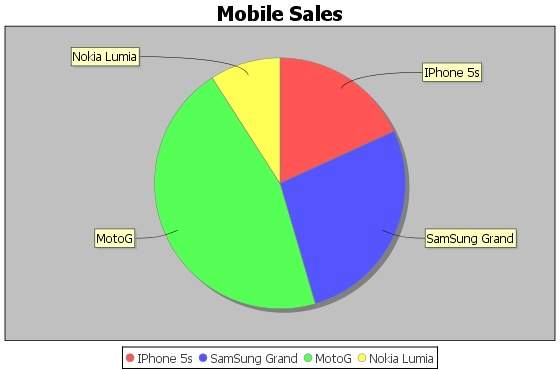
如果一切正常,它將編譯並執行,建立一個名為 **PieChart.jpeg** 的 JPEG 影像檔案,其中包含以下圖表。
廣告