
- JFreeChart 教程
- JFreeChart - 主頁
- JFreeChart - 概述
- JFreeChart - 安裝
- JFreeChart - 架構
- JFreeChart - 引用的 API
- JFreeChart - 餅圖
- JFreeChart - 條形圖
- JFreeChart - 折線圖
- JFreeChart - XY 圖
- JFreeChart - 3D 圖/條形圖
- JFreeChart- 氣泡圖
- JFreeChart - 時間序列圖
- JFreeChart - 檔案介面
- JFreeChart - 資料庫介面
- JFreeChart 實用資源
- JFreeChart - 快速指南
- JFreeChart - 實用資源
- JFreeChart - 討論
JFreeChart - 資料庫介面
本章解釋瞭如何從資料庫表中讀取簡單資料,然後使用 JFreeChart 建立你選擇的圖表。
業務資料
考慮我們有以下 MySQL 表 mobile_tbl(mobile_brand VARCHAR(100) NOT NULL, unit_sale INT NO NULL);
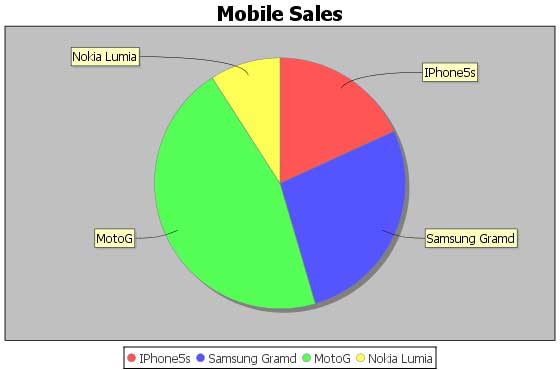
考慮此表有以下記錄 −
| 移動品牌 | 單位銷售 |
|---|---|
| IPhone5S | 20 |
| 三星 Grand | 20 |
| MotoG | 40 |
| 諾基亞 Lumia | 10 |
使用資料庫生成圖表
以下是在 MySQL 資料庫中 test_db 中的 mobile_tbl 表中提供的詳細資訊的基礎上建立餅圖的程式碼。根據你的要求,你可以使用任何其他資料庫。
import java.io.*;
import java.sql.*;

import org.jfree.chart.ChartUtilities;
import org.jfree.chart.ChartFactory;
import org.jfree.chart.JFreeChart;
import org.jfree.data.general.DefaultPieDataset;

public class PieChart_DB {

   public static void main( String[ ] args )throws Exception {

      String mobilebrands[] = {
         "IPhone 5s",
         "SamSung Grand",
         "MotoG",
         "Nokia Lumia"
      };

      /* Create MySQL Database Connection */
      Class.forName( "com.mysql.jdbc.Driver" );
      Connection connect = DriverManager.getConnection(
         "jdbc:mysql://:3306/jf_testdb" ,
         "root",
         "root123");

      Statement statement = connect.createStatement( );
      ResultSet resultSet = statement.executeQuery("select * from mobile_data" );
      DefaultPieDataset dataset = new DefaultPieDataset( );

      while( resultSet.next( ) ) {
         dataset.setValue(
         resultSet.getString( "mobile_brand" ) ,
         Double.parseDouble( resultSet.getString( "unit_sale" )));
      }

      JFreeChart chart = ChartFactory.createPieChart(
         "Mobile Sales",   // chart title
         dataset,          // data
         true,             // include legend
         true,
         false );

      int width = 560;    /* Width of the image */
      int height = 370;   /* Height of the image */
      File pieChart = new File( "Pie_Chart.jpeg" );
      ChartUtilities.saveChartAsJPEG( pieChart , chart , width , height );
   }
}
讓我們將上面的 Java 程式碼儲存在PieChart_DB.java 檔案中,然後從命令提示裡編譯並執行它,如下所示 −
$javac PieChart_DB.java
$java PieChart_DB
如果一切都好,它將編譯並執行以建立一個名為 Pie_Chart.jpeg 的 JPEG 影像檔案,其中有以下圖表。
廣告