
 資料結構
資料結構 網路
網路 關係資料庫管理系統(RDBMS)
 作業系統
作業系統 Java
Java MS Excel
 iOS
iOS HTML
HTML CSS
CSS Android
 Python
 C語言程式設計
 C++
C++ C#
C# MongoDB
 MySQL
MySQL Javascript
 PHP
PHP 物理
物理 化學
化學 生物
生物 數學
數學 英語
英語 經濟學
經濟學 心理學
心理學 社會學
社會學 服裝設計
服裝設計 法學
法學如何在OpenCV Python中旋轉影像?
OpenCV 提供了函式 cv.rotate() 用於旋轉影像(NumPy陣列),旋轉角度為90度的倍數。此函式可以以三種方式旋轉影像:順時針旋轉90、180和270度。我們使用以下語法:
語法
cv2.rotate(img, rotateCode)
rotateCode 是一個旋轉標誌,用於指定如何旋轉陣列。三個旋轉標誌如下:
cv2.ROTATE_90_CLOCKWISE
cv2.ROTATE_180
cv2.ROTATE_90_COUNTERCLOCKWISE
步驟
要旋轉輸入影像,您可以按照以下步驟操作:
匯入所需的庫OpenCV和matplotlib。確保您已安裝它們。
使用cv2.imread()方法讀取輸入影像。指定影像的完整路徑。
使用cv2.rotate()函式旋轉輸入影像。將所需的rotateCode作為引數傳遞給函式。我們可以傳遞cv2.ROTATE_180、cv2.ROTATE_90_CLOCKWISE或cv2.ROTATE_90_COUNTERCLOCKWISE作為引數。
顯示旋轉後的影像。
讓我們看看旋轉輸入影像的示例。
輸入影像
我們將在下面的示例中使用以下影像作為輸入檔案:

示例
在此示例中,我們將輸入影像順時針旋轉180度。
# import required libraries
import cv2

# load the input image
img = cv2.imread('leaf.jpg')

# rotate the image by 180 degree clockwise
img_cw_180 = cv2.rotate(img, cv2.ROTATE_180)

# display the rotated image
cv2.imshow("Image rotated by 180 degree", img_cw_180)
cv2.waitKey(0)
cv2.destroyAllWindows()
輸出
執行上述程式後,將生成以下輸出視窗:

請注意,輸入影像順時針旋轉了180度。
讓我們看看OpenCV中可用的其他旋轉方式。
示例
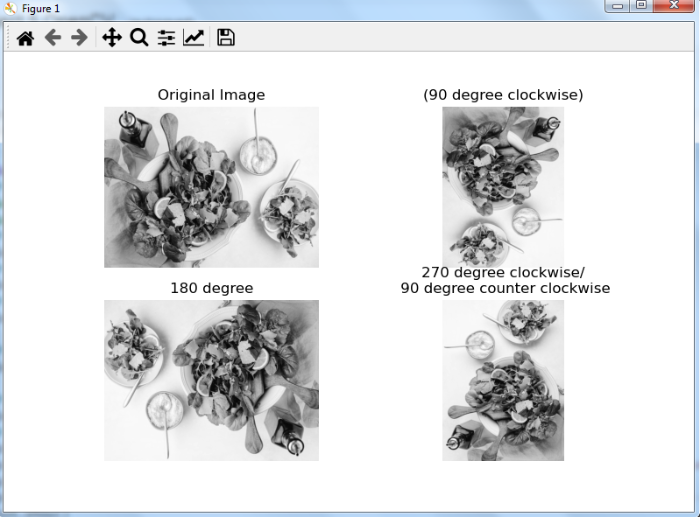
在此示例中,我們將展示如何將輸入影像旋轉90、180和270度。
# import required libraries
import cv2
import matplotlib.pyplot as plt

# load the input image
img = cv2.imread('leaf.jpg')

# convert the image to grayscale
img = cv2.cvtColor(img, cv2.COLOR_BGR2GRAY)

# rotate the image by 90 degree clockwise
img_cw_90 = cv2.rotate(img, cv2.ROTATE_90_CLOCKWISE)

# rotate the image by 270 degree clockwise or 90 degree counterclockwise
img_ccw_90 = cv2.rotate(img, cv2.ROTATE_90_COUNTERCLOCKWISE)

# rotate the image by 180 degree clockwise
img_cw_180 = cv2.rotate(img, cv2.ROTATE_180)

# display all the images
plt.subplot(221), plt.imshow(img, 'gray'), plt.title('Original
Image'), plt.axis('off')
plt.subplot(222), plt.imshow(img_cw_90,'gray'), plt.title('(90
degree clockwise)'), plt.axis('off')
plt.subplot(223), plt.imshow(img_cw_180, 'gray'),
plt.title('180 degree'), plt.axis('off')
plt.subplot(224), plt.imshow(img_ccw_90, 'gray'),
plt.title('270 degree clockwise/\n 90 degree counter
clockwise'), plt.axis('off')
plt.show()
輸出
執行上述程式後,將生成以下輸出視窗:

更新於:2023年8月28日
29K+ 次瀏覽

廣告