
 資料結構
資料結構 網路
網路 關係資料庫管理系統
 作業系統
作業系統 Java
Java MS Excel
 iOS
iOS HTML
HTML CSS
CSS Android
 Python
 C 程式設計
 C++
C++ C#
C# MongoDB
 MySQL
MySQL Javascript
 PHP
PHP 物理學
物理學 化學
化學 生物學
生物學 數學
數學 英語
英語 經濟學
經濟學 心理學
心理學 社會學
社會學 服裝設計
服裝設計 法律研究
法律研究使用 OpenCV Python 旋轉影像而不裁剪邊緣
旋轉影像是在影像編輯中最基本的操作。Python OpenCV 庫提供了 cv2.getRotationMatrix2D()、cv2.rotate() 等方法來非常輕鬆地完成此任務。
cv2.rotate() 僅將影像旋轉 0、90、180 或 270 度,而 Cv2.getRotationMatrix2D() 可以將影像旋轉到任何指定的角度。在下面的文章中,我們將使用 OpenCV Python 旋轉影像,同時不會裁剪或切掉邊緣。
要使用 cv2.getRotationMatrix2D() 方法旋轉影像,我們需要遵循以下三個步驟:
首先,我們需要獲取旋轉中心。
接下來,使用 getRotationMatrix2D() 方法,我們需要建立 2D 旋轉矩陣。
最後,透過使用 OpenCV 中的 warpAffine() 函式,我們需要將仿射變換應用於影像以校正影像的幾何失真或變形。
使用 Cv2.getRotationMatrix2D() 函式
該函式建立輸入影像陣列的變換矩陣,因此它將用於旋轉影像。如果角度引數的值為正,則影像將沿逆時針方向旋轉。如果要順時針旋轉影像,則角度需要為負。
語法
cv2.getRotationMatrix2D(center, angle, scale)
引數
center:輸入影像的旋轉中心。
angle:旋轉角度(度)。
scale:各向同性縮放因子。根據提供的值放大或縮小影像。
示例
讓我們舉個例子,並使用 math 模組的三角函式旋轉影像。
import cv2
import math

def rotate_image(array, angle):
   height, width = array.shape[:2]
   image_center = (width / 2, height / 2)

   rotation_mat = cv2.getRotationMatrix2D(image_center, angle, 1)

   radians = math.radians(angle)
   sin = math.sin(radians)
   cos = math.cos(radians)
   bound_w = int((height * abs(sin)) + (width * abs(cos)))
   bound_h = int((height * abs(cos)) + (width * abs(sin)))

   rotation_mat[0, 2] += ((bound_w / 2) - image_center[0])
   rotation_mat[1, 2] += ((bound_h / 2) - image_center[1])

   rotated_mat = cv2.warpAffine(array, rotation_mat, (bound_w, bound_h))
   return rotated_mat

img = cv2.imread('Images/car.jpg',1)
rotated_image = rotate_image(img, 256)

cv2.imshow('Rotated image', rotated_image)
cv2.waitKey(0)
cv2.destroyAllWindows()
輸入影像

輸出
旋轉後的輸出影像顯示如下。

輸入影像已成功旋轉到 256 度角。
示例
在這個例子中,我們將使用 cv2.getRotationMatrix2D() 和 Python 內建的 abs() 函式旋轉影像。
import cv2

def rotate_image(arr, angle):
   height, width = arr.shape[:2]
   # get the image centers
   image_center = (width/2, height/2)

   rotation_arr = cv2.getRotationMatrix2D(image_center, angle, 1)

   abs_cos = abs(rotation_arr[0,0])
   abs_sin = abs(rotation_arr[0,1])

   bound_w = int(height * abs_sin + width * abs_cos)
   bound_h = int(height * abs_cos + width * abs_sin)

   rotation_arr[0, 2] += bound_w/2 - image_center[0]
   rotation_arr[1, 2] += bound_h/2 - image_center[1]

   rotated_mat = cv2.warpAffine(arr, rotation_arr, (bound_w, bound_h))
   return rotated_arr

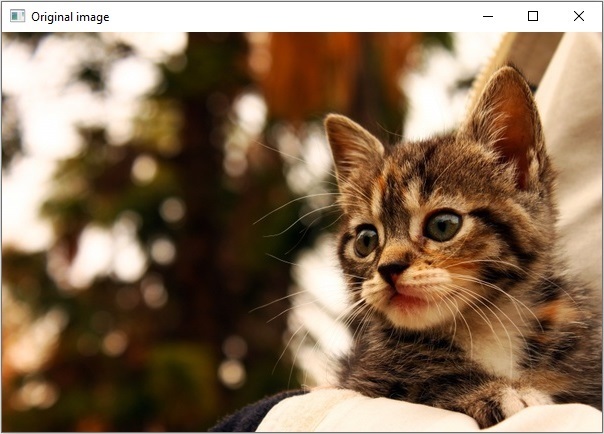
img = cv2.imread('Images/cat.jpg',1)
rotated_image = rotate_image(img, 197)

cv2.imshow('Original image', img)
cv2.imshow('Rotated image', rotated_image)
cv2.waitKey(0)
cv2.destroyAllWindows()
原始影像
旋轉後的影像
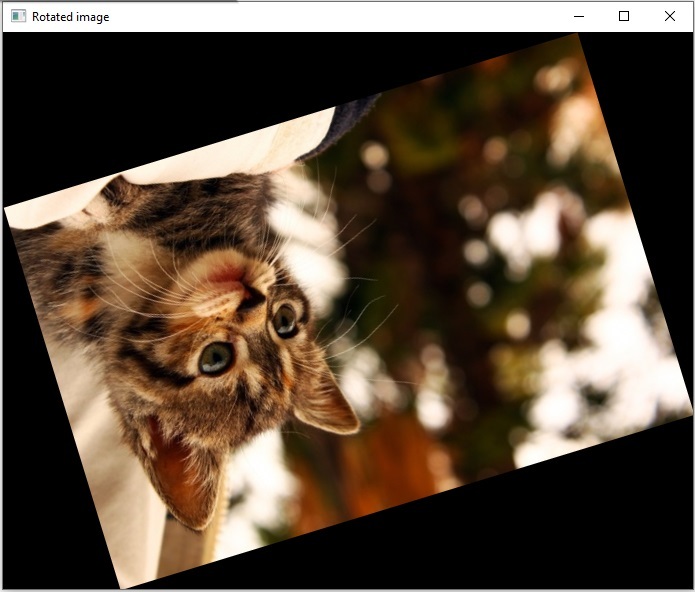
輸入影像已成功旋轉到 197 度角。
cv2.rotate()
cv2.rotate() 函式將影像幀旋轉 90 度的倍數(0、90、180 或 270 度)。該函式使用 rotateCode= 0 或 1 或 2 引數以三種不同的方式旋轉影像。
語法
cv2.cv.rotate( src, rotateCode[, dst] )
引數
src:輸入影像
rotateCode:指定如何旋轉影像。
dst:與輸入影像大小和深度相同的輸出影像。
返回值
它返回一個旋轉後的影像。
示例
在這個例子中,輸入影像“Fruits.jpg”將逆時針旋轉 90 度。
import cv2
import numpy as np

img = cv2.imread('Images/logo.jpg',1)
rotated_image = cv2.rotate(img,rotateCode = 2)

cv2.imshow('Original image', img)
cv2.imshow('Rotated image', rotated_image)
cv2.waitKey(0)
cv2.destroyAllWindows()
原始影像

旋轉後的影像

使用 np.rot90() 函式
numpy.rot90() 方法用於將陣列旋轉 90 度。如果只需要將輸入旋轉約 90 度,則這是一種簡單易行的方法。
示例
在這個例子中,我們將採用一個尺寸為 850X315 的輸入矩形影像“car.jpg”。
import cv2
import numpy as np
img = cv2.imread('Images/car.jpg',1)
rotated_image = np.rot90(img)
cv2.imwrite('Rotated image.jpg', rotated_image)
cv2.imshow('InputImage', img)
cv2.waitKey(0)
原始影像

旋轉後的影像
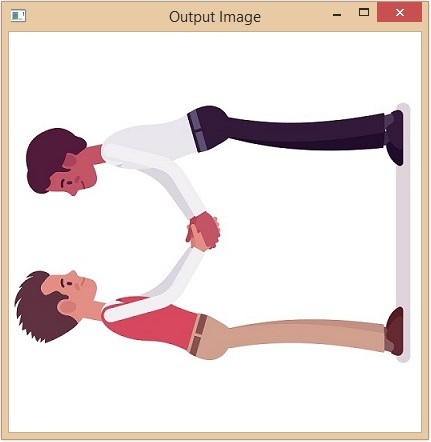
該方法從第一個軸向第二個軸方向旋轉陣列。因此,給定影像將沿逆時針方向旋轉。

1K+ 次檢視
