
 資料結構
資料結構 網路
網路 關係型資料庫管理系統
 作業系統
作業系統 Java
Java MS Excel
 iOS
iOS HTML
HTML CSS
CSS Android
 Python
 C 程式設計
 C++
C++ C#
C# MongoDB
 MySQL
MySQL Javascript
 PHP
PHP 物理學
物理學 化學
化學 生物學
生物學 數學
數學 英語
英語 經濟學
經濟學 心理學
心理學 社會學
社會學 時尚研究
時尚研究 法律研究
法律研究如何在 MATLAB 中繪製直方圖?
直方圖是一種資料圖形表示,顯示資料點的頻率分佈。MATLAB 提供了一個內建函式“histogram”來繪製資料集的直方圖。
什麼是 MATLAB 中的直方圖?
在 MATLAB 中,直方圖是一種以圖形方式表示一組資料點頻率分佈的方法。它顯示了資料點在稱為 bin 的特定區間內的頻率分佈。
在直方圖中,區間或 bin 在 x 軸上表示,資料點的頻率在 y 軸上表示。在 MATLAB 中,直方圖是圖形化表示和分析資料的一種有效方法。
有一個名為“histogram”的內建函式,我們可以使用它來繪製 MATLAB 中資料集的直方圖。此函式具有不同的語法格式,可以根據需要繪製各種型別的直方圖。
現在讓我們討論 MATLAB 中“histogram”函式的各種語法格式。
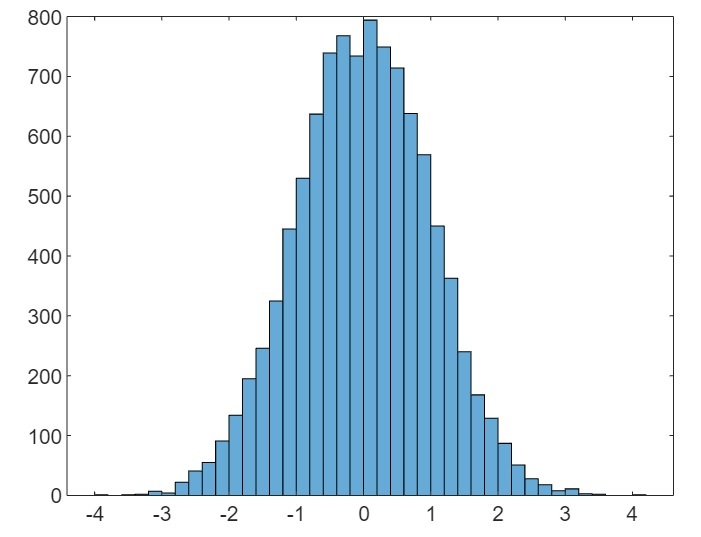
(1). 使用預設屬性繪製直方圖
在 MATLAB 中,以下“histogram”函式的語法用於使用預設屬性繪製資料集的直方圖。
histogram(X);
這裡,X 是資料點的向量。
以下示例演示瞭如何使用此函式建立直方圖。
示例(1)
% MATLAB code to plot default histogram
% Create a sample data set
X = randn(5000, 2);

% Plot the histogram for the data set
histogram(X);
輸出
(2). 使用指定的 bin 數繪製直方圖
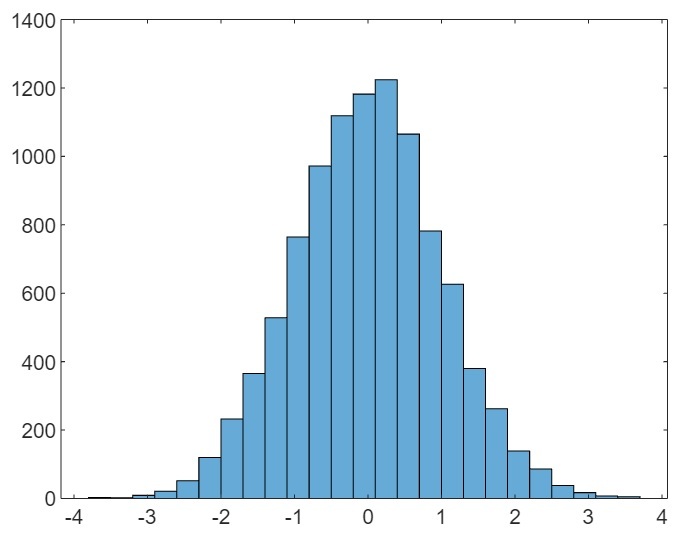
以下“histogram”函式的語法用於繪製具有指定 bin 數或區間的直方圖。
histogram(X, bins);
這裡,X 是資料集的向量,“bins”指定直方圖的區間數。
以下 MATLAB 程式碼顯示了此函式的實現,
示例(2)
% MATLAB code to plot histogram with specified number of bins
% Create a sample data set
X = randn(5000, 2);

% Plot the histogram for the data set
histogram(X, 25);
輸出
(3). 使用指定的 bin 邊界繪製直方圖
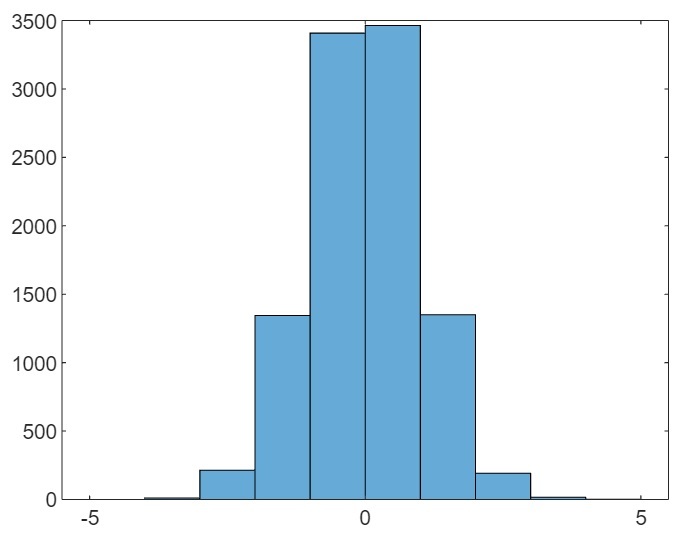
要繪製具有指定 bin 邊界的直方圖,請使用以下“histogram”函式的語法。
histogram(X, edges);
這裡,X 是包含資料集的向量,“edges”是包含 bin 邊界的向量。
讓我們看一個示例來了解此函式的實現。
示例(3)
% MATLAB code to plot histogram with specified edges of the bins
% Create a sample data set
X = randn(5000, 2);

% Create a vector containing edges of bins
edges = [-5 -4 -3 -2 -1 0 1 2 3 4 5];

% Plot the histogram for the data set
histogram(X, edges);
輸出
(4). 繪製分類資料的直方圖
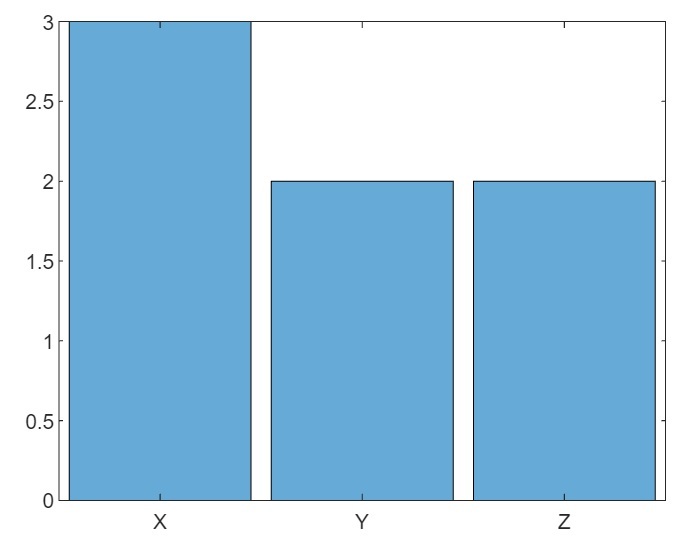
以下“histogram”函式的語法用於繪製分類資料的直方圖。
histogram(C);
這裡,C 是分類資料。
示例(4)
以下示例演示了此函式的實現。
% MATLAB code to plot histogram of categorical data
% Create a sample array of categories
cat = {'X', 'Y', 'Z', 'X', 'Y', 'X', 'Z'};

% Create categorical data
C = categorical(cat);

% Plot the histogram for the categorical data
histogram(C);
輸出
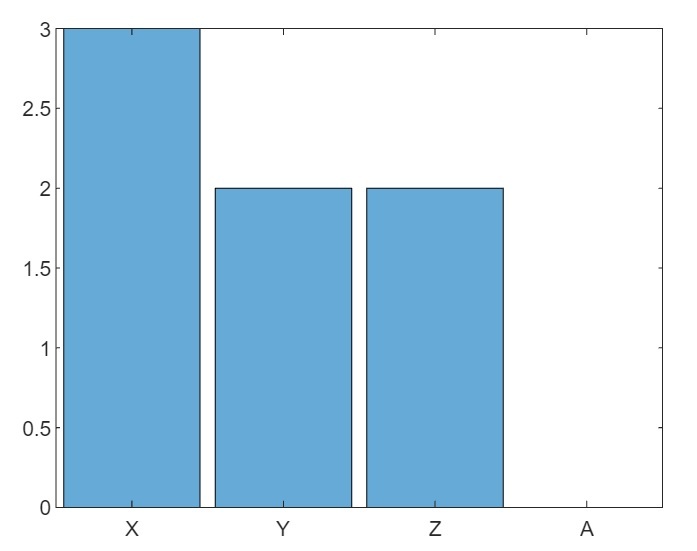
(5). 使用指定的類別繪製分類資料的直方圖
以下“histogram”函式的語法用於繪製具有指定類別的分類資料的直方圖。
histogram(C, Categories);
讓我們看一個基於此函式的示例。
示例(5)
% MATLAB code to plot histogram of categorical data with specified categories
% Create a sample array of categories
cat = {'X', 'Y', 'Z', 'X', 'Y', 'X', 'Z'};

% Create categorical data
C = categorical(cat);

% Plot the histogram for the categorical data
histogram(C,{'X', 'Y', 'Z', 'A'});
輸出
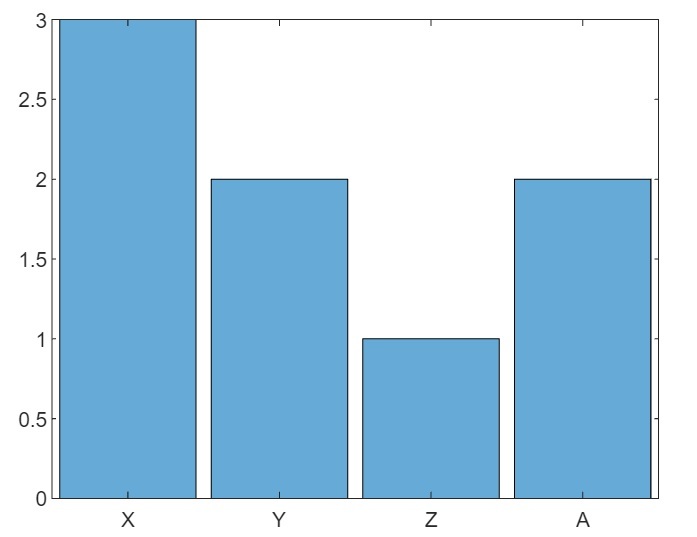
(6). 使用指定的類別和預計算的 bin 計數繪製分類資料的直方圖
以下“histogram”函式的語法用於繪製具有指定類別和預計算的 bin 計數的分類資料的直方圖。
histogram('Categories', Categories, 'BinCounts', counts);
示例(6)
這是一個演示此函式實現的示例。
% MATLAB program to plot categorical histogram with prespecified categories and bin counts
% Create sample categories
cat = {'X', 'Y', 'Z', 'X', 'Y', 'X', 'Z'};

% Calculate bin counts for each category
counts = [3, 2, 1, 2];

% Plot the histogram
histogram('Categories', {'X', 'Y', 'Z', 'A'}, 'BinCounts', counts);
輸出
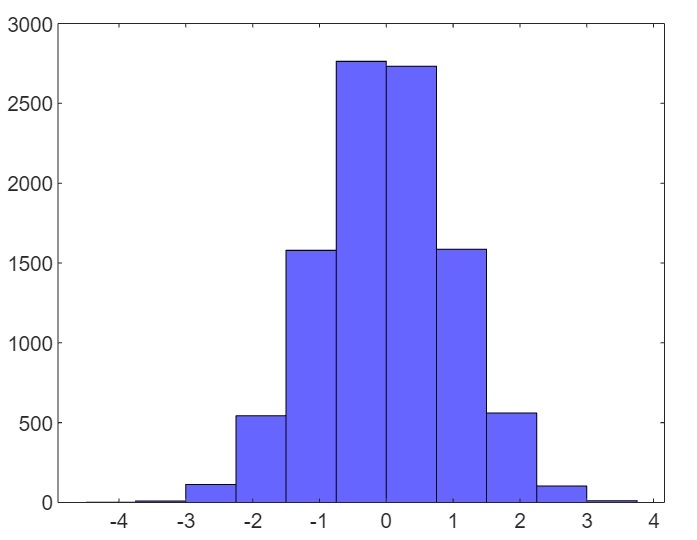
(7). 使用自定義屬性繪製直方圖
以下“histogram”函式的語法用於使用自定義屬性繪製直方圖。
histogram(___, Name, Value);
這裡,直方圖的自定義屬性使用名稱-值對指定。
示例(7)
讓我們看一個示例來了解如何實現此函式。
% MATLAB program to plot a histogram with customized properties
% Create a sample data set
X = randn(5000, 2);

% Plot the histogram with customized properties
histogram(X, 'FaceColor', 'blue', 'BinWidth', 0.75);
輸出
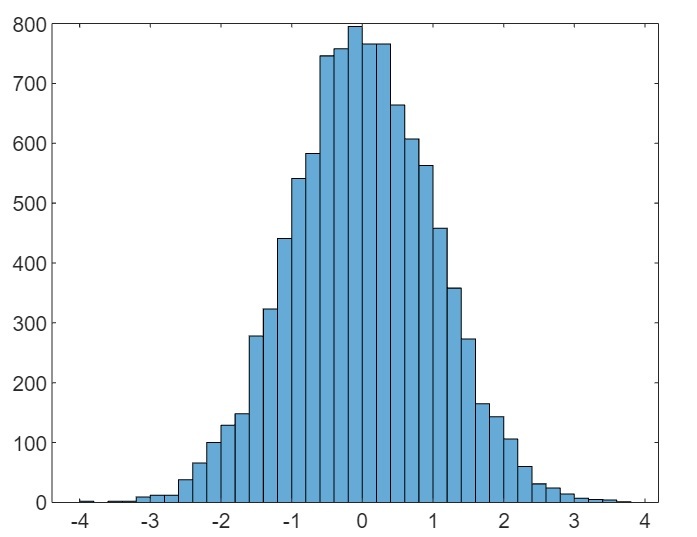
(8). 使用指定的軸繪製直方圖
以下“histogram”函式的語法用於使用指定的軸繪製直方圖。
histogram(ax, ___);
示例(8)
以下 MATLAB 示例演示瞭如何使用此函式繪製直方圖。
% MATLAB code to plot a histogram with specified axes
% Create a sample data set
X = randn(5000, 2);

% Specify the subplot axes
ax = subplot(1, 1, 1);

% Plot the histogram in the subplot
histogram(ax, X);
輸出
結論
MATLAB 有一個內建函式“histogram”來繪製資料集的直方圖。在本教程中,我已經解釋了“histogram”函式的不同語法格式,具體取決於不同型別的資料和輸出要求。

326 次檢視
