
 資料結構
資料結構 網路
網路 關係資料庫管理系統 (RDBMS)
 作業系統
作業系統 Java
Java MS Excel
 iOS
iOS HTML
HTML CSS
CSS Android
 Python
 C語言程式設計
 C++
C++ C#
C# MongoDB
 MySQL
MySQL Javascript
 PHP
PHP 物理學
物理學 化學
化學 生物學
生物學 數學
數學 英語
英語 經濟學
經濟學 心理學
心理學 社會學
社會學 服裝學
服裝學 法學
法學如何使用PowerShell安裝Windows功能?
要在伺服器上安裝Windows功能,使用 **Install-WindowsFeature** cmdlet。
Install-WindowsFeature Windows-Server-Backup -LogPath C:\Temp\Installfeatures.txt -Verbose
在上面的例子中,**Windows-Server-Backup** 功能將安裝在本地伺服器上,日誌將儲存在 **C:\Temp** 位置,檔名是 **InstallFeatures.txt**。
PS C:\Users\Administrator> Install-WindowsFeature Windows-Server-Backup -LogPath C:\Temp\Installfeatures.txt -Verbose
VERBOSE: Installation started...
VERBOSE: Continue with installation?
VERBOSE: Prerequisite processing started...
VERBOSE: Prerequisite processing succeeded.
Success Restart Needed Exit Code Feature Result
------- -------------- --------- --------------
True No Success {Windows Server Backup}
VERBOSE: Installation succeeded.
您也可以使用管道命令安裝該功能:
Get-WindowsFeature Windows-server-backup | Install-WindowsFeature -LogPath C:\Temp\Installfeatures.txt -Verbose
如果您的Windows功能包含子功能,例如Web伺服器(IIS),並且還需要管理工具。
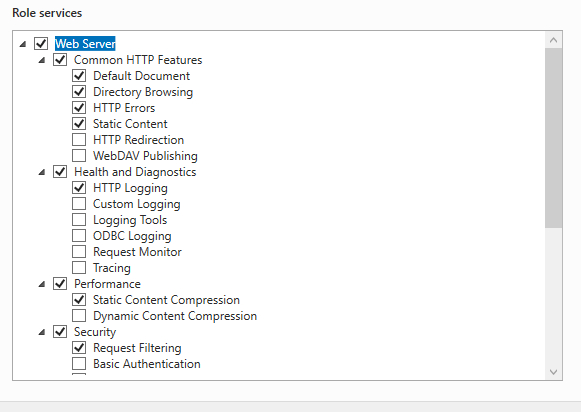
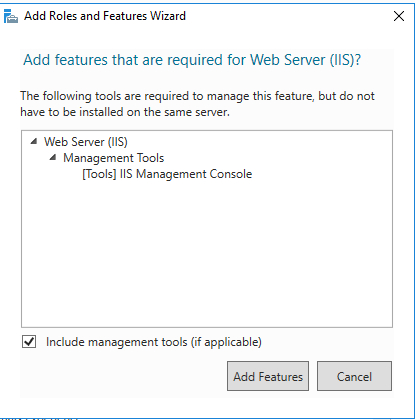
對於上述場景,我們將使用 **-IncludeAllSubFeature** 來包含角色,並使用 **-IncludeManagementTools** 來安裝管理工具。
Install-WindowsFeature Web-Server -IncludeAllSubFeature -IncludeManagementTools -Source -Verbose
安裝任何功能時,如果未提供任何源路徑,請確保已載入與該特定作業系統相關的Windows作業系統磁碟,否則將生成源路徑錯誤。
Install-WindowsFeature Web-Server -IncludeAllSubFeature -IncludeManagementTools -verbose VERBOSE: Installation started...
VERBOSE: Continue with installation?
VERBOSE: Prerequisite processing started...
VERBOSE: Prerequisite processing succeeded.

Success Restart Needed Exit Code Feature Result
------- -------------- --------- --------------
True No Success {Application Development, Application Init...
VERBOSE: Installation succeeded.
如果未掛載作業系統磁碟,則需要從相關的作業系統CD複製**Source**目錄下的**SXS**資料夾,並將該目錄作為源路徑提供。例如:
Install-WindowsFeature Web-Server -IncludeAllSubFeature -IncludeManagementTools -Source C:\Temp\sxs\ -Verbose
PS C:\Users\Administrator> Install-WindowsFeature Web-Server -IncludeAllSubFeature -IncludeManagementTools -Source C:\Temp\sxs\ -Verbose VERBOSE: Installation started...
VERBOSE: Continue with installation?
VERBOSE: Prerequisite processing started...
VERBOSE: Prerequisite processing succeeded.

Success Restart Needed Exit Code Feature Result
------- -------------- --------- --------------
True No Success {Application Development, Application Init.
..
VERBOSE: Installation succeeded.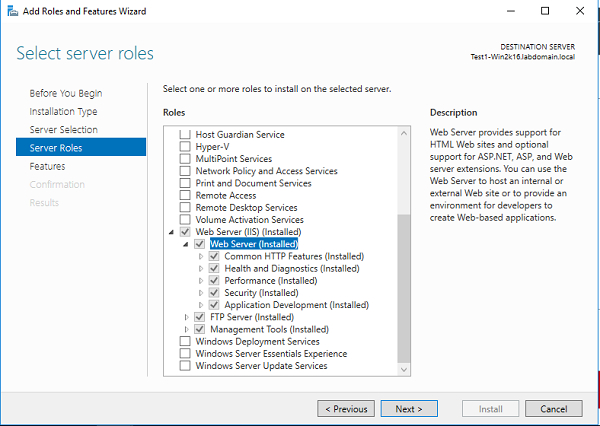
此 **-Name** 引數支援多個功能。因此,我們可以一起安裝多個功能,例如GUI。
help Install-WindowsFeature -Parameter Name -Name <Feature[]>
例如:
Install-WindowsFeature -Name Telnet-Client, Search-Service -Verbose
輸出
Install-WindowsFeature -Name Telnet-Client, Search-Service -Verbose
VERBOSE: Installation started...
VERBOSE: Continue with installation?
VERBOSE: Prerequisite processing started...
VERBOSE: Prerequisite processing succeeded.
Success Restart Needed Exit Code Feature Result
------- -------------- --------- --------------
True No Success {Windows Search Service, Telnet Client}
VERBOSE: Installation succeeded.
要在遠端計算機上安裝Windows功能,可以使用 -ComputerName 引數。例如:
Install-WindowsFeature Telnet-Client -ComputerName Test1-Win2k16 -Verbose
輸出
VERBOSE: Installation started...
VERBOSE: Continue with installation?
VERBOSE: Prerequisite processing started...
VERBOSE: Prerequisite processing succeeded.
Success Restart Needed Exit Code Feature Result
------- -------------- --------- --------------
True No Success {Telnet Client}
VERBOSE: Installation succeeded.
如果我們檢查 **-ComputerName** 引數允許的資料型別,它是一個字串型別,而不是陣列,因此我們只能傳遞一個計算機名。
PS C:\Users\Administrator > help Install-WindowsFeature -Parameter ComputerName -ComputerName [<String>]
因此,要在多臺計算機上安裝功能,我們需要使用foreach迴圈迴圈 **-ComputerName**,或者可以使用 **Invoke-Command** 方法。為方便起見,我們將使用後者。
Invoke-Command -ComputerName Test1-Win2k12, Test1-Win2k16 -ScriptBlock{Install-WindowsFeature Telnet-Client}

更新於:2020年8月26日
5K+ 次瀏覽

廣告