
 資料結構
資料結構 網路
網路 關係型資料庫管理系統
 作業系統
作業系統 Java
Java MS Excel
 iOS
iOS HTML
HTML CSS
CSS Android
 Python
 C 程式設計
 C++
C++ C#
C# MongoDB
 MySQL
MySQL Javascript
 PHP
PHP 物理學
物理學 化學
化學 生物學
生物學 數學
數學 英語
英語 經濟學
經濟學 心理學
心理學 社會學
社會學 時尚研究
時尚研究 法律研究
法律研究如何使用 PowerShell 獲取 Windows 功能?
要使用 PowerShell 獲取可用的或已安裝的 Windows 功能和角色,您需要使用 **Get-WIndowsFeature** cmdlet。很明顯,Windows 功能和角色僅在伺服器作業系統上可用,而不是在客戶端作業系統上可用。
從 Windows Server 2008 開始,在伺服器作業系統上使用 PowerShell 執行 **Get-WindowsFeature** 時,您將獲得如下輸出。
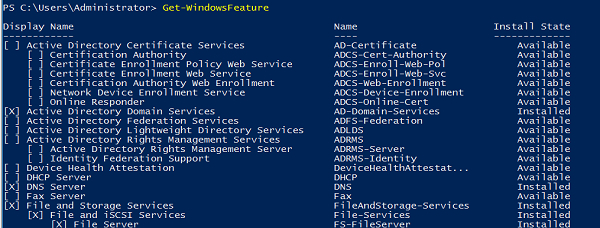
方框中的叉號表示該功能已安裝。您還可以使用 **“安裝狀態”** 檢查相同內容。要僅獲取伺服器上已安裝的功能,您需要篩選安裝狀態功能。
Get-WindowsFeature | where{$_.InstallState -eq "Installed"}輸出
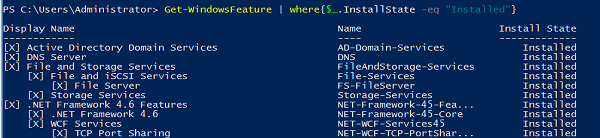
要獲取未安裝的 Windows 功能/角色,您需要使用屬性值 **“Available”** 篩選安裝狀態,或者使用 **NOT** 運算子和 **INSTALLED** 值。
Get-WindowsFeature | where{!($_.InstallState -eq "Installed")}輸出
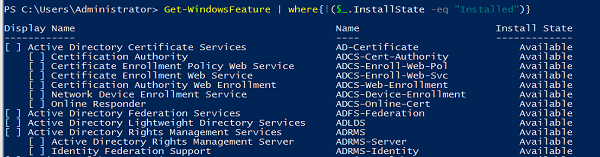
如果您需要查詢特定功能/角色,您只需鍵入名稱或顯示名稱即可。如果您不知道功能/角色的完整名稱,則允許使用萬用字元來完成搜尋操作。例如,
Get-WindowsFeature *Remote*
輸出

要檢查遠端伺服器上的已安裝功能,您需要使用 -**ComputerName** 引數執行上述命令。例如,我們需要檢索兩個功能 **RemoteAccess** 和 **ADRMS**,然後我們可以使用以下命令。
Get-WindowsFeature -ComputerName Test1-Win2k16 -Name ADRMS,Remoteaccess
輸出

如果您需要從多個遠端伺服器檢索 Windows 功能資訊,則可以使用 **Invoke-Command**,因為使用 **-ComputerName** 引數的 **Get-WindowsFeature** 命令不支援陣列,並且使用 Invoke-Command,您還可以獲取安裝了特定功能的計算機名稱。例如,
Invoke-Command -ComputerName Test1-Win2k16,Test1-Win2k12 -ScriptBlock{Get- WindowsFeature ADRMS,RemoteAccess}輸出

您還可以使用萬用字元字元 (*) 搜尋 Windows 功能。例如,
Invoke-Command -ComputerName Test1-win2k16 -ScriptBlock{Get-WindowsFeature *Backup*}

更新於: 2020-08-26
10K+ 瀏覽量

廣告