
 資料結構
資料結構 網路
網路 關係資料庫管理系統 (RDBMS)
 作業系統
作業系統 Java
Java MS Excel
 iOS
iOS HTML
HTML CSS
CSS Android
 Python
 C語言程式設計
 C++
C++ C#
C# MongoDB
 MySQL
MySQL Javascript
 PHP
PHP 物理學
物理學 化學
化學 生物學
生物學 數學
數學 英語
英語 經濟學
經濟學 心理學
心理學 社會學
社會學 服裝設計
服裝設計 法學
法學如何使用JavaFX建立氣泡圖?
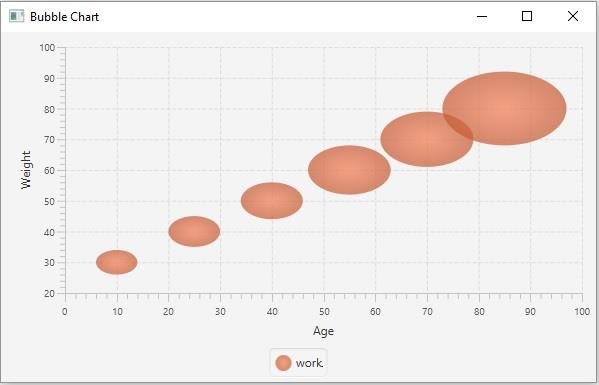
氣泡圖接受一系列資料點 (x, y) 作為輸入值,併為給定系列中的資料點建立氣泡。在 JavaFX 中,您可以透過例項化 **javafx.scene.chart.BubbleChart** 類來建立氣泡圖。
通常,在所有 X-Y 圖表中,資料點繪製兩個值 (x, y)。在氣泡圖中,您可以選擇第三個值,該值由氣泡的半徑表示。
例項化此類時,您必須傳遞代表 x 軸和 y 軸的 Axis 類 的兩個物件(作為建構函式的引數)。由於 Axis 類是抽象類,您需要傳遞其具體子類的物件,例如 NumberAxis(用於數值)或 CategoryAxis(用於字串值)。
建立軸後,您可以使用 **setLabel()** 方法為其設定標籤。
設定資料
**XYChart.Series** 代表資料項的系列。您可以透過例項化此類來建立氣泡點系列。此類包含一個可觀察列表,其中包含系列中的所有點。
**XYChart.Data** 代表 x-y 平面中的特定資料點。要建立點,您需要透過傳遞該點的 x 值和 y 值來例項化此類。
因此,要為氣泡建立資料:
透過例項化 **XYChart.Data** 類建立所需數量的點。
透過例項化 **XYChart.Series** 類建立系列。
使用 **getData()** 方法獲取 XYChart.Series 類的可觀察列表。
使用 **add()** 或 **addAll()** 方法將建立的資料點新增到列表中。
將建立的資料系列新增到區域圖中,方法如下:
bubbleChart.getData().add(series);
示例
import javafx.application.Application;
import javafx.scene.Scene;
import javafx.scene.chart.BubbleChart;
import javafx.stage.Stage;
import javafx.scene.chart.NumberAxis;
import javafx.scene.chart.XYChart;
import javafx.scene.layout.StackPane;
public class BubbleChartExample extends Application {
   public void start(Stage stage) {
      //Creating X and Y axes
      NumberAxis xAxis = new NumberAxis(0, 100, 10);
      NumberAxis yAxis = new NumberAxis(20, 100, 10);
      //Creating labels to the axes
      xAxis.setLabel("Age");
      yAxis.setLabel("Weight");
      //Creating the Bubble chart
      BubbleChart bubbleChart = new BubbleChart(xAxis, yAxis);
      //Preparing data for bubble chart
      XYChart.Series series = new XYChart.Series();
      series.getData().add(new XYChart.Data(10, 30, 4));
      series.getData().add(new XYChart.Data(25, 40, 5));
      series.getData().add(new XYChart.Data(40, 50, 6));
      series.getData().add(new XYChart.Data(55, 60, 8));
      series.getData().add(new XYChart.Data(70, 70, 9));
      series.getData().add(new XYChart.Data(85, 80, 12));
      //Setting the data to bar chart
      bubbleChart.getData().add(series);
      //Setting name to the bubble chart
      series.setName("work");
      //Creating a stack pane to hold the chart
      StackPane pane = new StackPane(bubbleChart);
      //Setting the Scene
      Scene scene = new Scene(pane, 595, 350);
      stage.setTitle("Bubble Chart");
      stage.setScene(scene);
      stage.show();
   }
   public static void main(String args[]){
      launch(args);
   }
}
輸出

更新於:2020年5月19日
瀏覽量:182

廣告