
 資料結構
資料結構 網路
網路 RDBMS
RDBMS 作業系統
作業系統 Java
Java MS Excel
 iOS
iOS HTML
HTML CSS
CSS Android
 Python
 C 程式語言
 C++
C++ C#
C# MongoDB
 MySQL
MySQL Javascript
 PHP
PHP 物理學
物理學 化學
化學 生物
生物 數學
數學 英語
英語 經濟學
經濟學 心理學
心理學 社會研究
社會研究 時尚研究
時尚研究 法律研究
法律研究如何使用 JavaFX 建立 ListView?
列表檢視是可滾動列表,以便從中選擇所需專案。可透過例項化 javafx.scene.control.ListView 類建立列表檢視元件。可以使用垂直或水平 ListView。
示例
以下 JavaFX 程式演示瞭如何建立 ListView。
import javafx.application.Application;
import javafx.collections.FXCollections;
import javafx.collections.ObservableList;
import javafx.geometry.Insets;
import javafx.scene.Scene;
import javafx.scene.control.Label;
import javafx.scene.control.ListView;
import javafx.scene.layout.VBox;
import javafx.scene.text.Font;
import javafx.scene.text.FontPosture;
import javafx.scene.text.FontWeight;
import javafx.stage.Stage;
public class ListViewExample extends Application {
   public void start(Stage stage) {
      //Label for education
         Label label = new Label("Educational qualification:");
      Font font = Font.font("verdana", FontWeight.BOLD, FontPosture.REGULAR, 12);
      label.setFont(font);
      //list View for educational qualification
      ObservableList<String> names = FXCollections.observableArrayList("Engineering", "MCA", "MBA", "Graduation", "MTECH", "Mphil", "Phd");
      ListView<String> listView = new ListView<String>(names);
      listView.setMaxSize(200, 160);
      //Creating the layout
      VBox layout = new VBox(10);
      layout.setPadding(new Insets(5, 5, 5, 50));
      layout.getChildren().addAll(label, listView);
      layout.setStyle("-fx-background-color: BEIGE");
      //Setting the stage
      Scene scene = new Scene(layout, 595, 200);
      stage.setTitle("List View Example");
      stage.setScene(scene);
      stage.show();
   }
   public static void main(String args[]){
      launch(args);
   }
}
輸出
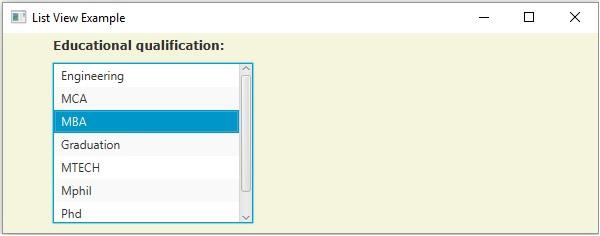

更新日期:18-5-2020
4K+ 瀏覽量

廣告