
 資料結構
資料結構 網路
網路 關係資料庫管理系統
 作業系統
作業系統 Java
Java MS Excel
 iOS
iOS HTML
HTML CSS
CSS Android
 Python
 C 程式設計
 C++
C++ C#
C# MongoDB
 MySQL
MySQL Javascript
 PHP
PHP 物理學
物理學 化學
化學 生物
生物 數學
數學 英語
英語 經濟學
經濟學 心理學
心理學 社會學
社會學 時尚研究
時尚研究 法律研究
法律研究如何使用 JavaFX 建立多段線?
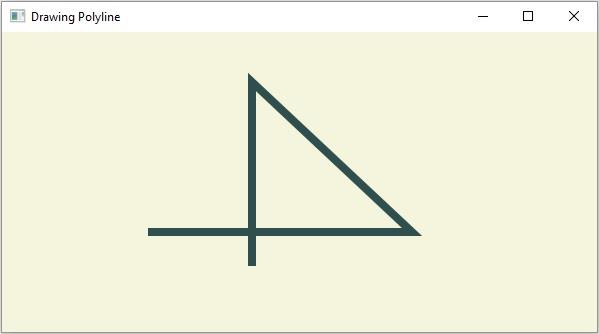
多段線是由存在於同一平面中的 n 條線形成的開放圖形。即多段線與多邊形相同,只是它沒有閉合。在 JavaFX 中,多段線由 javafx.scene.shape.PolyLine 類表示。
要建立多段線,你需要:
例項化此類。
將繪製多段線的線段的起點和終點傳遞給此類,或者透過將它們作為建構函式的引數傳遞,或者使用 getPoints() 方法傳遞,如下所示:
polygon.getPoints().addAll(new Double[]{ List of XY coordinates separated by commas });將建立的節點(形狀)新增到 Group 物件中。
示例
import javafx.application.Application;
import javafx.scene.Group;
import javafx.scene.Scene;
import javafx.scene.paint.Color;
import javafx.stage.Stage;
import javafx.scene.shape.Polyline;
public class DrawingPolyLine extends Application {
   public void start(Stage stage) {
      //Drawing a polygon
      Polyline poliline = new Polyline();
      //Setting the properties of the ellipse
      poliline.getPoints().addAll(new Double[]{
         150.0, 200.0, 410.0, 200.0, 250.0, 50.0, 250.0, 230.0 });
      //Setting other properties
      poliline.setStrokeWidth(8.0);
      poliline.setStroke(Color.DARKSLATEGREY);
      //Setting the Scene
      Group root = new Group(poliline);
      Scene scene = new Scene(root, 595, 300, Color.BEIGE);
      stage.setTitle("Drawing Polyline");
      stage.setScene(scene);
      stage.show();
   }
   public static void main(String args[]){
      launch(args);
   }
}
輸出

更新於:2020 年 4 月 14 日
324 次瀏覽

廣告