
 Data Structure
 Networking
 RDBMS
RDBMS Operating System
 Java
Java MS Excel
 iOS
iOS HTML
HTML CSS
CSS Android
 Python
 C Programming
 C++
C++ C#
C# MongoDB
 MySQL
MySQL Javascript
 PHP
PHP Physics
 Chemistry
 Biology
 Mathematics
 English
 Economics
 Psychology
 Social Studies
 Fashion Studies
 Legal Studies
如何使用 JavaFX 建立分隔符?
分隔符是應用程式中的一個水平或垂直線,用於分隔 UI 元素。
在 JavaFX 中,javafx.scene.control.Separator 類表示一個分隔符,要建立一個分隔符,你需例項化此類。此類有以下三個屬性:-
halignment − 此屬性指定垂直分隔符的水平對齊方式。你可使用 setHalignment() 方法為其設定值
orientation − 此屬性指定當前分隔符的方向,即水平或垂直。可使用 setOrientation() 方法為其設定值。
valignment − 此屬性指定水平分隔符的垂直對齊方式。可使用 setValignment() 方法為其設定值
預設情況下,分隔符類建立一個水平分隔符,若要建立垂直分隔符,需要使用 setOrientation() 方法更改其方向。
示例
import javafx.application.Application;
import javafx.geometry.HPos;
import javafx.geometry.Insets;
import javafx.scene.Scene;
import javafx.scene.control.CheckBox;
import javafx.scene.control.Label;
import javafx.scene.control.Separator;
import javafx.scene.layout.VBox;
import javafx.scene.paint.Color;
import javafx.scene.text.Font;
import javafx.scene.text.FontPosture;
import javafx.scene.text.FontWeight;
import javafx.stage.Stage;
public class SeparatorExample extends Application {
   public void start(Stage stage) {
      //Creating the check boxes
      CheckBox checkBox1 = new CheckBox("Hindi");
      CheckBox checkBox2 = new CheckBox("Gujarathi");
      CheckBox checkBox3 = new CheckBox("Punjabi");
      CheckBox checkBox4 = new CheckBox("Telugu");
      CheckBox checkBox5 = new CheckBox("Tamil");
      CheckBox checkBox6= new CheckBox("Malayalam");
      //Creating a label
      Label label = new Label("Select known languages:");
      Font font = Font.font("verdana", FontWeight.BOLD, FontPosture.REGULAR, 12);
      label.setFont(font);
      //Creating a separator
      Separator sep = new Separator();
      sep.setMaxWidth(80);
      sep.setHalignment(HPos.CENTER);
      //Adding the check boxes and separator to the pane
      VBox vBox = new VBox(5);
      vBox.setPadding(new Insets(5, 5, 5, 50));
      vBox.getChildren().addAll(label, checkBox1, checkBox2, checkBox3,
      checkBox4, checkBox5, checkBox6);
      //Adding the separator after the 3rd check box
      vBox.getChildren().add(4, sep);
      //Setting the stage
      Scene scene = new Scene(vBox, 595, 200, Color.BEIGE);
      stage.setTitle("Seperator Example");
      stage.setScene(scene);
      stage.show();
   }
   public static void main(String args[]){
      launch(args);
   }
}
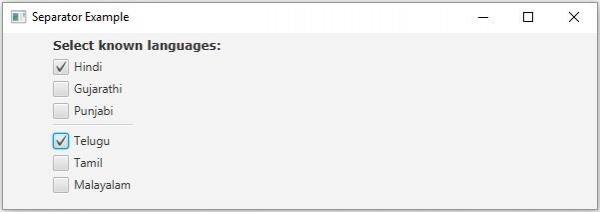
輸出

更新於: 2020 年 5 月 18 日
851 次瀏覽

廣告