
 資料結構
資料結構 網路
網路 關係資料庫管理系統 (RDBMS)
 作業系統
作業系統 Java
Java MS Excel
 iOS
iOS HTML
HTML CSS
CSS Android
 Python
 C語言程式設計
 C++
C++ C#
C# MongoDB
 MySQL
MySQL Javascript
 PHP
PHP 物理學
物理學 化學
化學 生物學
生物學 數學
數學 英語
英語 經濟學
經濟學 心理學
心理學 社會學
社會學 服裝設計
服裝設計 法律研究
法律研究如何使用JavaFX建立三次貝塞爾曲線?
三次貝塞爾曲線是兩個變數的三次多項式函式。
在JavaFX中,三次貝塞爾曲線由**javafx.scene.shape.CubicCurve**類表示。此類包含八個屬性,它們是:
**startX** - 此屬性表示曲線的起點的x座標。您可以使用**setStartX()**方法為此屬性設定值。
**startY** - 此屬性表示曲線的起點的y座標。您可以使用**setStartY()**方法為此屬性設定值。
**controlX1**:此屬性表示曲線的第一個控制點的x座標。您可以使用**setControlX1()**方法為此屬性設定值。
**controlY1** - 此屬性表示曲線的第一個控制點的y座標。您可以使用**setControlY1()**方法為此屬性設定值。
**controlX2** - 此屬性表示曲線的第二個控制點的x座標。您可以使用**setControlX2()**方法為此屬性設定值。
**controlY2** - 此屬性表示曲線的第二個控制點的y座標。您可以使用**setControlY2()**方法為此屬性設定值。
**endX** - 此屬性表示曲線終點的x座標。您可以使用**setEndX()**方法為此屬性設定值。
**endY** - 此屬性表示曲線終點的y座標。您可以使用**setEndY()**方法為此屬性設定值。
要建立一個圓,您需要:
例項化此類。
使用setter方法設定所需的屬性,或者將它們作為引數傳遞給建構函式。
將建立的節點(形狀)新增到Group物件。
示例
import javafx.application.Application;
import javafx.scene.Group;
import javafx.scene.Scene;
import javafx.scene.paint.Color;
import javafx.stage.Stage;
import javafx.scene.shape.CubicCurve;
public class DrawingCubicCurve extends Application {
   @Override
   public void start(Stage stage) {
      //Drawing a cubic curve
      CubicCurve cubicCurve = new CubicCurve();
      //Setting properties to cubic curve
      cubicCurve.setStartX(75.0f);
      cubicCurve.setStartY(75.0f);
      cubicCurve.setControlX2(250.0f);
      cubicCurve.setControlY2(250.0f);
      cubicCurve.setControlX1(400.0f);
      cubicCurve.setControlY1(40.0f);
      cubicCurve.setEndX(500.0f);
      cubicCurve.setEndY(260.0f);
      //Setting other properties
      cubicCurve.setFill(Color.CHOCOLATE);
      cubicCurve.setStrokeWidth(8.0);
      cubicCurve.setStroke(Color.BROWN);
      //Setting the scene object
      Group root = new Group(cubicCurve);
      Scene scene = new Scene(root, 600, 300);
      stage.setTitle("Drawing a cubic curve");
      stage.setScene(scene);
      stage.show();
   }
   public static void main(String args[]){
      launch(args);
   }
}
輸出
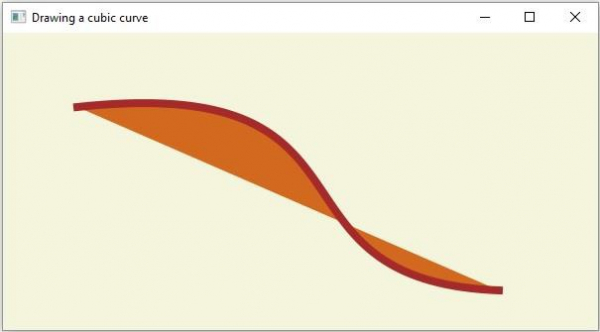

更新於:2020年4月14日
143 次瀏覽

廣告