
 資料結構
資料結構 網路
網路 RDBMS
RDBMS 作業系統
作業系統 Java
Java MS Excel
 iOS
iOS HTML
HTML CSS
CSS Android
 Python
 C 程式設計
 C++
C++ C#
C# MongoDB
 MySQL
MySQL Javascript
 PHP
PHP 物理
物理 化學
化學 生物
生物 數學
數學 英語
英語 經濟
經濟 心理
心理 社會學
社會學 時尚學
時尚學 法學
法學如何使用 JavaFX 建立 border 窗格?
為應用程式建立所有必需的節點後,可使用佈局對其進行排列。其中,佈局是計算給定空間中物件位置的過程。JavaFX 在 javafx.scene.layout 包中提供各種佈局。
Border 窗格
在此佈局中,節點排列在頂部、中間、底部、左側和右側位置。可以透過例項化javafx.scene.layout.BorderPane 類在應用程式中建立 border 窗格。
此類(節點型別)具有五個屬性,分別指定窗格中的位置,即頂部、底部、右側、左側、中間。可以使用setTop()、setBottom()、setRight()、setleft() 和 setCenter()將節點設定為這些屬性的值。
可以使用 setPrefSize() 方法設定 border 窗格的大小。要向此窗格新增節點,可以將它們作為建構函式的引數傳遞,或者將其新增到窗格的可觀察列表中,如下所示 −
getChildren().addAll();
示例
import javafx.application.Application;
import javafx.scene.Scene;
import javafx.scene.control.Button;
import javafx.scene.layout.BorderPane;
import javafx.stage.Stage;
public class BorderPaneExample extends Application {
   public void start(Stage stage) {
      //Creating buttons
      Button left = new Button("Left");
      left.setPrefSize(200, 100);
      Button right = new Button("Right");
      right.setPrefSize(200, 100);
      Button top = new Button("Top");
      top.setPrefSize(595, 100);
      Button bottom = new Button("Buttom");
      bottom.setPrefSize(595, 100);
      Button center = new Button("Center");
      center.setPrefSize(200, 100);
      //Creating the border pane
      BorderPane pane = new BorderPane();
      //Setting the top, bottom, center, right and left nodes to the pane
      pane.setTop(top);
      pane.setBottom(bottom);
      pane.setLeft(left);
      pane.setRight(right);
      pane.setCenter(center);
      //Setting the Scene
      Scene scene = new Scene(pane, 595, 300);
      stage.setTitle("Border Pane");
      stage.setScene(scene);
      stage.show();
   }
   public static void main(String args[]){
      launch(args);
   }
}
輸出
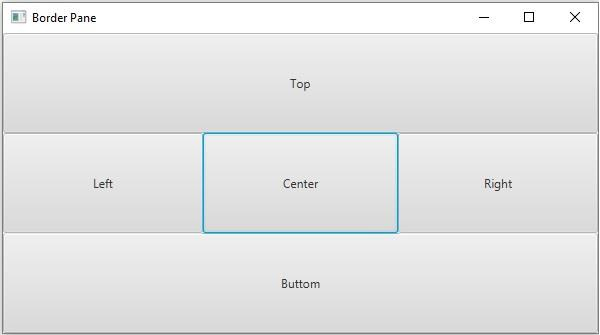

更新於:19-5-2020
761 次瀏覽

廣告