
 資料結構
資料結構 網路
網路 RDBMS
RDBMS 作業系統
作業系統 Java
Java MS Excel
 iOS
iOS HTML
HTML CSS
CSS Android
 Python
 C 程式設計
 C++
C++ C#
C# MongoDB
 MySQL
MySQL Javascript
 PHP
PHP 物理
物理 化學
化學 生物
生物 數學
數學 英語
英語 經濟學
經濟學 心理學
心理學 社會學
社會學 時裝設計
時裝設計 法律研究
法律研究如何使用 JavaFX 更改圖塊窗格中節點的方向?
在 TilePane 佈局中,節點以統一大小的圖塊網格進行排列。你可以在應用中透過例項化 javafx.scene.layout.TilePane 類來建立圖塊窗格。
方向是指窗格中節點的總體排列方式,它們可以是水平排列,也可以是垂直排列。
預設情況下,圖塊窗格的方向是水平的。你可以使用 setOrientation() 方法來更改它。此方法接收兩個值 −
Orientation.VERTICAL
Orientation.HORIZONTAL
示例
import javafx.application.Application;
import javafx.collections.ObservableList;
import javafx.geometry.Orientation;
import javafx.geometry.Pos;
import javafx.scene.Scene;
import javafx.scene.control.Button;
import javafx.scene.layout.TilePane;
import javafx.stage.Stage;
public class TilePaneOrientation extends Application {
   @Override
   public void start(Stage stage) {
      //Creating buttons
      Button one = new Button("one");
      one.setPrefSize(100, 100);
      Button two = new Button("Two");
      two.setPrefSize(100, 100);
      Button three = new Button("Three");
      three.setPrefSize(100, 100);
      Button four = new Button("Four");
      four.setPrefSize(100, 100);
      Button five = new Button("Five");
      five.setPrefSize(100, 100);
      Button six = new Button("six");
      six.setPrefSize(100, 100);
      Button seven = new Button("seven");
      seven.setPrefSize(100, 100);
      Button eight = new Button("eight");
      eight.setPrefSize(100, 100);
      Button nine = new Button("nine");
      nine.setPrefSize(100, 100);
      //Creating the tile pane
      TilePane tilePane = new TilePane();
      //Setting the orientation for the Tile Pane
      tilePane.setOrientation(Orientation.VERTICAL);
      //Setting the alignment for the Tile Pane
      tilePane.setTileAlignment(Pos.BASELINE_CENTER);
      //Setting the preferred columns for the Tile Pane
      tilePane.setPrefRows(3);
      //Retrieving the observable list of the Tile Pane
      ObservableList list = tilePane.getChildren();
      //Adding the array of buttons to the pane
      list.addAll(one, two, three, four, five, six, seven, eight, nine);
      //Setting the Scene
      Scene scene = new Scene(tilePane, 600, 300);
      stage.setTitle("Tile Pane");
      stage.setScene(scene);
      stage.show();
   }
   public static void main(String args[]){
      launch(args);
   }
}
輸出
Orientation.VERTICAL
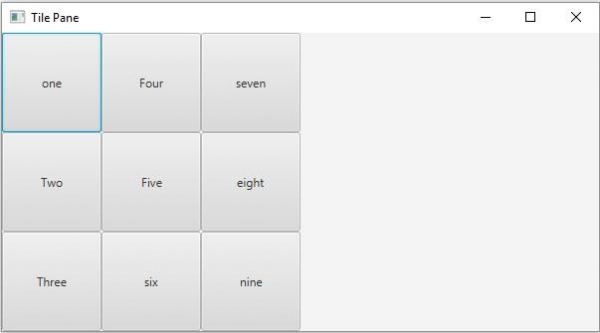
Orientation.HORIZONTAL
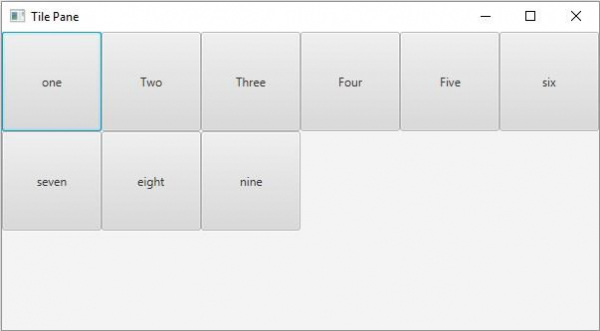

更新時間:20-May-2020
213 次瀏覽

廣告