
 資料結構
資料結構 網路
網路 RDBMS
RDBMS 作業系統
作業系統 Java
Java Microsoft Excel
 iOS
iOS HTML
HTML CSS
CSS Android
 Python
 C 程式設計
 C++
C++ C#
C# MongoDB
 MySQL
MySQL JavaScript
 PHP
PHP 物理
物理 化學
化學 生物
生物 數學
數學 英語
英語 經濟學
經濟學 心理學
心理學 社會學
社會學 時尚學
時尚學 法學
法學如何在 JavaFX MenuItem 中嵌入節點?
選單是提供給使用者的一系列選項或命令。在 JavaFX 中,選單由 javafx.scene.control.Menu 類表示,可以透過例項化此類來建立一個選單。
選單項是選單中的一種選項,它由 javafx.scene.control.MenuItem 類表示,此類是 Menu 類的超類。你可以顯示文字或圖形作為選單項,並向其新增所需的按鈕。
設定節點作為選單項
MenuItem 類有一個名為 graphic 的屬性,其型別為 Node,這指定了當前選單項的可選圖形。你可以使用 setGraphic() 方法將值設定為此屬性。
要將節點嵌入為選單項,你需要透過例項化相應的類來建立它的物件,並將其作為引數傳遞給 setGraphic() 方法。
示例
import javafx.application.Application;
import javafx.scene.Group;
import javafx.scene.Scene;
import javafx.scene.control.Menu;
import javafx.scene.control.MenuBar;
import javafx.scene.control.MenuItem;
import javafx.scene.paint.Color;
import javafx.scene.paint.PhongMaterial;
import javafx.scene.shape.CullFace;
import javafx.scene.shape.DrawMode;
import javafx.scene.shape.Sphere;
import javafx.stage.Stage;
public class NodeAsMenuItem extends Application {
   @Override
   public void start(Stage stage) {
      //Drawing a Sphere
      Sphere sphere = new Sphere();
      sphere.setRadius(12.0);
      sphere.setDrawMode(DrawMode.LINE);
      //Setting other properties
      sphere.setCullFace(CullFace.BACK);
      sphere.setDrawMode(DrawMode.FILL);
      PhongMaterial material = new PhongMaterial();
      material.setDiffuseColor(Color.BROWN);
      sphere.setMaterial(material);
      //Creating menu
      Menu fileMenu = new Menu("File");
      //Creating menu item
      MenuItem item = new MenuItem("Open");
      //Setting slider as a menu item
      item.setGraphic(sphere);
      //Adding all the menu items to the menu
      fileMenu.getItems().addAll(item);
      //Creating a menu bar and adding menu to it.
      MenuBar menuBar = new MenuBar(fileMenu);
      menuBar.setTranslateX(200);
      menuBar.setTranslateY(20);
      //Setting the stage
      Group root = new Group(menuBar);
      Scene scene = new Scene(root, 595, 200, Color.BEIGE);
      stage.setTitle("Menu");
      stage.setScene(scene);
      stage.show();
   }
   public static void main(String args[]){
      launch(args);
   }
}
輸出
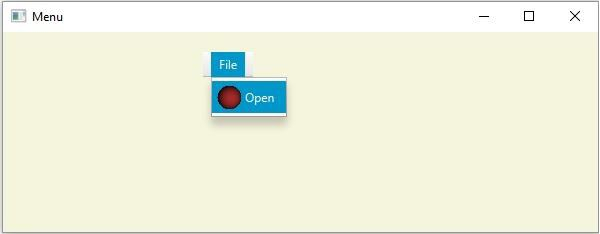

更新時間:2020 年 5 月 20 日
193 次瀏覽

廣告