
 資料結構
資料結構 網路
網路 關係資料庫管理系統(RDBMS)
 作業系統
作業系統 Java
Java MS Excel
 iOS
iOS HTML
HTML CSS
CSS Android
 Python
 C語言程式設計
 C++
C++ C#
C# MongoDB
 MySQL
MySQL Javascript
 PHP
PHP 物理學
物理學 化學
化學 生物學
生物學 數學
數學 英語
英語 經濟學
經濟學 心理學
心理學 社會學
社會學 服裝學
服裝學 法學
法學如何使用OpenCV Python逼近影像中的輪廓形狀?
函式`cv2.approxPolyDP()`將輪廓形狀逼近到具有較少頂點的另一個形狀。它接受以下引數:
**cnt** – 輪廓點的陣列。
**epsilon** – 輪廓到逼近輪廓的最大距離。需要明智地選擇epsilon才能獲得正確的輸出。
語法
以下語法用於逼近輪廓形狀
epsilon = 0.01*cv2.arcLength(cnt,True)
approx = cv2.approxPolyDP(cnt,epsilon,True)
步驟
您可以使用以下步驟來逼近影像中的輪廓形狀:
匯入所需的庫。在以下所有Python示例中,所需的Python庫是**OpenCV**。確保您已安裝它。
import cv2
使用`cv2.imread()`讀取輸入影像並將其轉換為灰度影像。
img = cv2.imread('approx1.png')
gray = cv2.cvtColor(img, cv2.COLOR_BGR2GRAY)
對灰度影像應用閾值處理以建立二值影像。調整第二個引數以獲得更好的輪廓檢測。
ret,thresh = cv2.threshold(gray,150,255,0)
使用`cv2.findContours()`函式查詢影像中的輪廓。
contours, _ = cv2.findContours(thresh, cv2.RETR_TREE, cv2.CHAIN_APPROX_SIMPLE)
從輪廓列表中選擇一個輪廓(例如第一個輪廓)**cnt**。
cnt = contours[0]
定義精度,即**epsilon**。此步驟非常重要。輪廓的正確逼近取決於epsilon的選擇。
epsilon = 0.01*cv2.arcLength(cnt,True)
使用`cv2.approxPolyDP()`函式計算近似的輪廓點。
approx = cv2.approxPolyDP(cnt,epsilon,True)
使用不同的顏色在輸入影像上繪製輪廓和近似輪廓。
cv2.drawContours(img, [cnt], -1, (0,255,255), 3)
cv2.drawContours(img, [approx], -1, (0,0,255), 3)
顯示繪製了輪廓和近似輪廓的影像。
cv2.imshow("Approximate Contour", img)
cv2.waitKey(0)
cv2.destroyAllWindows()
示例
在下面的Python程式碼中,我們找到輸入影像中物件的近似輪廓。我們還在輸入影像上繪製近似輪廓。
import cv2
import numpy as np

# Read the input image
img = cv2.imread('approx1.png')

# convert the image to grayscale
gray = cv2.cvtColor(img, cv2.COLOR_BGR2GRAY)

# apply thresholding to convert the grayscale image to a binary image
ret,thresh = cv2.threshold(gray,150,255,0)

# find the contours
contours,hierarchy = cv2.findContours(thresh, cv2.RETR_TREE,cv2.CHAIN_APPROX_SIMPLE)
print("Number of contours detected:",len(contours))

# take first contour
cnt = contours[0]

# define the precision
epsilon = 0.01*cv2.arcLength(cnt,True)

# approximate the contour
approx = cv2.approxPolyDP(cnt,epsilon,True)

# draw the contour on the input image
cv2.drawContours(img, [cnt], -1, (0,255,255), 3)

# draw the approximate contour on the input image
cv2.drawContours(img, [approx], -1, (0,0,255), 3)

# display the image with drawn contours and approximate contours
cv2.imshow("Approximate Contour", img)
cv2.waitKey(0)
cv2.destroyAllWindows()
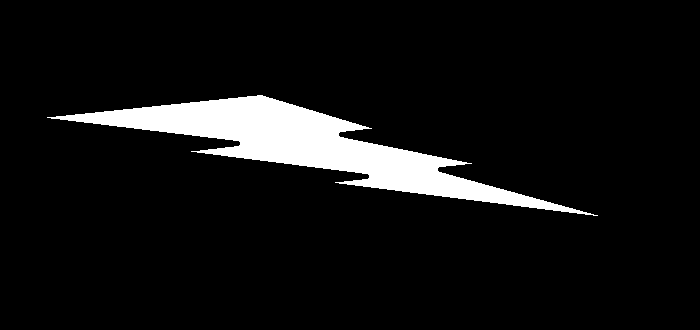
我們將使用以下影像作為上述程式程式碼中的**輸入檔案**。
輸出
執行上述程式碼後,將產生以下**輸出**。
Number of contours detected: 1
我們將得到以下視窗,顯示**輸出**:
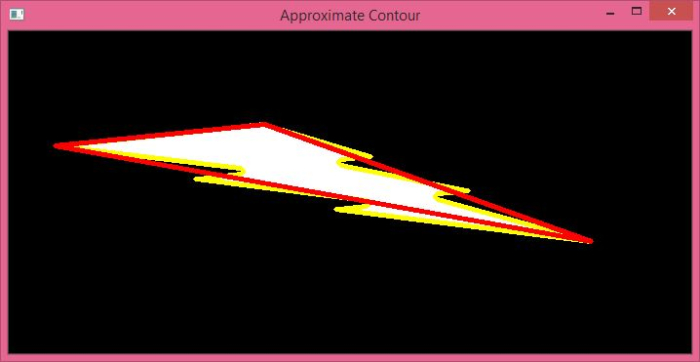
在上述輸出影像中,物件的輪廓以黃色顯示,物件的近似輪廓以紅色顯示。注意這兩個輪廓之間的區別。

更新於:2022年9月28日
6000+ 次瀏覽

廣告